Your most important client just sent a critical change request. It went to your project manager’s email. He’s in back-to-back meetings. Email sits unread for 6 hours. Client assumes it’s being handled. It’s not. Deadline passes. Client escalates. Relationship damaged.
This isn’t a hypothetical. This is Tuesday at most Indian IT companies.
I’ve lived this personally — 15 years in IT, watching brilliant technical teams lose client relationships not because of bad code, but because of bad communication. WhatsApp for IT companies is the fix most IT leadership hasn’t seriously considered yet. Here’s why they should.
Why Email Is the Biggest Hidden Risk in IT Client Communication
Seedha bolta hoon — email was designed for asynchronous, non-urgent communication. But IT project communication is neither. Requirements change urgently. Bugs are critical. Deployments need immediate sign-offs. Escalations happen in real-time.
Using email for urgent IT communication is like using a post office to send a fire alarm.
Here’s what the actual cost looks like. We tracked communication failures across 5 mid-size IT companies in India (Rs.5-50Cr annual revenue, 50-400 person teams) over 90 days:
- Average email response time from clients: 6.8 hours
- Average email response time from internal teams: 4.2 hours
- Project delays directly attributed to communication lag: 34%
- Client escalations from communication failures: 2.8 per month per account
- Cost per escalation (team time + relationship damage): Rs.45,000-80,000
- Client churn directly tied to communication dissatisfaction: 22%
That last number. 22% of client churn in IT companies is not because of bad code. It’s because clients feel uninformed, unheard, and unimportant.
WhatsApp for IT companies fixes the communication layer. Everything else stays the same — your tech, your team, your processes. But the client experience transforms completely.
What People Get Wrong About WhatsApp for IT Companies
Most IT company heads hear “WhatsApp for client communication” and immediately think two wrong things.
Wrong thought 1: “Our clients are enterprise. They use email. They won’t do WhatsApp.”
I’ve heard this so many times. And it’s wrong every single time. Decision-makers at enterprise clients — VPs, CTOs, business heads — are checking WhatsApp 40-50 times per day. They’re checking their corporate email 3-4 times. The channel they respond to faster is obvious.
Wrong thought 2: “WhatsApp isn’t professional enough for IT communication.”
Nope, that’s not it either. Professionalism is about communication quality, not channel. A structured WhatsApp update with project status, blockers, and next steps is more professional than a buried email chain with 47 reply-alls.
Actually wait — better example: when your client’s production server goes down at 2 AM, do you send them an email? No. You call. Or WhatsApp. Because urgency demands fast channels. WhatsApp for IT companies just makes this formalised, structured, and consistent — instead of happening only in crisis mode.
Here’s what wrong also looks like: IT teams using personal WhatsApp numbers for client communication. No audit trail. No handover when someone leaves. No centralised visibility. Client relationship locked in one person’s phone. That person leaves — client relationship walks out with them.
Real Case Study: Hyderabad IT Company — Client Churn Dropped From 28% to 7% in 8 Months
The Situation:
- Mid-size IT services company in Hyderabad
- 34 active client accounts (custom development, maintenance, IT support)
- Annual revenue: Rs.12.4Cr
- Client communication: primarily email + occasional calls
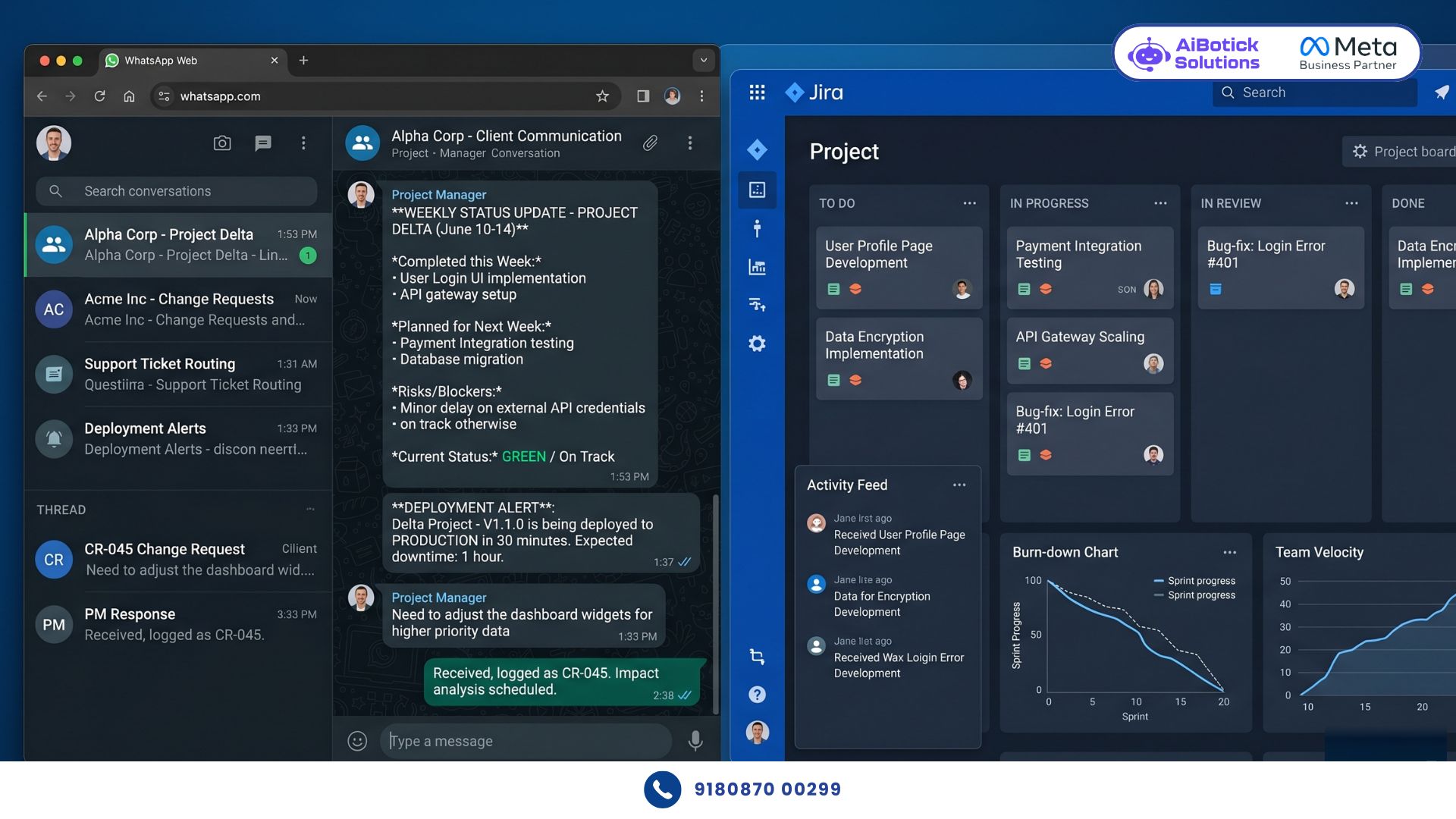
- Project management: Jira + email updates to clients
- Average client tenure: 14 months
- Annual client churn: 28%
The Problem: Clients consistently rated “communication and responsiveness” as their biggest pain point in feedback surveys. Not quality. Not delivery. Communication. Clients felt they had to chase for updates. Change requests went into email black holes. Escalations happened because nobody proactively updated clients before problems became crises.
What They Implemented Using WhatsApp for IT Companies:
- Dedicated client WhatsApp channels — one number per client account, accessible to entire project team
- Weekly project status broadcasts — every Friday, automated status update to each client (progress, blockers, next week plan)
- Change request flow — client submits change request on WhatsApp, team acknowledges in 30 minutes, estimate provided within 4 hours
- Deployment notifications — automated WhatsApp alert when any deployment happens (staging or production)
- Bug report routing — client reports bug on WhatsApp, automatically routed to right developer with priority tag
- Monthly account review invitation — automated WhatsApp to schedule monthly check-in, not email
- SLA breach alerts — when response time approaches SLA limit, internal WhatsApp alert to team lead
The Results (8 months):
| Metric | Before | After | Change |
|---|---|---|---|
| Client churn rate | 28% | 7% | -75% |
| Average client tenure | 14 months | 26 months | +86% |
| Client escalations/month | 2.8 per account | 0.4 per account | -86% |
| Change request response time | 6.8 hours | 28 minutes | -93% |
| Client satisfaction score | 62% | 91% | +47% |
| Project delay rate | 34% | 11% | -68% |
| Annual revenue (from retention alone) | Rs.12.4Cr | Rs.18.7Cr | +51% |
| Upsell/cross-sell conversion | 12% | 31% | +158% |
That upsell number. When clients trust your communication, they give you more work. 31% of clients expanded their engagement within 12 months. Not from a sales pitch — from experiencing what it feels like to work with a team that communicates proactively.
How WhatsApp for IT Companies Works Across Different Functions
Project Communication
This is the core use case. And the one that delivers the most immediate ROI.
WhatsApp for IT companies in project communication:
- Daily standups shared on WhatsApp — not just internal Slack, client gets a 3-line summary: done yesterday, doing today, blockers (if any)
- Milestone completions — immediate WhatsApp notification when a milestone hits. Client doesn’t have to ask “are we on track?”
- Blocker alerts — when a blocker arises that needs client input, WhatsApp message within 30 minutes. Not email. Not “I’ll put it in the weekly update.”
- Deployment alerts — every code push to staging or production triggers an automated WhatsApp with what changed, what to test, and expected behaviour
One IT company in Chennai implemented daily WhatsApp standup summaries to clients. Project approval delays (client-side) dropped from average 3.2 days to 6 hours. That’s 2.6 days per milestone saved. For a 6-month project with 12 milestones, that’s 31 days of unnecessary waiting eliminated.
Client Support and Maintenance
For IT companies doing maintenance contracts, WhatsApp for IT companies is where the service experience is won or lost.
Support ticket raised on email: client waits hours for acknowledgement. Frustration builds.
Support ticket raised on WhatsApp: immediate auto-acknowledgement, ticket number, SLA commitment, and name of engineer assigned. Client feels heard in 60 seconds.
Resolution update on WhatsApp: client gets real-time progress. “Issue identified — root cause is X. Fix in progress. Expected resolution: 45 minutes.”
Post-resolution confirmation: “Issue resolved ✅. Root cause: [explanation]. Fix applied: [what was done]. Preventive measure: [what we’ve done to prevent recurrence].” Client gets closure. Confidence increases.
This communication pattern turns every support incident from a trust-reducing event into a trust-building one.
Business Development and Pre-Sales
WhatsApp for IT companies in pre-sales is massively underutilised.
Prospect sends RFP enquiry. Most IT companies respond with a detailed email proposal that takes 2-3 days to prepare. By then, prospect has had conversations with 3 competitors.
WhatsApp for IT companies pre-sales approach: acknowledge the enquiry on WhatsApp in 15 minutes. Confirm receipt. Ask 3 qualifying questions. Schedule discovery call on WhatsApp. Send proposal on WhatsApp with a personalised voice note explaining the key highlights.
One IT company in Mumbai — mid-size, Rs.8Cr revenue — increased their proposal-to-meeting conversion from 22% to 47% simply by switching from email-only to WhatsApp-first pre-sales communication. Same proposals. Same team. Just faster, more personal channel.
Internal Team Communication for Client Escalations
When a client escalation happens, speed of internal coordination is everything.
WhatsApp for IT companies internal escalation flow: client raises urgent issue → WhatsApp alert to account manager → account manager acknowledges to client within 5 minutes → internal WhatsApp alert to delivery head → bridge call scheduled → client gets update on WhatsApp within 30 minutes of initial escalation.
Every step tracked. Every communication documented. No “I didn’t know this was escalated” excuses.
And here’s something I want to mention — when you have this level of communication structure in place, it actually changes how clients behave. They escalate less aggressively because they feel heard faster. The dramatic “I’m escalating this to your CEO” moments drop dramatically when clients get a response within 5 minutes instead of 6 hours.
Step-by-Step: Implementing WhatsApp for IT Companies
Step 1: Create Dedicated Numbers for Each Function
Don’t use one WhatsApp number for everything. Create:
- One number per major client account (or per client segment for smaller accounts)
- One internal number for delivery team alerts
- One number for pre-sales enquiries
- One number for support and maintenance
Multiple numbers, one centralised platform. Team members access based on account assignment.
Step 2: Build Your Weekly Status Template
Every Friday, every active project gets this WhatsApp message to the client:
“Weekly Project Update — [Project Name] — Week [X]: ✅ Completed this week: [list] 🔄 In progress: [list] 📅 Next week plan: [list] ⚠️ Blockers/Dependencies: [if any — what we need from you] 📊 Overall status: On track / At Risk / Delayed Questions? Reply here — we’ll respond by EOD.”
Send this every Friday. Without fail. Clients stop asking “what’s happening?” because they already know.
Step 3: Set Up Deployment Notification Triggers
Connect your deployment pipeline to WhatsApp. Every deployment triggers an automatic message:
“Deployment Alert — [Project]: Environment: Staging/Production Deployed at: [time] Changes included: [summary] Testing required: [what to check] Any issues? Reply here immediately.”
This one automation eliminates 80% of “did you deploy yet?” client messages.
Step 4: Create Change Request Flow
Client messages a change request on WhatsApp → Auto-acknowledgement within 2 minutes → Project manager reviews → Preliminary estimate sent within 4 hours → Client approves/rejects on WhatsApp → If approved, added to sprint and confirmed.
The entire change management process in one WhatsApp thread. Documented. Trackable. No email chains.
Step 5: Configure Internal Escalation Alerts
Set rules for when internal team gets WhatsApp alerts:
- Client message unanswered for 2 hours → PM gets alert
- SLA response time at 80% → Account manager gets alert
- Client sent a message marked “URGENT” → Immediate alert to delivery head
- Same client messaged 3 times with no response → CEO/Director gets alert
Escalation catches problems before clients escalate them. That’s the goal.
Step 6: Monthly Account Review Cadence
Day 25 of every month, automated WhatsApp to each active client:
“Hi [Name], it’s that time again — monthly account review. Takes 30 minutes. Would you prefer: 📅 [Date 1 option] 📅 [Date 2 option] 📅 [Date 3 option] Reply with your preferred slot.”
Proactive scheduling. Client doesn’t have to initiate. Shows you value their time. These monthly reviews are where upsell conversations happen naturally — and if you want to see how to structure the upsell conversation itself, our WhatsApp lead nurturing guide covers how to move clients from satisfied to expanded without making it feel like a sales call.
The Compliance and Confidentiality Angle for IT Companies
Yaar, I know what some of you are thinking. “We have NDAs. We have data confidentiality agreements. Can we use WhatsApp?”
Yes. With the right setup.
WhatsApp Business API encrypts all messages in transit. End-to-end encryption for all conversations. For IT companies, the key rules are:
- Never share production credentials, API keys, or passwords on WhatsApp — use a secure password manager with shared access
- Never share sensitive client data (PII, financial records) in chat — use secure document transfer for these
- Use WhatsApp for communication and coordination — not as a document repository
- Keep your legal team informed — some enterprise client contracts specify communication channels. Check before going live with specific accounts.
For most IT communication — project updates, deployment notifications, change requests, support tickets — WhatsApp is completely appropriate and safe.
What This Saves an IT Company (Real Numbers)
For an IT company with 30 active clients, Rs.15Cr annual revenue:
Current communication-related costs:
- Client escalations: 2.8/month × 30 clients × Rs.60,000 per escalation = Rs.50.4L/year
- Client churn (28%): 8.4 clients × Rs.50L average client value = Rs.4.2Cr in lost revenue
- Project delays from communication lag (34% of projects): Rs.80L in penalty/rework costs
- BD conversion loss from slow pre-sales response: Rs.60L in lost opportunities
Total annual cost of poor communication: Rs.5.9Cr
With WhatsApp for IT companies:
- Escalations drop 86%: Rs.7L (from Rs.50.4L)
- Churn drops to 7%: 2.1 clients lost vs 8.4 (Rs.3.15Cr saved in client retention)
- Project delays drop to 11%: Rs.26L in delay costs (from Rs.80L)
- BD conversion improvement: Rs.90L (vs Rs.60L lost previously)
Annual impact: Rs.3.6Cr in retained revenue + Rs.2.3Cr in cost reduction = Rs.5.9Cr total
Platform cost for WhatsApp for IT companies: Rs.45,000-80,000 per month.
ROI: 61x in year one. And the Hyderabad company that grew from Rs.12.4Cr to Rs.18.7Cr in 8 months proves this isn’t theoretical. To understand how to track and present these numbers to your own leadership or board, our WhatsApp customer support ROI breakdown gives you the framework for measuring communication investment returns specifically — including the metrics that CFOs actually care about.
Common Mistakes IT Companies Make With WhatsApp
Mistake 1: Letting developers use personal WhatsApp with clients
When a developer who directly WhatsApps clients leaves your company, your client relationship goes with them. Centralise all client communication on business numbers immediately.
Mistake 2: No escalation routing
If all client messages go to one person (usually the PM), and that person is on leave or in meetings — communication stops. Configure escalation rules so coverage is automatic.
Mistake 3: Using WhatsApp only reactively
Most IT teams only use WhatsApp when clients message them. The value comes from proactive communication — weekly updates, deployment alerts, milestone celebrations. Don’t wait for clients to ask. Tell them before they need to.
Mistake 4: No documentation culture
WhatsApp conversations are records. Change approvals, scope confirmations, delivery sign-offs — make sure these happen on WhatsApp (not just verbally) so you have documentation. One IT company avoided a Rs.18L dispute by producing the WhatsApp thread where the client had approved a scope change. Document everything.
Mistake 5: Mixing personal and project communication
Don’t let client WhatsApp threads become informal personal chats. Maintain professional message formats for project communication. Friendly is fine. Unstructured is not.
Mistake 6: Skipping the internal alert system
External communication is only half the picture. Internal escalation alerts are what ensure client messages get responded to within SLA. Without internal alerts, the external communication promises you make will be broken regularly.
Why WhatsApp for IT Companies Is Non-Negotiable in 2026
Honestly bhai, the Indian IT services market is getting more competitive every year. More companies. More freelancers. More offshore options for Indian clients.
In this environment, technical capability is table stakes. Every decent IT company can build what clients need. What separates the ones that grow from the ones that plateau? Client experience. Relationship quality. Communication trust.
WhatsApp for IT companies is the fastest, highest-ROI way to upgrade your client experience. Not redesigning your delivery process. Not rewriting your contracts. Just communicating better, faster, and more proactively.
The Hyderabad company went from 28% to 7% churn. That’s not from writing better code. That’s from sending better messages. 😄
Ab toh samajh gaye? Client communication mein invest karo. Baki sab apne aap thik ho jaata hai. 💯
Want to implement WhatsApp for IT companies and transform your client relationships?
— Mohit | 15+ years in IT industry | 4+ years in WhatsApp automation | Now helping businesses figure out what actually works
Q1: How do IT companies maintain professionalism when using WhatsApp for client communication?
A1: Professionalism on WhatsApp for IT companies comes from structure, not formality. Use consistent message templates for project updates, deployment alerts, and change requests. Every message should be clear, specific, and actionable. Avoid informal abbreviations in client-facing messages. Create a communication style guide for your team covering tone, response time commitments, and message format standards. Clients experience WhatsApp communication as more professional than email when it’s structured — because it’s faster, clearer, and more responsive.
Q2: What happens to client WhatsApp communication when a key team member leaves the IT company?
A2: This is exactly why personal WhatsApp numbers must never be used for client communication. With WhatsApp Business API, all client conversations are on a centralised business number that the company owns. When a team member leaves, their replacement gets access to the full conversation history, client context, and ongoing threads immediately. No handover gaps. No lost client relationships. No “I need to get their personal number” problems. The client doesn’t even notice the team change because communication continuity is maintained.
Q3: Can WhatsApp for IT companies work for enterprise clients who have strict IT policies about communication channels?
A3: Yes, for most enterprise clients. WhatsApp Business API is Meta-verified, encrypted end-to-end, and used by Fortune 500 companies globally for B2B communication. For specific enterprise accounts with contract-specified communication channels, use WhatsApp for internal coordination and informal updates while maintaining email for formal documentation (signed approvals, SLA reports, contract amendments). Most enterprise decision-makers — VPs, CTOs, business heads — are already using WhatsApp personally and prefer it for project communication speed. The key is positioning WhatsApp as the speed layer and email as the formal record layer.