Your customer said yes. They want to buy. You say “I’ll send you a payment link.” You open Razorpay. Create a link. Copy it. Paste it in WhatsApp. Customer receives it. Opens browser. Page loads. Enters card details. OTP comes. They enter it. Payment done.
Seven steps. 3-4 minutes. Multiple friction points.
WhatsApp Razorpay integration collapses this to two steps: you send the payment link directly inside the WhatsApp conversation. Customer taps. Pays. Done. In under 60 seconds.
Here’s how to set it up and why it’s changing how Indian businesses collect payments.
Why Payment Collection in India Still Has a Massive Friction Problem
Dekho, India cracked UPI. The world envies our payment infrastructure. But there’s still one enormous friction point that costs Indian businesses crores in abandoned transactions every year.
The gap between “customer agrees to pay” and “payment actually received.”
Here’s what typically happens: customer says yes on WhatsApp. You send a payment link via SMS or email. Customer checks SMS 2 hours later. Clicks link. Times out. Asks you to resend. You resend. They pay. Or they forget. Or they change their mind in those 2 hours.
Every minute between “yes” and “payment link” is an opportunity for the customer to reconsider, get distracted, or lose enthusiasm.
WhatsApp Razorpay integration eliminates this gap. The payment link arrives in the same conversation where they said yes. Same app. Same thread. Same moment of commitment. Tap. Pay. Confirmed.
I’ve worked with enough D2C brands, service businesses, and coaching institutes to tell you this with confidence: payment completion rates increase 35-45% when the link goes in WhatsApp vs being sent separately via SMS or email. Same customer. Same offer. Just different delivery of the payment link.
What WhatsApp Razorpay Integration Actually Does
Let me be precise here because there are two different things people mean when they say WhatsApp Razorpay integration.
Version 1: Manual (Simple) You create a Razorpay payment link manually in Razorpay dashboard. Copy the URL. Paste it into your WhatsApp Business conversation with the customer. Customer pays through the link in browser.
This works. But it’s manual and doesn’t scale.
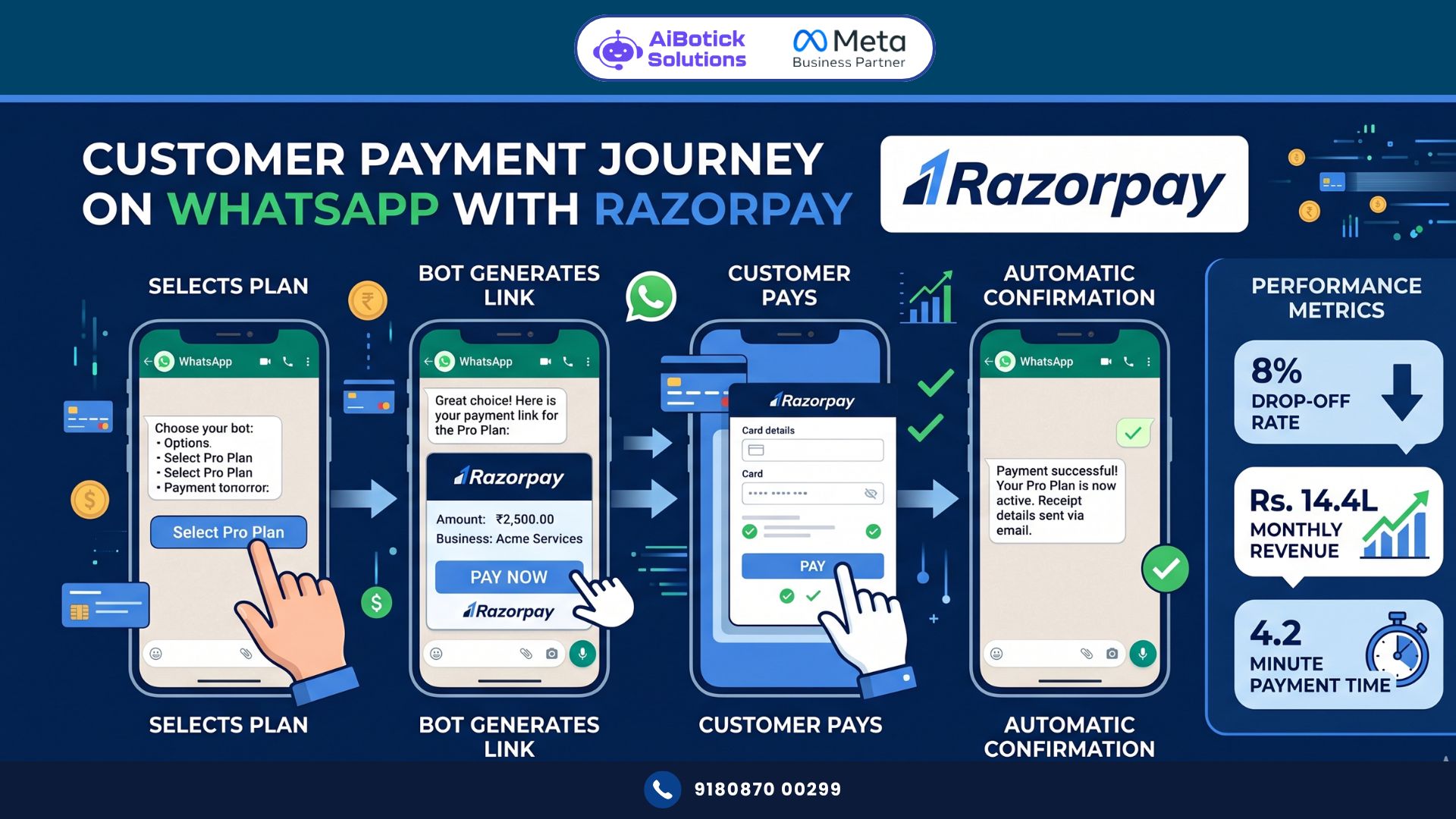
Version 2: Automated (What This Article Is About) Your WhatsApp automation platform connects to Razorpay’s API. When a specific trigger happens in your WhatsApp conversation (customer confirms order, bot collects order details, customer types “pay now”), your system automatically creates a Razorpay payment link for the exact amount, with the right description, and sends it directly in the WhatsApp chat. No manual step.
Customer pays. Razorpay notifies your system. Your WhatsApp sends an automatic payment confirmation with receipt. Order processing begins.
That’s WhatsApp Razorpay integration done properly. Full automation. Zero manual payment link creation for standard transactions.
What People Get Wrong About WhatsApp Payment Collection
Most businesses think WhatsApp Razorpay integration means WhatsApp Pay (Meta’s own payment feature).
Nope. Different things entirely.
WhatsApp Pay is Meta’s native payment feature — built into WhatsApp itself. Works for basic P2P and some business payments. But it has limitations: transaction limits, fewer payment method options, and restricted to certain merchant categories.
WhatsApp Razorpay integration is about sending Razorpay’s payment links — which support credit cards, debit cards, net banking, UPI, wallets, EMI, and international payments — inside WhatsApp conversations. Much broader payment method coverage. Razorpay’s established fraud protection and refund infrastructure. Better for businesses with diverse customer payment preferences.
Actually wait — they’re not mutually exclusive. Some businesses use both: WhatsApp Pay for simple small transactions, Razorpay links for larger orders with more payment method requirements.
But for serious business payment collection — Razorpay integration is the more complete solution. And that’s what we’re building here.
Real Case Study: Bengaluru Online Coaching Platform — Payment Drop-offs Fell From 34% to 8%
The Situation:
- Online fitness and nutrition coaching platform in Bengaluru
- Monthly paid enrollments: 280 (average plan value Rs.3,500)
- Payment collection process: sales call → email with payment link → follow-up call if not paid in 24 hours
- Payment drop-off rate: 34% (customer says yes but doesn’t complete payment)
- Monthly revenue lost to drop-offs: ~Rs.3.36L (95 lost sales × Rs.3,500)
The Problem: After a successful sales conversation on WhatsApp, the customer received a payment link via email. 34% never opened the email. Or opened it and forgot. Or planned to pay later and never did.
What They Implemented:
WhatsApp Razorpay integration with full automation:
- Sales conversation happens on WhatsApp
- Customer says “yes, I want to enroll”
- Chatbot flow triggers: “Fantastic! Let me set up your account. Which plan works for you? Reply 1 (Monthly — Rs.3,500) or 2 (Quarterly — Rs.9,000) or 3 (Annual — Rs.29,000)”
- Customer replies with choice
- System auto-creates Razorpay payment link for exact plan amount with customer’s name in description
- WhatsApp sends: “Great choice! Complete your enrollment payment here 👇 [Razorpay Link] — link expires in 30 minutes. Questions? Reply here.”
- Customer taps link. Pays in under 60 seconds.
- Razorpay payment success webhook fires
- WhatsApp sends automatic confirmation: “Payment received ✅ Rs.3,500. Your coaching plan is active! Coach [Name] will WhatsApp you within 2 hours to schedule your first session. Welcome aboard 😄”
- CRM updated. Coach notified. Onboarding sequence triggered.
Zero manual steps in the payment collection process.
The Results (60 days):
| Metric | Before | After | Change |
|---|---|---|---|
| Monthly enrollments | 280 | 412 | +47% |
| Payment drop-off rate | 34% | 8% | -76% |
| Payment completion time | 2.4 hours avg | 4.2 minutes avg | -97% |
| Manual follow-up calls for payment | 95/month | 22/month | -77% |
| Monthly revenue | Rs.9.8L | Rs.14.4L | +47% |
| Customer experience score (payment) | 61% | 91% | +49% |
That drop-off rate. 34% to 8%. Rs.3.36L in previously lost sales — most of it now recovered. Not from more leads. Not from better sales pitches. Just from delivering the payment link in the right place at the right moment.
How WhatsApp Razorpay Integration Works (Technical Overview — Simple Version)
Don’t worry — you don’t need to be a developer to understand this. But you do need to understand the basic flow to implement it properly.
The Components:
- WhatsApp Business API (via AiBotick) — manages the conversation and sends/receives messages
- Razorpay API — creates payment links programmatically
- Webhook — notifies your system when payment is completed
- Your automation logic — connects the pieces: when conversation trigger X happens, create Razorpay link, send to WhatsApp
The Flow:
Customer action in WhatsApp
→ Trigger detected by automation
→ API call to Razorpay: "Create payment link for Rs.X, customer name Y, description Z"
→ Razorpay creates link, returns URL
→ WhatsApp sends URL to customer in conversation
→ Customer pays
→ Razorpay sends webhook: "Payment successful, order ID, amount, customer"
→ Your system receives webhook
→ WhatsApp sends confirmation message to customer
→ Order processing/fulfillment triggered
That’s the complete technical loop. One-time setup. Runs automatically forever after.
Step-by-Step: Setting Up WhatsApp Razorpay Integration
Step 1: Razorpay Setup
Ensure your Razorpay account has:
- API keys generated (Settings → API Keys → Generate Key)
- Note your Key ID and Key Secret — you’ll need these
- Payment Links feature enabled (it’s on by default for most accounts)
- Webhooks configured (Settings → Webhooks → Add new endpoint)
Your webhook URL is provided by your WhatsApp automation platform (AiBotick provides this in integration settings).
Step 2: WhatsApp Business API Setup
Connect your WhatsApp number to AiBotick’s platform. Ensure:
- API is active and connected
- Templates approved for payment-related messages
- Chatbot flows configured for your ordering process
Step 3: Configure the Integration in AiBotick
In AiBotick’s integration settings:
- Go to Integrations → Payment Gateways → Razorpay
- Enter your Razorpay Key ID and Key Secret
- Configure default settings: currency (INR), expiry time for payment links (typically 30-60 minutes), receipt format
Step 4: Build the Payment Trigger Flow
In your chatbot flow, add a “Create Payment Link” action at the point where payment is needed:
Configuration:
- Amount: dynamic (pulled from conversation variable — what the customer selected)
- Description: “[Product name] — [Customer name]”
- Customer name: from conversation variable
- Customer email: from conversation variable (if collected)
- Customer phone: automatically from their WhatsApp number
- Expiry: 30 minutes (creates urgency, prevents link abuse)
Step 5: Configure the Payment Confirmation Message
When Razorpay’s webhook fires (payment successful), configure what WhatsApp sends:
“Payment received ✅ Amount: Rs.[Amount] Order ID: [Razorpay Order ID] Date: [Date]
[Relevant next step — delivery info, account activation, appointment confirmation, etc.]
Thank you for choosing [Business Name]! 🙏”
Step 6: Test the Complete Flow
Run through your complete payment flow as a customer:
- Send test message to your WhatsApp number
- Navigate through chatbot to payment step
- Confirm Razorpay payment link is generated and sent correctly
- Complete test payment (Razorpay has test mode — use test card numbers)
- Confirm webhook fires and WhatsApp confirmation is sent
- Check your CRM/order system is updated
Fix everything before going live. A broken payment flow is the worst possible customer experience — worse than no payment flow at all.
WhatsApp Razorpay Integration for Different Business Types
E-commerce and D2C
Customer browses your WhatsApp catalog. Selects products. Bot calculates total including shipping. Creates Razorpay link for exact amount. Customer pays. Fulfillment triggered automatically.
No Shopify or WooCommerce needed for basic WhatsApp-direct sales. Your catalog + bot + Razorpay IS your checkout system.
A D2C skincare brand in Mumbai does Rs.18L monthly directly through this WhatsApp-catalog-Razorpay flow. Zero ecommerce website. Zero platform fees. Direct to customer.
Service Businesses (Coaching, Consulting, Agencies)
Proposal accepted on WhatsApp → WhatsApp Razorpay integration sends invoice-style payment link → customer pays → engagement confirmed automatically.
No more “I’ll pay by next week” that becomes “I’ll pay next month” that becomes the client you never actually onboarded.
Education (Coaching Institutes, Online Courses)
Student confirms enrollment → payment link for specific course fee → payment completes → batch WhatsApp group invite sent → student portal access granted. All automated. Zero admin involvement.
For businesses scaling admissions with WhatsApp, our WhatsApp admission automation guide covers the complete enrollment funnel — from first inquiry to enrolled student — that WhatsApp Razorpay integration plugs directly into at the payment stage.
Real Estate (Token Amount / Booking Amount)
Site visit done. Client likes the property. Sales manager sends booking amount request on WhatsApp: “To confirm your booking for [Unit], the token amount is Rs.1L. Secure it now before this unit goes to the next interested buyer: [Razorpay link]” — with a 4-hour expiry.
Urgency + convenience + WhatsApp = token collection in minutes instead of days.
Freelancers and Consultants
Project scoped on WhatsApp. Advance payment requested: “As discussed, the advance for this project is Rs.25,000. Pay here to get started: [link] — once received, I’ll begin on Monday.”
Advance collected same day. Project starts. No “I’ll transfer it this week” ambiguity.
Advanced Features Worth Implementing
Partial Payment / Installment Links
Razorpay supports payment plan links — customer pays in defined instalments. Configure your WhatsApp Razorpay integration to send the first instalment link on confirmation, then automatically send subsequent instalment links on their due dates.
Coaching institutes using this see 23% higher enrollment conversion when they offer “₹5,000 now, ₹5,000 in 30 days” vs “₹10,000 now.”
Payment Expiry Reminders
Link expires in 30 minutes. Customer hasn’t paid at 25 minutes. Automatic WhatsApp: “Hi [Name], your payment link expires in 5 minutes. If you need a new one, just reply ‘NEW LINK’ and I’ll send one instantly.”
This reminder alone recovers 12-18% of lapsed payment sessions.
Abandoned Payment Recovery
Link created. Not paid in 2 hours. Automated WhatsApp: “Hi [Name], noticed you didn’t complete your payment for [product]. Still interested? Here’s a fresh link: [new link]. Valid for 1 hour.”
Win-back rate: 22-28%. Revenue recovered from zero additional effort.
Payment Receipt on WhatsApp
Every successful payment automatically generates and sends a formatted receipt in WhatsApp:
“PAYMENT RECEIPT [Business Name] — Receipt No: [#] Date: [Date] Customer: [Name] — [Item]: Rs.[Amount] Total: Rs.[Amount] Payment Method: [UPI/Card/etc] — Thank you for your payment!”
Customer has their receipt in WhatsApp. No email needed. No “can you send me a receipt?” support request.
The Cost Comparison: WhatsApp Razorpay Integration vs Traditional Payment Collection
Traditional flow costs:
- Staff time creating payment links manually: 5 min per transaction × 300 transactions = 25 hours/month
- Staff time chasing unpaid invoices: 34% drop-off = 102 lost payments requiring 3 follow-up calls each = 20 hours/month
- Lost revenue from drop-offs: 34% × Rs.3,500 avg = Rs.1,190 per dropped order × 102 drops = Rs.1.21L/month
Total monthly cost of manual payment collection: Rs.1.21L in lost revenue + 45 hours in staff time
WhatsApp Razorpay integration costs:
- Razorpay transaction fee: 2% per transaction (standard — negotiable at volume)
- AiBotick platform: already in your subscription
- Setup: one-time 4-8 hours
At 300 monthly transactions of Rs.3,500 average: Razorpay fee: 300 × Rs.3,500 × 2% = Rs.21,000/month
Monthly saving vs manual: Rs.1.21L saved + 45 hours staff time + 26 additional sales from reduced drop-off × Rs.3,500 = Rs.91,000 additional revenue
Net benefit: Rs.1.8L+ monthly from implementation. And if you want to understand how payment integration connects to your broader WhatsApp commerce strategy — specifically how payment collection integrates with order tracking, customer support, and repeat purchase automation — our WhatsApp payments India guide covers the complete payment ecosystem for Indian businesses.
Common Mistakes With WhatsApp Razorpay Integration
Mistake 1: No payment expiry configured Payment link with no expiry = link circulates, gets shared, potentially used by wrong people, or expires on Razorpay’s end unexpectedly. Always set 30-60 minute expiry for product/service links. For invoice links, longer expiry (24-48 hours) is appropriate.
Mistake 2: Generic payment link descriptions “Payment from Customer” as description. Useless for reconciliation. Always include: customer name, product/service, date. “Fitness Plan — Quarterly — Rahul Sharma — May 2026” tells you everything at a glance in your Razorpay dashboard.
Mistake 3: No payment confirmation WhatsApp message Payment completes. Customer hears nothing. Did it work? Are they enrolled? They message to ask. Adds support load. Always send automatic confirmation immediately via webhook. Customers need closure.
Mistake 4: Not testing the webhook Integration is set up. Works in test mode. Webhook not configured correctly in production. Live customer pays. System doesn’t know. No confirmation sent. Chaos. Test webhook with actual small payment before going live.
Mistake 5: Missing failed payment handling Customer tries to pay. Card declines. They don’t know why. Nobody follows up. Lost sale. Configure a failed payment webhook too: if payment fails → automated WhatsApp: “Hi [Name], looks like your payment didn’t go through. Try a different payment method or UPI: [new link]. Need help? Reply here.”
Mistake 6: Not reconciling WhatsApp payments with accounting Rs.14L flowing through WhatsApp Razorpay integration monthly and it’s not properly reconciled in your books? That’s a GST and accounting nightmare. Use Razorpay’s export features. Ensure every WhatsApp payment maps to an invoice in your accounting system.
Why WhatsApp Razorpay Integration Is the Future of Indian Business Payments
Honestly? The combination of WhatsApp (where customers already are) + Razorpay (India’s most trusted payment infrastructure) is as close to a perfect payment experience as Indian businesses can offer right now.
Your customer doesn’t need to download an app. Doesn’t need to navigate to a website. Doesn’t even need to remember your UPI ID. They just tap a link in the conversation they’re already in, and pay.
That’s frictionless. And frictionless payments = more payments completed = more revenue.
The Bengaluru coaching platform that went from Rs.9.8L to Rs.14.4L monthly? Same customers. Same courses. Same price. Just removed 5 steps from the payment process.
Real talk — in India’s mobile-first, WhatsApp-native market, any business still emailing payment links is leaving significant revenue on the table. WhatsApp Razorpay integration isn’t a fancy feature. It’s table stakes for 2026. 😄
Ab toh ek kaam karo — set it up, test it, go live. Pehla successful payment aaega toh you’ll wonder why you waited this long. 💯
Want to set up WhatsApp Razorpay integration for your business?
— Mohit Shah | 15+ years in IT industry | 4+ years in WhatsApp automation | Worked with various MNC brands | Now helping businesses figure out what actually works
Q1: Does WhatsApp Razorpay integration work with all Razorpay payment methods, including EMI and international cards?
A1: Yes. Razorpay payment links sent via WhatsApp Razorpay integration support all Razorpay payment methods — UPI, credit cards, debit cards, net banking, wallets (Paytm, PhonePe), EMI (credit card and Bajaj Finserv), and international cards. The payment link opens in browser where the full Razorpay checkout experience is available, including currency conversion for international customers. One important note: if you want EMI options to appear, ensure your Razorpay account has EMI enabled and your transaction meets the minimum amount threshold (typically Rs.3,000+ for EMI). This makes WhatsApp Razorpay integration especially valuable for high-ticket products and services where customers prefer instalment options.
Q2: How does WhatsApp Razorpay integration handle GST and invoice requirements for B2B transactions?
A2: Razorpay allows custom notes and descriptions in payment links — include GST number, invoice number, and line item details in the payment link description. For formal GST invoices, configure your system to generate a GST-compliant invoice (via Razorpay’s invoice feature or your accounting software) and send the PDF alongside the payment link in the WhatsApp conversation. The WhatsApp payment confirmation message can include the GST invoice download link. For businesses with high B2B transaction volumes, integrate Razorpay with your accounting software (Tally, Zoho Books, QuickBooks) so every WhatsApp Razorpay payment automatically creates a GST invoice — reducing manual reconciliation to zero.
Q3: What’s the difference between using WhatsApp Pay and WhatsApp Razorpay integration for business payments?
A3: WhatsApp Pay is Meta’s native payment feature — simple, built into WhatsApp, no additional integration needed, but limited to UPI payments, lower transaction limits (Rs.1L per transaction, Rs.1L per day), fewer supported business categories, and basic dispute resolution. WhatsApp Razorpay integration sends Razorpay payment links inside WhatsApp — supports all payment methods (cards, EMI, wallets, international), no practical transaction limits for business accounts, full Razorpay fraud protection and dispute resolution, detailed analytics, and complete integration with your business systems. For small casual transactions under Rs.5,000, WhatsApp Pay is convenient. For serious business payment collection — especially for services, courses, or products above Rs.5,000 — WhatsApp Razorpay integration is the correct choice.