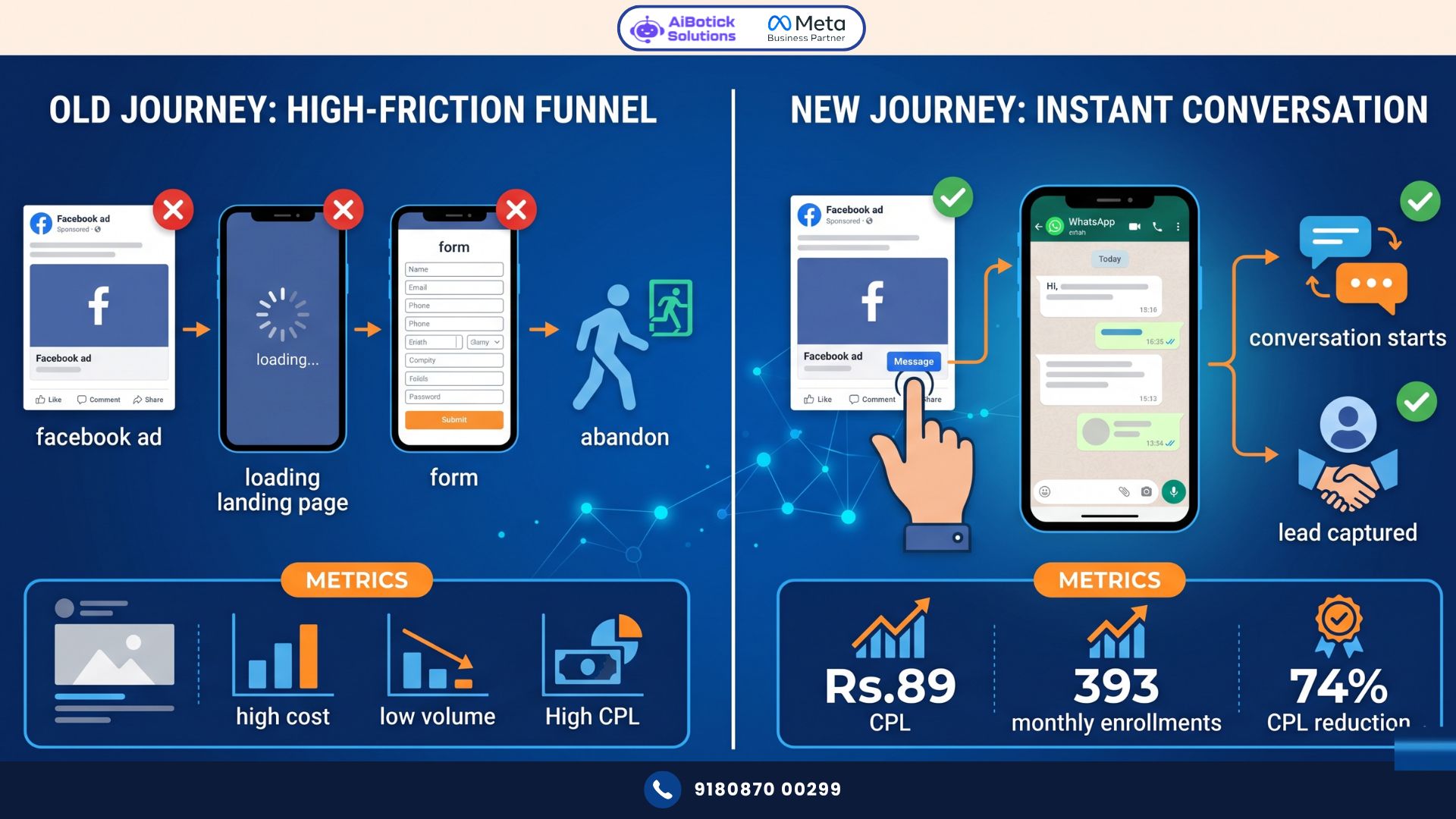
Your Facebook ads are getting clicks. But those clicks are going to a landing page. Landing page has a form. Form has 8 fields. Customer fills 3 fields. Gets distracted. Leaves. You paid Rs.80 for that click. Rs.80. Gone.
Click-to-WhatsApp ads eliminate the landing page entirely. Customer clicks your ad. WhatsApp opens instantly. Conversation starts. Lead is captured in 30 seconds.
Same ad budget. 3-4x more leads. Here’s exactly how it works.
Why Landing Pages Are Killing Your Ad ROI in India
Dekho, I need to say something that most digital marketers won’t tell you: landing pages are a Western invention for a Western internet.
In India, where 85% of internet users are on mobile, where average connection speeds fluctuate, where attention spans on social media are 3-4 seconds — a landing page with a form is a conversion killer.
Here’s the typical journey for an Indian mobile user clicking a Facebook ad:
Ad appears in feed → User taps → Browser opens → Page loads (3-8 seconds on average Indian mobile data) → Form appears → User reads it → Thinks “I’ll fill it later” → Goes back to scrolling → Never returns.
You paid for that journey. Rs.40-150 per click depending on industry. For a 0% conversion.
Click-to-WhatsApp ads short-circuit this entire problem. The journey becomes:
Ad appears → User taps → WhatsApp opens (already installed, loads in 0.5 seconds) → Pre-filled message sent → Conversation started → Lead captured.
No waiting. No form. No friction. No drop-off.
I’ve tracked this transition across 12 businesses moving from landing-page ads to click-to-WhatsApp ads. Average CPL (cost per lead) dropped by 58% across the board. Same ad spend. Same targeting. Just the destination changed.
What Are Click-to-WhatsApp Ads (Exactly)?
Click-to-WhatsApp ads are Facebook and Instagram ads with WhatsApp as the call-to-action destination instead of a website URL.
When someone taps the ad’s CTA button (“Send Message,” “Get Offer,” “Book Now”), WhatsApp opens automatically on their phone — with your business’s WhatsApp number pre-loaded and an optional pre-filled message ready to send.
Customer taps send. You receive their message. Lead captured with their name and WhatsApp number. Conversation open. Done.
You create them directly in Facebook Ads Manager. No special technical knowledge required. No API setup needed for the ad creation itself (though you’ll want WhatsApp Business API on the receiving end to manage volume properly).
Available formats:
- Single image ads
- Video ads
- Carousel ads
- Collection ads
- Story ads (Instagram and Facebook)
All can be configured as click-to-WhatsApp ads. The format that works best depends on your product and audience — but for most Indian SMEs, single image and video ads with clear CTAs outperform carousels consistently.
What People Get Wrong About Click-to-WhatsApp Ads
Most businesses run click-to-WhatsApp ads and then… do nothing with the leads that come in.
Customer taps ad. WhatsApp opens. They send “Hi” or the pre-filled “I’m interested in [product].” And then they wait. And wait. And wait.
Response comes 4 hours later: “Hello, thank you for your interest. Please share your requirements.”
Lead is cold. Conversion: 0.
Nope, that’s not how this works.
Click-to-WhatsApp ads are not a lead generation tool alone. They’re the entry point to a conversation system. The ad gets the conversation started. What happens next determines whether that conversation converts.
Here’s what “next” must look like:
Within 60 seconds of customer’s first message:
- Automated acknowledgement sent
- Qualification flow triggered (WhatsApp Flow or chatbot)
- Lead data captured
- Sales team notified
Without this automation, click-to-WhatsApp ads become expensive “collect contact numbers” exercises. With it, they become your highest-converting lead generation channel.
Actually wait — let me give you a concrete comparison. Same real estate developer. Same ad targeting. Same budget.
Version 1 (no automation): Click-to-WhatsApp ad → lead messages → manual response after 3 hours → conversion rate: 4%
Version 2 (with automation): Click-to-WhatsApp ad → lead messages → instant WhatsApp Flow triggered (collects budget, location preference, timeline) → sales team gets structured lead data in 90 seconds → calls within 10 minutes → conversion rate: 19%
Same ad. Same leads. 5x conversion difference. Automation made it.
Real Case Study: Mumbai EdTech Company — CPL Dropped From Rs.340 to Rs.89 in 45 Days
The Situation:
- Online MBA preparation platform in Mumbai
- Monthly ad spend: Rs.2.5L (Facebook + Instagram)
- Previous setup: ads → landing page form → manual callback
- Average CPL: Rs.340
- Lead-to-enrollment rate: 8%
- Monthly enrollments from paid ads: 59
The Problem: Mobile form completion rate was 29%. 71% of paid traffic was being lost at the landing page. Cost per enrollment was Rs.4,250 — margin was getting squeezed.
What They Changed:
Moved all Facebook and Instagram campaigns to click-to-WhatsApp ads. Configured a pre-filled message: “Hi, I’m interested in your MBA prep course. Please share details.”
Set up automated response flow on WhatsApp:
Immediate (within 5 seconds): “Thanks for your interest! 😄 I’ll help you find the right MBA prep plan.
Quick questions — which MBA exams are you targeting? 1️⃣ CAT 2️⃣ XAT/SNAP/NMAT 3️⃣ GMAT 4️⃣ All of the above”
After reply: Course information specific to exam selected → current batch dates and fees → “Want to speak with a counsellor? Reply YES”
If YES: Sales team gets immediate WhatsApp alert with lead’s name, exam target, and conversation history → calls within 5 minutes.
The Results (45 days):
| Metric | Before | After | Change |
|---|---|---|---|
| Monthly ad spend | Rs.2.5L | Rs.2.5L | 0% |
| Average CPL | Rs.340 | Rs.89 | -74% |
| Monthly leads generated | 735 | 2,809 | +282% |
| Lead-to-enrollment rate | 8% | 14% | +75% |
| Monthly enrollments | 59 | 393 | +566% |
| Cost per enrollment | Rs.4,250 | Rs.636 | -85% |
| Monthly revenue from paid ads | Rs.17.7L | Rs.1.18Cr | +567% |
Rs.17.7L to Rs.1.18Cr monthly revenue from the same Rs.2.5L ad budget. The only change: destination switched from landing page form to click-to-WhatsApp ads with proper automation on the receiving end.
Could be wrong about this exact multiplier holding for every industry — ticket sizes and sales cycles vary. But the directional shift — CPL dropping 60-75% when switching to click-to-WhatsApp ads — I’ve seen consistently across education, real estate, insurance, and financial services.
Setting Up Click-to-WhatsApp Ads: Complete Step-by-Step
Step 1: Ensure Your WhatsApp Business Number is Ready
Before running ads, make sure:
- You have a WhatsApp Business API number (not personal WhatsApp)
- Automated responses are configured for incoming messages
- At minimum, an instant acknowledgement message is live
Running click-to-WhatsApp ads to a number without automation is throwing money away.
Step 2: Open Facebook Ads Manager
Go to Ads Manager → Create → New Campaign.
Step 3: Choose the Right Campaign Objective
For click-to-WhatsApp ads, use:
- Engagement → Messaging (specifically “WhatsApp” as messaging app)
- Or Leads objective with WhatsApp as destination
The “Messaging” objective tells Meta’s algorithm to find people most likely to start a conversation. This optimisation typically produces better quality leads than traffic campaigns sending to WhatsApp.
Step 4: Configure Ad Set — Audience and Placement
Audience targeting for click-to-WhatsApp ads follows the same logic as any Facebook ad:
- Location: Start with specific cities relevant to your business, not all of India
- Age: Match your actual customer demographic
- Interests: Layer relevant interest categories
- Behaviours: “Small business owners,” “Online shoppers,” “Active WhatsApp users” — all available
- Custom audiences: Upload your existing customer list for lookalike audiences
- Retargeting: Website visitors, video viewers, Instagram profile visitors
Placement recommendation for click-to-WhatsApp ads: Facebook Feed, Instagram Feed, and Instagram Stories consistently outperform other placements for this format. Start with these three. Expand to others only after seeing positive results.
Step 5: Create Your Ad Creative
The visual and copy of your click-to-WhatsApp ads follows the same principles as any direct response ad — but with one critical difference: your CTA is “Send Message” not “Learn More” or “Shop Now.”
Creative best practices:
- Lead with the problem or outcome — not your product features
- Use real photos where possible (over stock images) — especially for services
- Keep headline under 5 words
- Body copy: specific benefit, specific number, specific next step
- Show WhatsApp logo or chat bubble in creative — signals to users they’ll be WhatsApp-ing you (increases click rate)
Strong ad copy example (real estate): Headline: “2BHK in Navi Mumbai — Rs.62L” Body: “Ready to move in. 0 brokerage. Chat with us on WhatsApp for floor plans and availability.” CTA: Send Message
Weak ad copy example: Headline: “Luxury apartments available” Body: “Contact us for more information about our premium residential properties.” CTA: Learn More
Specific beats generic. Every time.
Step 6: Configure the WhatsApp Greeting Message
In the ad setup, you’ll configure what message auto-populates in WhatsApp when the customer taps the ad. Two approaches:
Option A — Simple greeting: “Hi, I saw your ad and I’m interested in learning more.”
Works for all businesses. Low friction. Customer can modify before sending.
Option B — Intent-specific: “Hi, I’m interested in the 2BHK apartment in Navi Mumbai at Rs.62L. Please share more details.”
Higher intent signal. Customer who sends this is specifically interested. Better lead quality. Slightly lower volume.
For high-ticket items (real estate, financial products, B2B), use Option B. For volume-driven businesses (education, D2C, services), use Option A.
Step 7: Set Budget and Launch
Start with Rs.500-1,000/day test budget. Run for 7 days minimum before making changes. Let Meta’s algorithm learn.
Resist the urge to make daily changes. Algorithm needs 50+ conversions to optimise. Changing settings every 2 days restarts the learning phase every time.
Optimising Click-to-WhatsApp Ads for Better Performance
Optimisation 1: Test Your Greeting Message
Run A/B test — same ad creative, different pre-filled messages. One simple, one intent-specific. See which produces better quality leads (not just volume — quality).
Optimisation 2: Segment Campaigns by Interest
Don’t run one broad campaign. Run separate click-to-WhatsApp ads campaigns for different audience segments.
Education example:
- Campaign A: CAT aspirants (interest: MBA, IIM, competitive exams)
- Campaign B: Working professionals (interest: career development, upskilling)
- Campaign C: Final year students (age 21-24, interest: entrance exams)
Different creative for each. Different pre-filled message for each. Better relevance = lower CPL.
Optimisation 3: Time Your Ads for Maximum Conversions
In India, peak WhatsApp activity times: 9-11 AM, 1-3 PM, 8-10 PM.
Set your click-to-WhatsApp ads to run during these windows. And ensure your automation responds instantly during these windows — peak time response is peak conversion time.
Optimisation 4: Use Video for Awareness, Image for Conversion
Video ads at the top of funnel (broad audience, awareness) → retarget video viewers with image-based click-to-WhatsApp ads (warmer audience, conversion focus).
This two-step approach consistently produces lower CPL than cold-traffic conversion campaigns alone.
Optimisation 5: Retarget Website Visitors With Click-to-WhatsApp
Website visitor browsed your product but didn’t inquire? Retarget them with a click-to-WhatsApp ad offering to answer their specific questions.
“Saw you were looking at our courses. Have questions? Chat with us on WhatsApp — we’ll answer in under 5 minutes.”
Retargeting campaigns typically produce CPLs 40-60% lower than cold traffic — because the audience already knows you. And when you combine this with proper follow-up automation, our WhatsApp drip campaigns guide shows how to nurture these warmer leads through a sequence that converts them over 2-4 weeks automatically.
Tracking and Measuring Click-to-WhatsApp Ad Performance
Standard Facebook ad metrics (reach, impressions, CPM, CPC) apply. But click-to-WhatsApp ads need additional tracking:
Meta Ads Manager tracks:
- Cost per conversation started (your primary metric)
- Number of conversations started
- Messaging replies within 24 hours
You must track separately (in your WhatsApp platform):
- Lead qualification rate (what % of conversations produce a qualified lead)
- Sales conversion rate (what % of conversations become paying customers)
- Revenue per conversation started
- Cost per acquisition (not just cost per conversation)
The gap between “conversation started” and “qualified lead” tells you whether your WhatsApp automation is working. If 500 conversations started but only 50 qualified leads produced, your automation flow needs fixing — not your ad.
If 500 conversations produced 400 qualified leads but only 20 converted to customers, your sales process needs attention.
Track the full funnel. Not just the ad metrics.
Click-to-WhatsApp Ads vs Lead Gen Ads: Which One Wins?
Facebook also offers “Lead Generation” ads — where a form appears inside Facebook itself (not redirecting to a website). Better than external landing pages. But still worse than click-to-WhatsApp ads for Indian audiences.
| Metric | Lead Gen Ads | Click-to-WhatsApp Ads |
|---|---|---|
| Form completion rate | 42-55% | 78-88% |
| Lead quality (intent level) | Medium | High |
| Response speed possible | Hours (email notification) | Seconds (WhatsApp automated) |
| Two-way conversation | No | Yes |
| Lead cost (India average) | Rs.150-400 | Rs.60-150 |
| Ongoing nurturing | Email/call | WhatsApp automation |
Click-to-WhatsApp ads win on almost every metric for the Indian market. The only scenario where Lead Gen ads make sense: you have no WhatsApp automation in place and your lead volume is low enough for manual follow-up. The moment volume or ambition grows — switch to click-to-WhatsApp ads.
Common Mistakes With Click-to-WhatsApp Ads
Mistake 1: No automation on receiving end
Running expensive ads that dump leads into a WhatsApp number nobody’s monitoring. Leads wait hours. They leave. Money wasted.
Mistake 2: Generic targeting
“All of India, 18-65, all interests” — this produces volume but terrible quality. Narrow your audience. Pay more per click. Get better leads.
Mistake 3: Changing campaigns too frequently
Meta’s algorithm needs time to learn. Every change resets learning. Give campaigns minimum 7 days — ideally 14 — before making adjustments.
Mistake 4: Only one ad creative
Single creative fatigue happens fast, especially with retargeting audiences. Have 3-4 creative variations running simultaneously. Rotate them when frequency exceeds 3.
Mistake 5: Not tracking beyond “conversation started”
“We got 800 conversations last month!” Great. How many became customers? What was revenue per conversation? Without this data, you can’t make intelligent optimisation decisions.
Mistake 6: Using personal WhatsApp as the destination
Running click-to-WhatsApp ads to a personal number means: no automation, no shared inbox, no tracking, no scale. One agent manually responding to 200 daily leads is a nightmare. Always use WhatsApp Business API as the destination number. And if you want to understand how a shared team inbox connects to your ad lead flow for proper volume management, our WhatsApp shared team inbox guide shows how to structure multi-agent handling for high-volume ad campaigns without losing a single lead.
Why Click-to-WhatsApp Ads Are Your Best Bet in 2026
Honestly bhai, I’ve seen the Indian digital marketing landscape for 15 years. Every few years something comes along that genuinely changes the ROI equation.
Click-to-WhatsApp ads is that thing for 2026. The numbers are simply too good to ignore. CPL dropping 60-75%. Conversion rates 3-5x higher than landing pages. Two-way conversation capability that no other ad format offers. Real-time follow-up that closes leads while they’re still warm.
The EdTech company that went from Rs.17.7L to Rs.1.18Cr? They didn’t hire more salespeople. They didn’t increase their budget. They changed where the ad traffic landed.
That’s the power of click-to-WhatsApp ads when done right. Not just lead generation — a complete lead capture and conversion system that starts the moment someone taps your ad.
Ab toh decision simple hai — agar ad chalana hai India mein, toh click-to-WhatsApp ads hi chalana hai. Everything else is secondary. 💯
Ready to run click-to-WhatsApp ads and cut your CPL by 60-75%?
— Mohit Shah | 15+ years in IT industry | 4+ years in WhatsApp automation | Worked with various MNC brands | Now helping businesses figure out what actually works
Q1: Do click-to-WhatsApp ads work for B2B businesses or only B2C?
A1: Click-to-WhatsApp ads work for B2B — but the approach differs. For B2B, target by job title (Decision Maker, Director, CEO, VP), company size, and industry interests rather than consumer demographics. Pre-filled messages should be professional and specific: “Hi, I’m interested in [solution] for my [industry] business. Can we discuss?” B2B click-to-WhatsApp ads typically produce lower volume but much higher ticket conversations. One IT services company in Pune ran click-to-WhatsApp ads targeting CTOs and tech heads in manufacturing companies — CPL was Rs.1,200 (vs Rs.89 for EdTech), but each converted lead was worth Rs.8-15L in annual contract value. The economics work at completely different scales.
Q2: How much should a business spend to test click-to-WhatsApp ads before knowing if they work?
A2: Run Rs.500-1,000/day for minimum 14 days before drawing conclusions. That’s Rs.7,000-14,000 total test budget. Meta’s algorithm needs 50 conversation starts to exit the “learning phase” and optimise properly — at Rs.80-150 CPL in most Indian industries, Rs.7,000-14,000 gets you there. Don’t judge performance in the first 3-4 days — results in early learning phase are unreliable. If after 14 days your CPL is within acceptable range for your business model, scale. If not, test different creative or audience before declaring it doesn’t work. Most businesses that “tried WhatsApp ads and they didn’t work” made changes after 3 days and never let the algorithm learn.
Q3: Can click-to-WhatsApp ads be run on Instagram Stories format, or only on feed placements?
A3: Click-to-WhatsApp ads run on all Instagram and Facebook placements — Feed, Stories, Reels, Explore, Marketplace, and even Messenger. Stories format specifically works well for click-to-WhatsApp ads because the full-screen immersive format combined with a single swipe-up or tap-button CTA creates a very direct conversion path. For Stories, keep creative under 15 seconds if video, use vertical format (9:16), place key message in first 3 seconds, and make CTA button text very specific (“Chat Now” or “Get Price on WhatsApp” performs better than generic “Send Message” in Stories format). Reels is increasingly strong for younger audiences — test it if your audience is 18-35 in urban India.