A travel agent once told me something that stuck.
“Mohit bhai, I spend 2 hours creating a beautiful itinerary in Word. I email it to the client. They never open it. Then on Day 2 of the trip they call me and ask — ‘What time is our Jaisalmer fort visit?’ The answer was in the itinerary. The one they never opened.”
Two hours of work. Zero reference. Pure frustration on both sides.
This happens every day. Across thousands of travel agencies in India. Beautiful, detailed, carefully crafted itineraries that live unopened in email inboxes while travellers call their agents with questions that were already answered in the document.
The problem isn’t the itinerary. The problem is the channel.
Email is where documents go to be ignored. WhatsApp is where travellers live.
WhatsApp travel itinerary delivery — sending not just the PDF but structured, day-by-day information directly into the conversation where the traveller is already active — this changes the entire travel experience. For the traveller. And for the agent who stops getting “what time is our next stop?” calls at 8am.
Why Travellers Don’t Use Emailed Itineraries — The Real Reason
Let me be honest about this. Because most travel agents blame the traveller. “They didn’t read it.” “They’re lazy.”
It’s not the traveller. It’s the format.
A 12-page Word document with hotel details, day-by-day schedule, driver contact, restaurant recommendations, emergency numbers — when a traveller needs information quickly, the last thing they want to do is open a document, search for the right page, squint at the formatting.
They’re in the middle of Rajasthan. It’s 6pm. They want to know: “Where are we eating tonight?” Not “let me find page 7 of the itinerary.”
WhatsApp travel itinerary delivery solves this through contextual, time-relevant information. The right information arrives on the right day at the right time. No document to hunt through. No page to find. Just a WhatsApp message with today’s plan — when they wake up.
That’s the shift. From a reference document to a real-time travel companion.
The Complete WhatsApp Travel Itinerary System — Every Message Type
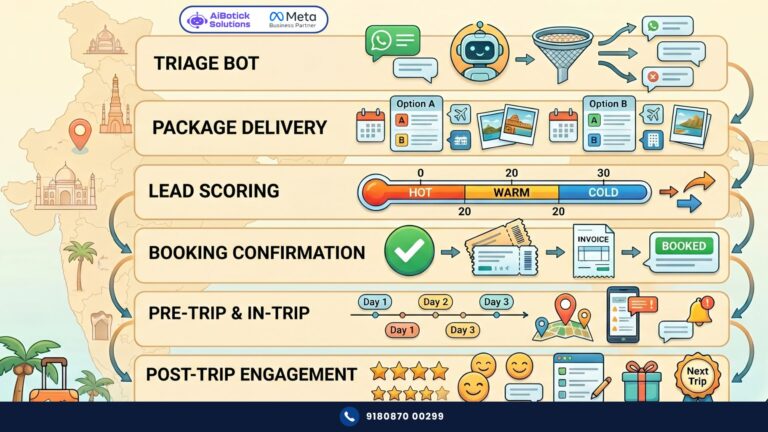
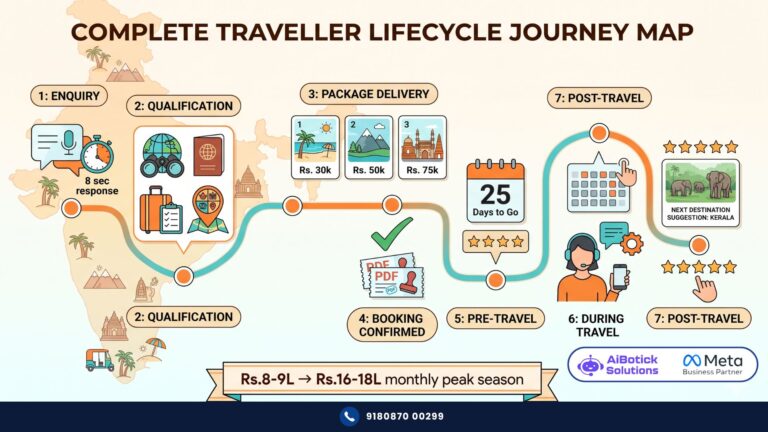
Let me map this out completely. Because WhatsApp travel itinerary delivery isn’t one message — it’s a structured communication journey throughout the trip.
Before the Trip — Setting Expectations
3 days before departure:
“[Name], your [Destination] adventure starts in 3 days! Here’s your complete trip overview: 📋
📅 Travel dates: [Start] to [End] 🏨 Hotels: [Hotel 1 — nights 1-2], [Hotel 2 — nights 3-4] 🚗 Transport: Private AC cab throughout 👤 Your driver: [Name, contact number] 📞 Your travel manager: [Name, number]
Full itinerary PDF: [Attachment]
Over the next few days — I’ll send you the day-wise plan so you always know exactly what’s coming. No need to refer to the PDF constantly — I’ve got you covered! 😊
Questions? Just reply here. — [Agent Name], [Agency Name]”
This message sets up the WhatsApp travel itinerary journey. Traveller knows they’ll receive day-wise updates. The PDF is still attached — for those who want the full document. But the WhatsApp will be their primary reference.
Day before departure:
“[Name], departure day is tomorrow! 🌟
✈️ Flight: [Flight Number] from [City] to [City] ⏰ Departure: [Time] | Arrival: [Time] 🏨 Tonight’s hotel: [Hotel Name, City] ⏱️ Check-in: [Time] 🚗 Airport pickup: [Driver Name] — [Contact]
What to pack reminder for [Destination]: ✅ [Item 1 — destination-specific] ✅ [Item 2] ✅ [Item 3]
Safe travels! I’ll message you with Day 1 details once you land. 🙏 — [Agent Name]”
During the Trip — Day-Wise WhatsApp Travel Itinerary Delivery
This is the core of the system. Every morning of the trip — day’s plan delivered fresh, specific, actionable.
Day 1 morning:
“Good morning [Name]! Day 1 of your [Destination] trip begins! ☀️
Today’s plan:
🕙 10:00am — [Activity 1] at [Location] 📍 Address: [Full address] ⏱️ Time needed: ~2 hours 💡 Tip: [Specific local tip — entrance from left side, photography allowed, morning light is best, etc.]
🍽️ Lunch (1:00pm recommended): [Restaurant Name] 📍 [Address or ‘Your driver knows the way’] 🍛 Try: [Specific dish recommendation] 💰 Budget: [Rs.X per person roughly]
🕓 3:00pm — [Activity 2] at [Location] 📍 [Address] ⏱️ ~1.5 hours
🏨 Check-in: [Hotel Name] 📍 [Address] 📞 Hotel: [Number] ⏰ Check-in from: [Time]
🌅 Evening: [Optional — sunset point, evening walk, rooftop etc.]
Your driver [Name]: [Contact]
Have an incredible day! Message me if anything. 😊 — [Agent Name]”
This message — every morning — is the WhatsApp travel itinerary at its most functional. Everything needed for today. Nothing about tomorrow (that comes tomorrow). Traveller wakes up, sees their plan, goes. No document. No searching. No calls asking “what’s next.”
Flight Alerts — Real-Time Updates During Travel
For multi-city trips with flights — the WhatsApp travel itinerary system includes flight alerts.
2 hours before flight:
“[Name], your flight is in 2 hours! ✈️
Flight: [Number] | [Departure city] → [Arrival city] Departure: [Time] | Gate: [Gate number if available] Terminal: [Number]
Current flight status: [On time / Delayed — if you have flight tracking integration]
After landing — [Driver Name] will be waiting at [Specific pickup point]. His contact: [Number]
Next hotel: [Hotel Name, City] Check-in: [Time] [Agent Name] available on WhatsApp if you need anything mid-journey. 🙏”
Upon arrival (if flight tracking enabled):
“Welcome to [City], [Name]! 😊
[Driver Name] is waiting at [Pickup point — eg: Exit Gate 2, domestic arrivals]. His car: [Vehicle type and colour] Contact: [Number]
Drive to your hotel is approximately [X minutes]. You’ll be checked in and relaxing soon.
Day [X] plan coming tomorrow morning. Enjoy the evening! 🙏”
Hotel Confirmation Messages
Every new hotel during the trip — WhatsApp travel itinerary includes a specific hotel confirmation message.
“[Name], tomorrow you check into [Hotel Name]! 🏨
📍 Address: [Full address] 🗺️ [Google Maps link] 📞 Hotel direct: [Number] ⏰ Check-in: [Time] | Checkout: [Time] 🛏️ Room type: [Your booking — eg: Deluxe Garden View]
Included in your booking: ✅ [Breakfast / included or not] ✅ [Amenities relevant — pool, spa, etc.]
Note: [Any specific note — eg: ‘Tell them you’re with [Agency Name] — they have a welcome note for you’ or ‘Your room is pre-allocated, no long check-in process’]
Anything to request in advance — late checkout, extra pillows, special occasion decoration? Reply here and I’ll arrange it. — [Agent Name]”
The “anything to request in advance” line — this is a service differentiator. Most travellers don’t know they can request things in advance. This prompt generates requests that your agency handles proactively — creating a “wow” moment when the traveller arrives and finds it already arranged.
Emergency and Support Messages
The WhatsApp travel itinerary system includes emergency support protocol.
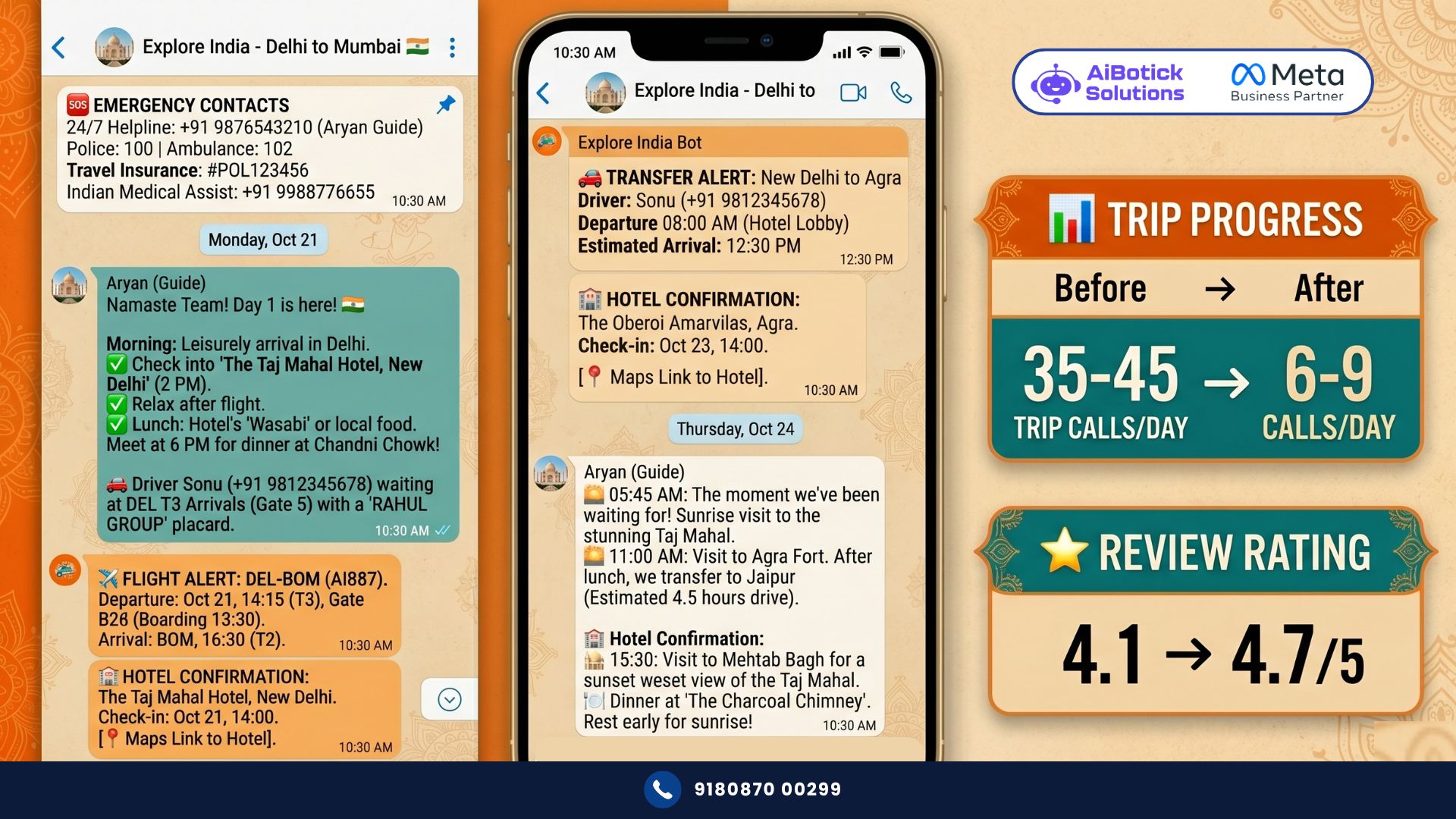
At the start of the trip — pinned reference message:
“[Name], quick reference for your trip. Save this! 📌
🆘 Your travel manager (24/7): [Name] — [Number] 🚑 Emergency (India): 112 🏥 Nearest hospital to Day 1 destination: [Hospital Name, Number] 🚓 Tourist police: [Number if available] 💳 Travel insurance helpline: [Number if applicable]
For any trip issue — big or small — I’m on WhatsApp anytime. Don’t hesitate. — [Agent Name], [Agency Name]”
And during the trip — if anything goes wrong (flight delayed, hotel issue, activity cancelled) — the agent sends an immediate proactive update rather than waiting for the traveller to discover the problem.
“[Name], quick heads up — your [Activity] tomorrow has been [cancelled / rescheduled] due to [brief reason]. I’ve already arranged [alternative]. No disruption to your trip. Details coming shortly. — [Agent Name]”
Proactive problem communication — this is what separates good travel agents from great ones. And WhatsApp makes it operationally possible at scale.
The Day-After Destination Check-In
One more touch point that creates loyalty.
“[Name], you’re in [New City] today! How was [Yesterday’s destination]? 😊
Today’s highlights for [New City]: [Brief 3-4 bullet preview of the day’s plan]
Full Day [X] plan arriving on your WhatsApp at 8am. Set your alarm for [First activity time]!
Anything specific you want to do or see today that’s not on the itinerary? Reply and I’ll check if we can add it. — [Agent Name]”
The “anything you want to add?” message — this converts spontaneous traveller wishes into agent upsells and goodwill builders. Traveller asks about a specific restaurant. Agent books it. Traveller is delighted. Trip becomes more personalised than any package tour.
Real Numbers — Mumbai-Based Group Tour Operator
Specific. Documented. Real.
Group tour operator. Mumbai. Specialising in Rajasthan, Kerala, Himachal, and Northeast India group tours. Average group size 15-20 people. Average tour price Rs.18,000-22,000 per person.
Before WhatsApp travel itinerary automation:
- Support calls received during trips: average 35-45 calls per active group per day
- Agent time on active-trip support: 4-6 hours daily during peak season (multiple groups active simultaneously)
- Post-trip complaints about “not knowing the plan”: 18-22% of group members raised this as a concern in post-tour surveys
- Post-trip re-booking rate: 19%
- Average tour review rating: 4.1/5
After WhatsApp travel itinerary automation (90 days):
- Support calls during trips: average 6-9 per active group per day (80% reduction)
- Agent time on active-trip support: 45-60 minutes daily (freed 4+ hours for new bookings)
- Post-trip complaints about “not knowing the plan”: 2-3% (dramatic reduction)
- Post-trip re-booking rate: 34% (nearly 2x — travellers who feel well-managed book again)
- Average tour review rating: 4.7/5
Revenue impact:
Agent time freed (4+ hours daily × 26 days = 104+ hours/month): redirected to processing new group booking enquiries. Conservative estimate: 3-4 additional group bookings per month from this freed capacity.
3 additional groups × 15 people × Rs.20,000 = Rs.9,00,000 additional monthly revenue. From the same team. Just from time freed by better trip communication.
Re-booking rate improvement: from 19% to 34% on monthly ~150 returning travellers = 22.5 additional bookings × Rs.20,000 = Rs.4,50,000 additional monthly revenue from repeat customers.
Total monthly revenue impact: Rs.13,50,000+
Platform cost: Rs.45,000/year.
And the tour rating improvement — 4.1 to 4.7 — this drives organic new bookings from better reviews. The compounding effect of this over 12 months is significant.
Actually wait — the operator shared something that genuinely surprised me. He said: “Pehle mujhe alag alag group ke logon ke WhatsApps yaad rakhne padte the. Ab system automatically sahi log ko sahi message bhejta hai. Main unhe personally jaanta hun — unka naam, unka room number, unka preference — kyunki system sab track karta hai. Mera personal attention quality actually badh gayi kyunki admin kaam system karta hai.”
That paradox — automation improving personal attention quality — this is what the best WhatsApp travel itinerary implementations deliver.
What Travel Operators Get Wrong About WhatsApp Travel Itinerary Delivery
Two mistakes. Both preventable. Both expensive.
Mistake 1 — Sending the entire itinerary on Day 1.
“Here’s your complete 7-day itinerary — all the details are in there.”
No no, scratch that approach entirely.
Seven days of information delivered at once — traveller reads Day 1, maybe Day 2, skims the rest. By Day 4 — they’ve forgotten what was in there. The 7-day message becomes as useless as the emailed PDF it replaced.
WhatsApp travel itinerary works through daily revelation. Today’s plan today. Tomorrow’s plan tomorrow. The information is always current, always relevant, never buried under 6 other days of details.
Mistake 2 — Generic messages not personalised to the group or individual.
“Day 3 — Jaisalmer Fort visit at 10am, lunch at [restaurant], camel safari at 4pm.”
This is a schedule, not a WhatsApp travel itinerary. There’s no warmth. No local tip. No specific detail that makes the traveller feel guided and cared for.
Compare: “Good morning [Name]! Day 3 in Jaisalmer — aaj ka din bahut special hai! The fort at 10am — go early, morning light makes the yellow stone glow like gold. Photography at the Patwon Ki Haveli is some of the best in Rajasthan — your driver knows the best angle spot. Lunch at Trio Restaurant — the dal baati churma here is genuinely the best I’ve had. And tonight’s camel safari — dress warm, desert nights get cold after sunset even in October. This is going to be a day you remember. 😊”
Same information. Completely different experience. The specificity — the personal recommendation — the warmth — this is what makes a travel agent irreplaceable even in the age of OTAs.
For understanding how WhatsApp automation ROI compounds in the travel industry beyond itinerary delivery — our WhatsApp for travel agents guide covers the complete revenue picture.
The Group Travel Challenge — Managing 15-20 People on One Number
Quick but important section for operators running group tours.
WhatsApp travel itinerary for groups needs one primary contact per booking (the group leader, usually). This person receives all messages — daily plans, flight alerts, hotel confirmations — and is the liaison with the rest of the group.
For group leaders — the WhatsApp also includes:
“[Group Leader Name], a quick note for your Rajasthan group:
Group headcount confirmed: [Number] Emergency group WhatsApp group created: [Link to join]
All 18 members’ emergency contacts have been logged. If anyone has a specific medical requirement I should know — please reply here.
I’m also directly available to any group member at [Number] if someone has a specific concern I should know about. — [Agent Name]”
The group emergency WhatsApp — this is a separate Meta WhatsApp group where the agent and all travellers are connected. It’s used only for genuine group communication — not individual itinerary messages (those go to the group leader). But it means every group member can reach the agent directly in an emergency.
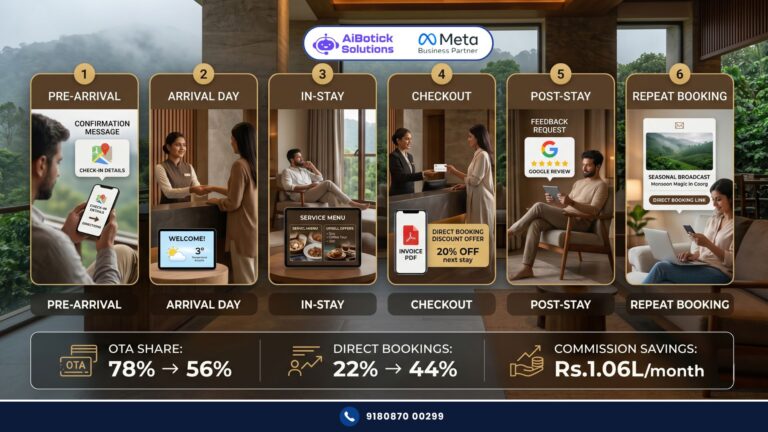
For how WhatsApp manages direct bookings and repeat engagement for travel hospitality clients — our WhatsApp for hotels guide shows the complete post-trip engagement methodology that applies to tour operators too.
Setting Up WhatsApp Travel Itinerary Automation — Exactly What to Do
Step 1 — Build your destination content library
For each destination you operate — create the day-by-day WhatsApp message templates. Each day: morning plan, lunch recommendation with specific dish, afternoon plan, hotel check-in details, evening option. Add local tips that make each message feel personalised.
This library — once built — runs for all future groups going to the same destination. One investment. Infinite reuse.
Step 2 — Build the pre-trip sequence
3-day-before overview message. Day-before departure message. These can be partially templated — destination-specific content + personalised names and booking details.
Step 3 — Build flight alert triggers
Connect to flight tracking data (optional but powerful). Or — manual trigger by agent when flight is imminent. Alert fires with flight details, driver contact, arrival instructions.
Step 4 — Build day-by-day message scheduling
For each group tour — operator sets up the 7 (or however many) day messages in AiBotick with scheduled send times (8am each morning). Messages fire automatically. Operator checks dashboard for replies needing response.
Step 5 — Build emergency reference message
Sent at start of trip. Contains all emergency contacts. Pinned in chat for easy access.
Step 6 — Build post-trip engagement
24-hour post-trip feedback. 30-day re-booking suggestion. These mirror the patterns from travel agent and hotel automation — same principles, travel context.
Toh yaar — ek honest question.
Aapke tour pe jab group hota hai aur koi traveller aapko call karta hai — “bhai, aaj kahan jaana hai?” — aap kya feel karte ho?
Irritation? Helplessness? “Itinerary mein tha toh…”
WhatsApp travel itinerary automation means that question stops coming. Because the traveller already knows — aaj kahan jaana hai — because a WhatsApp arrived at 8am with exactly that information. In a format they actually used.
That’s not just a better experience for the traveller. That’s a better life for you and your team during trip season.
Tap below. 👇 Tell us your destination specialisation, average group size, and number of active trips in peak season — we’ll design your complete WhatsApp travel itinerary delivery system and show you what the support call reduction looks like for your operation.
— Mohit Shah | 15+ years in IT industry | 4+ years in WhatsApp automation | Now helping businesses figure out what actually works