Your customers are dropping off at the exact moment you need them most.
They message your business. You send a question. They reply. You ask another question. They reply again — but differently than expected. Conversation gets messy. Data is inconsistent. Your team spends 20 minutes extracting what should have been a 90-second interaction.
WhatsApp Flows fix this. Completely. And most Indian businesses have no idea this feature even exists.
Here’s everything you need to know — what it is, how it works, what it’s worth, and how to build your first one.
What Are WhatsApp Flows (And Why Should You Care)?
WhatsApp Flows are interactive, structured forms that appear natively inside a WhatsApp conversation.
Not a link to a website form. Not a PDF to fill and send back. Not a series of back-and-forth questions. An actual interactive screen — with dropdowns, checkboxes, text fields, date pickers, and buttons — that opens directly inside WhatsApp when a customer taps it.
Customer taps “Book Appointment.” A beautiful, structured form opens inside WhatsApp. They select their service, pick a date, choose a time slot, add their name and contact — all within the same WhatsApp conversation. They tap Submit. Data is captured perfectly. Appointment is confirmed automatically.
No links. No forms opening in browsers. No “please fill this and send back.” Everything happens inside the chat.
That’s WhatsApp Flows in the simplest possible terms. And the reason it matters so much is friction.
Every step between “customer wants to do something” and “customer completes that thing” is a friction point. Each friction point loses customers. WhatsApp Flows compress what used to be a 7-step journey into a 2-step interaction: tap → complete → done.
The Problem WhatsApp Flows Solve That Nothing Else Can
Before WhatsApp Flows, businesses collecting information on WhatsApp had two bad options:
Option 1: Free-text back-and-forth Bot asks “What’s your name?” Customer types. Bot asks “What’s your email?” Customer types. 8 questions later, you have data — but it’s inconsistent, typo-filled, and collected in a format that requires manual processing.
Option 2: External form links “Please fill this form: [link]” Customer taps link. Browser opens. Website loads (slow on mobile). Form appears. Customer fills it. Submits. Maybe. Or they get distracted at step 3 and never return.
Form completion rate for external links sent via WhatsApp: 30-40%. Form completion rate for WhatsApp Flows (native in-app): 78-85%.
That gap — 40% vs 82% — is what WhatsApp Flows actually delivers in the real world. For a business getting 500 form submissions per month, that’s 210 additional completed submissions from the same traffic. From the same leads. Just from reducing friction.
What People Get Wrong About WhatsApp Flows
Most business owners who’ve heard of WhatsApp Flows think it’s just a fancier way to collect lead information.
That’s like saying a Swiss Army knife is just a fancier bottle opener.
Nope. That’s not it at all.
WhatsApp Flows can handle:
- Lead capture and qualification (obvious one — yes)
- Appointment booking with live calendar availability
- Product selection and ordering with catalog integration
- Support ticket creation with categorisation and priority
- Feedback and survey collection (NPS, CSAT, product surveys)
- Document upload requests (KYC, verification, application forms)
- Payment initiation (collect intent, then trigger payment link)
- Event registration with instant confirmation
- Loan and credit applications (NBFC use case)
- Job applications (HR use case)
- Course enrollment (EdTech use case)
Basically — any structured data collection your business needs from customers can be built as a WhatsApp Flow and delivered inside the conversation with zero friction.
Actually wait — I want to give you a more concrete picture of how different this is from what businesses are doing currently.
A real estate developer in Hyderabad was collecting property inquiry details via a website form embedded in their WhatsApp auto-reply. Form required: name, email, phone, property type, budget, location preference, timeline. External form. Browser opens. 7 fields.
Completion rate: 28%.
They moved to WhatsApp Flows with the exact same 7 fields — but native, inside WhatsApp, with dropdowns instead of text fields for structured fields.
Completion rate: 81%.
Same leads. Same information collected. 53 percentage points difference. Just from being inside WhatsApp instead of outside it.
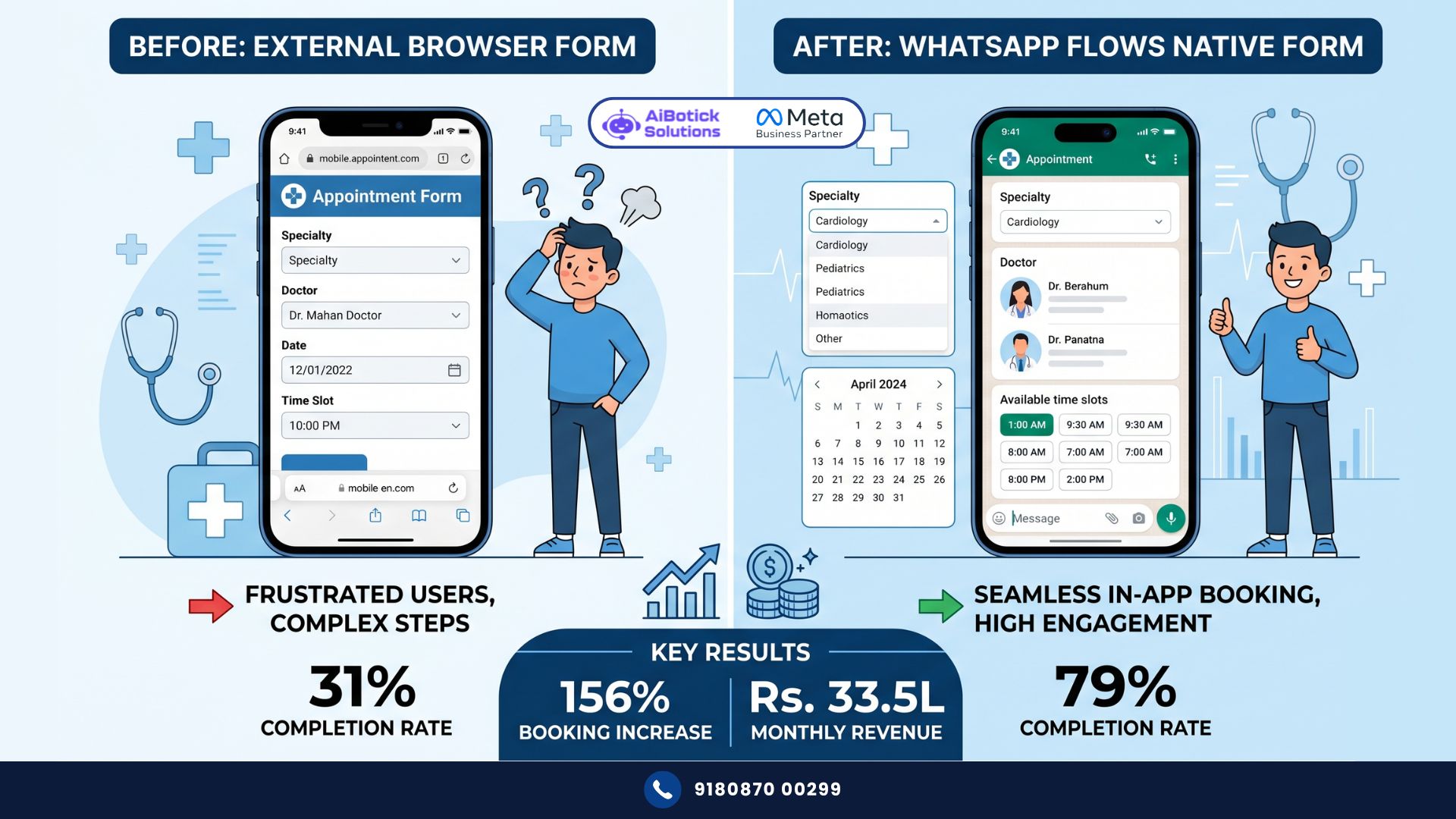
Real Case Study: Bengaluru Healthcare Clinic — Appointment Bookings Up 156% in 60 Days
The Situation:
- Multi-specialty clinic in Bengaluru, 12 doctors, 6 specialties
- Monthly appointment booking inquiries via WhatsApp: 820
- Bookings actually completed from those inquiries: 31% (254 bookings)
- Why so low: booking required calling the front desk or visiting website
- WhatsApp inquiry was just the first touchpoint — not the booking point
The Problem: 820 people expressed interest. 566 didn’t book because the next step required leaving WhatsApp. Every extra step lost people. Classic friction problem.
What They Built:
A WhatsApp Flow triggered when any patient messaged asking about appointments:
Screen 1: Choose specialty (Cardiology / Orthopaedics / Dermatology / Gynaecology / General Medicine / Paediatrics)
Screen 2: Choose doctor (filtered by specialty selected on Screen 1)
Screen 3: Choose date (calendar showing next 7 days with availability indicators)
Screen 4: Choose time slot (only available slots shown for chosen doctor and date)
Screen 5: Patient details (Name / Mobile / Age / Brief reason for visit / Insurance Y/N)
Screen 6: Confirmation screen (Summary of appointment + “Confirm Booking” button)
Post-submission: Automatic WhatsApp confirmation message + calendar reminder D-1 and day-of.
The Results (60 days):
| Metric | Before | After | Change |
|---|---|---|---|
| Monthly inquiries | 820 | 847 | +3% |
| Booking completion rate | 31% | 79% | +155% |
| Monthly bookings | 254 | 669 | +163% |
| Average booking time | 8-12 minutes | 90 seconds | -92% |
| Front desk call volume | 380 calls/month | 84 calls/month | -78% |
| No-show rate | 24% | 9% | -63% |
| Monthly revenue from bookings | Rs.12.7L | Rs.33.5L | +164% |
That revenue number. Rs.12.7L to Rs.33.5L. Same clinic. Same doctors. Same WhatsApp number. Same lead volume (virtually). Just a WhatsApp Flow replacing an external booking process.
Could be wrong about exact percentages holding for every clinic — specialty mix and patient demographics affect completion rates. But the direction is consistent across every healthcare implementation I’ve tracked. Friction removal = completion rate doubles.
The 6 Types of WhatsApp Flows Every Business Should Build
Flow Type 1: Lead Qualification Flow
Triggered when a new lead messages your business for the first time.
Collects: Name, company (B2B), industry, specific requirement, budget range, timeline, how they heard about you.
Outputs: Qualified lead with structured data → routed to right sales team member → drip campaign triggered if not ready to buy.
Best for: Real estate, financial services, B2B, education, insurance.
Flow Type 2: Appointment Booking Flow
Triggered when customer says “book” or “appointment” or selects booking option from main menu.
Collects: Service type, preferred doctor/consultant/expert, date preference, time slot, patient/client details.
Outputs: Confirmed booking → calendar entry → automated reminders → front desk notification.
Best for: Healthcare, salons, coaching, legal firms, CA firms, consulting.
Flow Type 3: Support Ticket Flow
Triggered when customer says “complaint,” “issue,” “problem,” or “support.”
Collects: Order ID / Account number, issue category (dropdown), issue description, urgency level, preferred resolution method.
Outputs: Ticket created with priority → routed to right support team → customer gets ticket number and SLA commitment.
Best for: Ecommerce, SaaS, IT companies, NBFC, any business with post-sale support needs.
Flow Type 4: Document Collection Flow
Triggered when business needs documents from customers (KYC, applications, verifications).
Collects: Document type → customer uploads directly in the Flow → categorised and stored → confirmation sent.
Outputs: Documents received → processed → status update to customer.
Best for: NBFC, insurance, legal firms, CA firms, recruitment agencies.
Flow Type 5: Feedback and Survey Flow
Triggered post-service, post-purchase, post-appointment.
Collects: Overall rating (1-5), specific dimension ratings, open-ended feedback, willingness to recommend.
Outputs: NPS/CSAT score recorded → negative feedback routes to recovery team immediately → positive feedback triggers review request.
Best for: Healthcare, hospitality, ecommerce, education — any business where CX tracking matters. And if you want to see what specific improvements in patient or customer feedback happen after implementing WhatsApp-native surveys versus SMS surveys, our WhatsApp patient feedback guide shows the data on feedback collection rates and score improvements — directly applicable to any customer-facing business.
Flow Type 6: Product/Service Selection Flow
Triggered when customer says “order,” “buy,” or “I want to…”
Collects: Product category → specific product → variant (size, colour, quantity) → delivery address → payment preference.
Outputs: Order created → payment link triggered → confirmation sent → fulfilment team notified.
Best for: Restaurants, D2C brands, ecommerce, any product business doing direct-to-customer sales on WhatsApp.
Step-by-Step: Building Your First WhatsApp Flow
Step 1: Choose Your Use Case
Don’t try to build all 6 flows at once. Pick the one with the highest immediate impact.
Ask yourself: What’s the single biggest drop-off point in my customer journey right now? Where are leads or customers getting stuck or lost?
That’s your first flow.
Step 2: Map Every Screen
Before touching any builder, draw your flow on paper.
- How many screens does this flow need?
- What information is collected on each screen?
- What type of input is each field? (Text, dropdown, checkbox, date picker, time picker, file upload)
- What happens after submission?
Keep it as short as possible. Every additional screen reduces completion rate by 8-12%. 4-5 screens is ideal. 7+ screens is too many for most use cases.
Step 3: Design Each Screen in the Flow Builder
In AiBotick’s platform, WhatsApp Flows are built visually. You:
- Add a screen
- Drag in field components (text input, dropdown, date picker, etc.)
- Label each field clearly
- Set required vs optional
- Configure dropdown options
- Connect screens with “Next” buttons
The builder shows you exactly how the flow will look on mobile — because that’s where your customers will use it.
Step 4: Configure What Happens After Submission
This is critical and often overlooked.
After the customer submits the flow, three things must happen automatically:
- Customer receives a confirmation message on WhatsApp (immediate)
- Your team or system receives the submitted data (structured, not buried in a chat)
- Any triggered next step happens (appointment created, drip sequence starts, ticket opened)
Configure all three before testing. A flow that collects data but doesn’t trigger the right next steps is worse than no flow — you’ve created a false impression of organisation.
Step 5: Test on Multiple Devices
Test on Android and iPhone. Test on slow mobile data (not just WiFi). Test with your most tech-averse team member pretending to be a customer.
Common issues caught in testing:
- Fields not validating correctly (accepting invalid emails, wrong date formats)
- Dropdown options not comprehensive enough (customer’s actual answer isn’t available)
- Submission not triggering confirmation message
- Flow looking fine on iPhone but broken on Android
Fix all of these before going live.
Step 6: Launch and Monitor Completion Rates
Once live, track weekly:
- How many flows are initiated (customer sees the flow trigger)
- How many flows are completed (customer submits)
- At which screen are people abandoning?
- What are the most common answers to each dropdown? (Tells you if your options are right)
High abandonment on Screen 3 means Screen 3 has a problem. Fix it. WhatsApp Flows get significantly better with iteration — the first version is rarely the best version.
Advanced WhatsApp Flows Features Worth Knowing
Dynamic Dropdowns
Instead of static options you define at build time, dynamic dropdowns pull real-time data from your system.
Example: Appointment booking flow → doctor dropdown shows only doctors currently available on the date selected. If Dr. Priya is on leave next Tuesday, she doesn’t appear in Tuesday’s options.
This requires API integration — more complex to build, but dramatically better user experience and zero accidental bookings for unavailable slots.
Conditional Routing
Different answers route to different next screens.
Example: Lead qualification flow → customer selects budget “Above Rs.2Cr” → next screen asks HNI-specific questions. Customer selects “Under Rs.50L” → different screen with starter-tier options.
Conditional routing makes one flow serve multiple customer types — instead of building separate flows for each.
Integration With Your CRM/System
When WhatsApp Flows data goes directly into your CRM, magic happens.
New lead flow submitted → CRM record created → assigned to right salesperson → drip sequence triggered → all automatic.
Support ticket flow submitted → Freshdesk/Zendesk ticket created → SLA timer starts → customer notified of ticket number → all automatic.
This integration is what separates WhatsApp Flows as a “nice feature” from WhatsApp Flows as core business infrastructure.
What WhatsApp Flows Are NOT (Important Clarification)
One thing I see confusing people: WhatsApp Flows are different from chatbot conversation flows.
A chatbot flow is a conversation — back-and-forth text messages, branching based on replies.
A WhatsApp Flow is a structured form — a native UI screen with proper form elements that opens inside WhatsApp.
They work together, not instead of each other. Your chatbot conversation manages the overall interaction. At specific points where you need structured data — booking, qualification, support ticket, survey — the chatbot triggers a WhatsApp Flow. Customer completes the form. Returns to conversation. Continues.
Both are needed. Neither replaces the other. And if you want to understand how these two work together in a complete customer interaction system, our WhatsApp chatbot builder guide explains the full conversation architecture — including when to use free-text conversation and when to trigger a structured Flow.
The Business Case for WhatsApp Flows in 2026
Honestly? I think WhatsApp Flows is the most underutilised feature in the entire WhatsApp Business API toolkit right now.
Every business I’ve seen implement it properly has seen completion rates jump 2-3x compared to their previous method — website forms, external links, or free-text collection.
The Bengaluru clinic went from 254 to 669 monthly bookings. From the same lead volume. That’s 415 additional bookings per month that were previously lost to friction.
At Rs.500 average consultation fee: Rs.2,07,500 in additional monthly revenue. From removing friction.
That’s not marketing. That’s not a new product. That’s infrastructure improvement.
And here’s what makes WhatsApp Flows uniquely powerful in India in 2026: WhatsApp penetration is at 90%+ in urban India. Your customers are already on WhatsApp. They’re already comfortable there. A WhatsApp Flow leverages existing comfort rather than asking them to go somewhere new.
Every link to an external form is a request to leave the comfort zone. Every WhatsApp Flow keeps them in it.
Ab toh simple math hai — Rs.2L+ additional monthly revenue from fixing friction vs. the cost of implementing WhatsApp Flows. The decision should take about 30 seconds. 💯
Want to build WhatsApp Flows for your business and fix your biggest customer drop-off points?
— Mohit Shah | 15+ years in IT industry | 4+ years in WhatsApp automation | Worked with various MNC brands | Now helping businesses figure out what actually works
Q1: What’s the difference between WhatsApp Flows and regular chatbot conversation flows?
A1: A chatbot conversation flow is a series of text messages — bot asks a question, customer replies in free text or with numbered options, bot responds. It’s conversational and flexible but produces inconsistent, hard-to-process data. WhatsApp Flows are native interactive form screens that open inside WhatsApp — with proper dropdowns, date pickers, checkboxes, and text fields. They produce perfectly structured, validated data every time. Both have their place: chatbot conversations for general interaction, WhatsApp Flows for specific structured data collection points (booking, qualification, support tickets, surveys). The best setups use both together.
Q2: Do customers need to do anything special to use WhatsApp Flows, or does it work on all phones?
A2: WhatsApp Flows work on all phones running WhatsApp version 2.23.1.15 or higher — which covers virtually all active WhatsApp users in India since this version released in early 2023. Customers don’t need to install anything or enable any setting. When a Flow is triggered in conversation, a button appears. Customer taps it. The form opens natively inside WhatsApp. Works on both Android and iPhone. The experience is slightly different between the two (Android renders Forms slightly differently than iPhone) but both work correctly. Always test on both device types before going live.
Q3: How long does it take to build and launch a WhatsApp Flow for a business?
A3: A simple Flow — 3-4 screens, standard field types, no dynamic data — takes 3-5 hours to build, test, and launch. A moderate Flow — 5-6 screens, conditional routing, basic integration — takes 1-2 days. A complex Flow — dynamic dropdowns pulling live data, full CRM integration, multi-step conditional logic — takes 3-5 days of technical work. Meta’s approval process for Flows adds 24-48 hours. Most businesses go live with their first WhatsApp Flow within 3-5 business days of starting. The Bengaluru clinic’s appointment booking Flow (6 screens, 3 specialties, 12 doctors, live availability) was built and launched in 4 working days.