Most business owners hear “chatbot” and immediately think: developers, APIs, weeks of work, and Rs.2-5L in development costs.
All of that is wrong. Outdated. 2019 thinking.
A WhatsApp chatbot builder today works like a drag-and-drop form builder. You define what the bot says, what options it shows, what happens when the customer replies — and the bot is live. No code. No developer. No waiting weeks.
I built a working lead qualification bot for a real estate client in 94 minutes last year. From blank canvas to live on WhatsApp. Rs.0 in development cost. Here’s exactly how you can do the same.
Why Businesses Are Replacing Human Agents With WhatsApp Chatbots
Dekho, let’s start with the uncomfortable truth: 68% of customer queries to Indian businesses are the same 10-12 questions asked repeatedly.
“What are your prices?” “Where are you located?” “Do you deliver to [city]?” “What’s the status of my order?” “How do I book an appointment?” “What are your working hours?”
Your team is answering these manually. Every day. Multiple times per day. For questions that haven’t changed in months.
That’s not customer service. That’s expensive data entry.
A WhatsApp chatbot builder lets you answer all 12 of these questions instantly, 24/7, without any human involvement. Your team steps in only for queries that genuinely need human judgment — complaints, complex requirements, negotiations.
Here’s what this looks like in numbers. A coaching institute in Pune was receiving 340 WhatsApp inquiries per month. Their 2-person admissions team was spending 6 hours daily just answering the same FAQ questions. After building a WhatsApp chatbot builder flow:
- 78% of inquiries handled completely by the bot
- Human involvement only for the 22% needing personal attention
- Admissions team time on WhatsApp: dropped from 6 hours to 1.2 hours daily
- Inquiry response time: from 2-4 hours to 8 seconds
- Lead-to-enrollment conversion: went up 34% (because speed of first response improved dramatically)
That last point is the one people miss. Speed of first response is the single biggest driver of conversion in education, real estate, and services. A WhatsApp chatbot builder gives you instant first response every time, regardless of the hour.
What People Get Wrong About WhatsApp Chatbot Builders
Most business owners think a WhatsApp chatbot builder is just an FAQ machine. A list of questions with pre-written answers. Helpful but limited.
Nope. That’s not it. That’s like saying a smartphone is just a better camera.
No no, scratch that. Let me explain what a modern WhatsApp chatbot builder actually does.
It’s a conversation flow designer. You’re not just creating answers — you’re designing a complete conversation that:
- Qualifies leads (collects name, requirement, budget, timeline)
- Books appointments (shows available slots, confirms, sends reminders)
- Processes orders (takes order, collects address, calculates price, sends confirmation)
- Handles support (diagnoses the issue, resolves if possible, escalates if not)
- Nurtures prospects (sends relevant content based on what they expressed interest in)
The bot doesn’t just answer questions. It moves customers through a journey — from inquiry to qualified lead to booked appointment to paying customer — without a single human touch for the majority of that journey.
That’s the real power of a WhatsApp chatbot builder. Not FAQ responses. Automated customer journeys.
The 5 Types of WhatsApp Chatbot Flows Every Business Needs
Flow 1: Welcome and Triage
Every customer who messages your business for the first time should hit this flow immediately.
“Welcome to [Business Name]! How can I help you today? 1️⃣ I want to know about your products/services 2️⃣ I want to place an order / book an appointment 3️⃣ I have a query about my existing order 4️⃣ I need to speak to someone Reply with 1, 2, 3, or 4.”
This one flow eliminates the “Hi, I have a query” opening that leads to 3-4 messages of back-and-forth just to understand what the customer wants.
Flow 2: Lead Qualification
For businesses where not every inquiry is worth the same amount of time (real estate, B2B sales, education, finance):
“Great, I’ll connect you with the right person! Quick question — what are you looking for? 🏠 2BHK 🏠 3BHK 🏠 4BHK or villa 📊 Commercial property Reply with your choice.”
→ “What’s your approximate budget? A. Under Rs.50L B. Rs.50L-1Cr C. Rs.1Cr-2Cr D. Above Rs.2Cr”
→ “When are you looking to buy? 1. Within 3 months 2. 3-6 months 3. 6-12 months 4. Just exploring”
Bot collects all qualification data. Passes it to the right salesperson with a summary. Salesperson calls only serious, qualified leads. Conversion goes up. Sales team efficiency doubles.
Flow 3: Appointment Booking
For clinics, salons, coaching institutes, consultants, CA firms — any service business:
“I’ll help you book an appointment! Which service do you need? 💊 General consultation — Rs.500 🦷 Dental check-up — Rs.800 👁️ Eye check-up — Rs.600 Reply with your choice.”
→ “Please choose your preferred date: 📅 Monday, 10th June 📅 Tuesday, 11th June 📅 Wednesday, 12th June Reply with your choice.”
→ Available slots for that date → Confirmation → Automated reminder D-1 and day-of.
Entire booking handled by bot. Zero staff time. And if you want to see how this appointment booking flow works in detail across different business types and what numbers it produces, our WhatsApp appointment booking guide covers the full setup with industry-specific results.
Flow 4: Order and Payment Flow
For restaurants, D2C brands, ecommerce businesses:
“Here’s our menu: 🍕 Veg Pizza — Rs.249 🍔 Burger Combo — Rs.199 🥗 Salad Bowl — Rs.179 🍰 Dessert — Rs.99
What would you like to order? Reply with item name and quantity (e.g., ‘Veg Pizza x2, Salad Bowl x1’)”
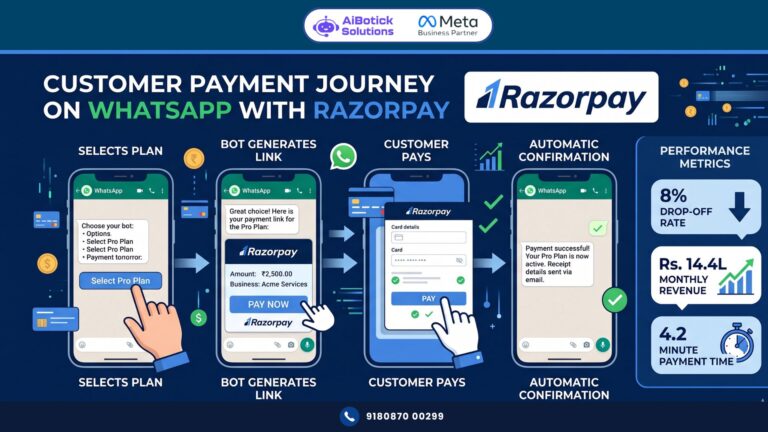
→ Order confirmation → Total calculation → UPI payment link → Order confirmation → Delivery tracking updates.
Flow 5: Support and Complaint Handling
“I’m sorry to hear you’re having an issue. Let me help. What’s the problem? 📦 My order hasn’t arrived ❌ I received a wrong/damaged item 💰 I need a refund 🔧 I need technical help 💬 Something else Reply with your choice.”
Each branch leads to either automated resolution (order tracking link, refund policy, technical FAQ) or intelligent escalation to human agent with full context of what the customer already told the bot.
Real Case Study: Pune EdTech Company — 340 Monthly Inquiries Handled in 8 Seconds Average Response
This is the coaching institute story I mentioned earlier. Let me go deeper.
The Situation:
- Online and offline coaching institute in Pune
- 340 monthly WhatsApp inquiries across courses (UPSC, MBA, CA, Banking)
- 2-person admissions team handling all inquiries manually
- Average first response time: 2.4 hours (often longer during peak inquiry periods)
- Inquiry-to-enrollment rate: 18%
- Team stress: high during admission season (March-April, June-July)
What They Built Using a WhatsApp Chatbot Builder:
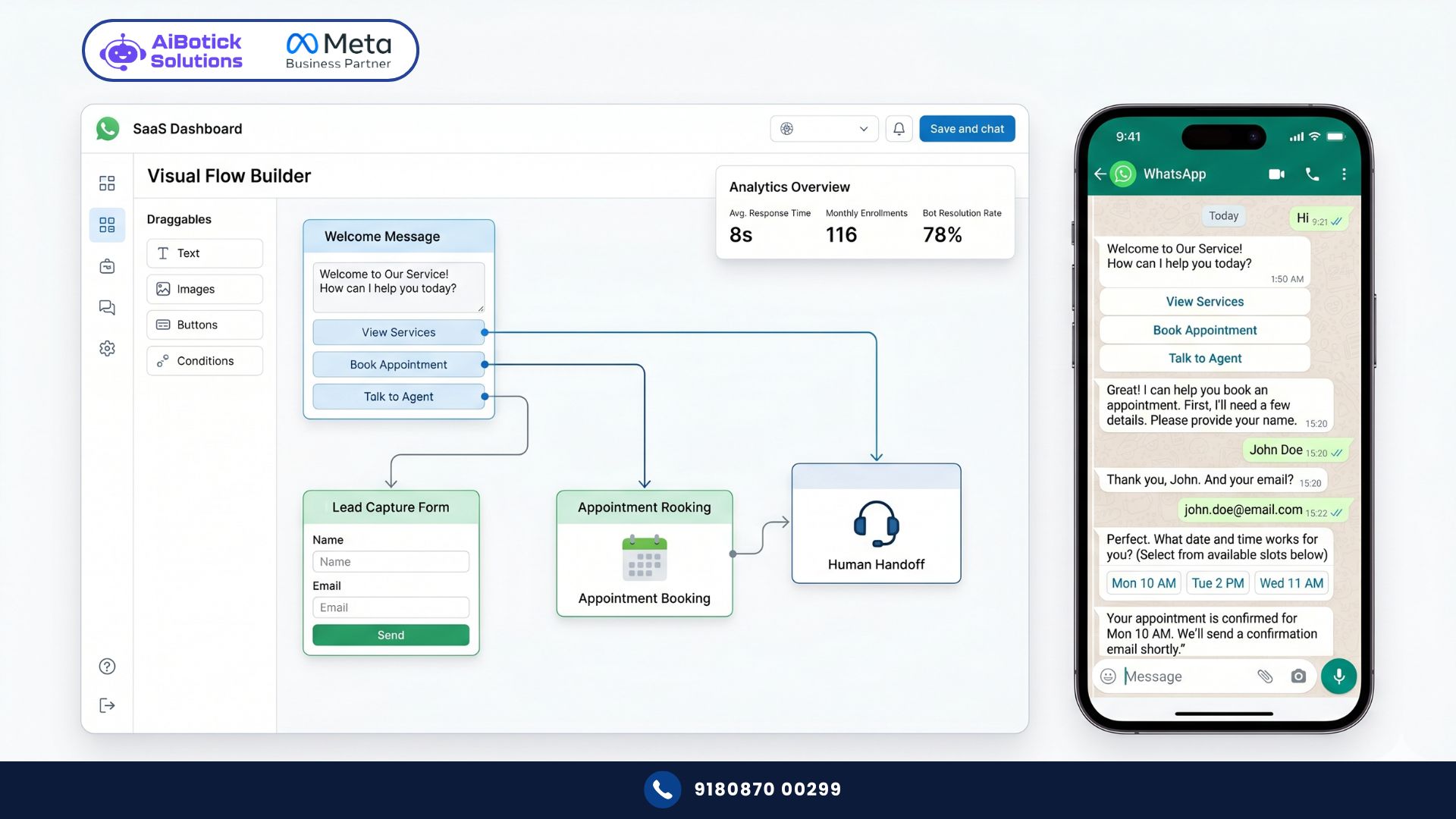
Level 1 — Course selector: “Welcome to [Institute]! Which course are you interested in? 📚 UPSC preparation 💼 MBA entrance (CAT/XAT/SNAP) 📊 CA Foundation/Inter/Final 🏦 Banking and SSC Other course”
Level 2 — Batch type: “We offer 3 batch formats: 📱 Online live classes 🏫 Offline classroom 🎥 Recorded self-paced Which works better for you?”
Level 3 — Fee and schedule info: Customised based on course + batch combination selected. Specific fees, schedule, faculty, and placement stats sent automatically.
Level 4 — Qualification question: “Are you currently: 1. Student (appearing/appeared for 12th) 2. Graduate (fresh) 3. Working professional 4. Repeating this exam attempt”
Level 5 — Next step capture: “Would you like to: A. Speak with our counsellor (call/WhatsApp) B. Attend a free demo class first C. Enroll directly Reply A, B, or C.”
By the time a counsellor gets involved (only for A responses), they have: course interest, batch preference, student profile, and intent level. Call takes 8 minutes instead of 25. Conversion is dramatically higher because the counsellor is prepared.
The Results (3 months):
| Metric | Before | After | Change |
|---|---|---|---|
| Average first response time | 2.4 hours | 8 seconds | -99.9% |
| Inquiries handled by bot alone | 0% | 78% | — |
| Admissions team daily WhatsApp hours | 6 hours | 1.2 hours | -80% |
| Inquiry-to-enrollment rate | 18% | 34% | +89% |
| Monthly enrollments | 61 | 116 | +90% |
| Revenue from new enrollments | Rs.9.2L | Rs.17.4L | +89% |
| Admissions team stress (self-reported) | “Very high” | “Manageable” | — |
That enrollment number. 61 to 116 per month. Same marketing spend. Same admissions team. Just a WhatsApp chatbot builder flow that responds in 8 seconds instead of 2.4 hours.
Step-by-Step: Building Your First WhatsApp Chatbot (No Code Required)
Step 1: Map Your Top 10 Customer Questions
Before touching the builder, do this exercise. Go through your last 200 customer messages. List every unique question asked. Group similar ones. You’ll find 80% of questions fall into 8-12 categories.
These 8-12 categories become your chatbot’s main menu options.
Step 2: Draw Your Flow on Paper First
Don’t open the builder yet. Draw your conversation flow on paper or a whiteboard.
Start with: What’s the first question the bot asks? Then: What are the possible replies? For each reply: What does the bot say next? Keep going until you reach an endpoint: information delivered, appointment booked, lead captured, or human handoff triggered.
A complete flow for a service business typically has 4-6 levels deep. Keep it simple. Every extra level is a drop-off point.
Step 3: Open Your WhatsApp Chatbot Builder
In AiBotick’s platform, the chatbot builder is visual. You’re placing conversation blocks and connecting them with arrows — like a flowchart.
Start with your Welcome message block. Add menu options. Connect each option to the next relevant block. Continue until all branches reach an endpoint.
Step 4: Write Each Message Carefully
Rules for bot messages:
- Short. Maximum 4-5 lines per message.
- Clear options. Never more than 4 choices per question.
- Friendly but professional. “Thanks for reaching out! 😊” not “GREETINGS ESTEEMED CUSTOMER”
- Specific. “Our Mumbai office is at [address], open 9 AM-6 PM Mon-Sat” not “We have offices in many locations”
- Always tell them what to do next. Every message should end with a clear instruction.
Step 5: Set Up Human Handoff Points
Your bot should never be a dead end. At every stage where the bot can’t resolve the query:
“I’ll connect you with our team right away. They’ll respond within 30 minutes during business hours (9 AM – 6 PM). After hours, they’ll respond by 9 AM tomorrow.”
Simultaneously, the bot sends an internal alert to your team: “Customer [Name] needs assistance. Their issue: [summary of conversation so far].”
Human agent picks up the conversation with full context. No “can you explain your issue again?” Customer experience is seamless.
Step 6: Test Every Path Yourself
Before going live, go through every possible conversation path as a customer. Check:
- Does every option lead somewhere?
- Are messages clear enough that someone seeing them for the first time understands?
- Do human handoffs work correctly?
- Does the bot handle unexpected replies gracefully? (Someone types “help” instead of “1” — does it know what to do?)
Test with at least 3 different people who haven’t seen the bot before. Their confusion points are your fix list.
Step 7: Go Live and Monitor for 2 Weeks
Launch. Then watch. Check:
- Where are customers dropping off? (High drop-off = confusing message at that point)
- Which options are never chosen? (Remove them or reword them)
- What unexpected replies are people sending? (Add these as triggers)
- What are people asking the human agents that the bot should handle? (Add these to bot flows)
The first version is never perfect. The 30-day version — after watching real customer behaviour — is much better. And if you want to understand how these chatbot flows fit into the broader context of what WhatsApp Business API can automate across your entire customer journey, our WhatsApp automation benefits guide shows the complete picture of what businesses are automating and the specific ROI each use case delivers.
Advanced Chatbot Features Worth Using
Keyword Triggers
Instead of only responding to numbered options, configure your bot to recognise keywords:
- Customer types “price” → bot sends pricing information
- Customer types “location” → bot sends address and map link
- Customer types “hours” → bot sends working hours
- Customer types “complaint” → bot triggers complaint handling flow
Keyword triggers make your bot much more natural to interact with. Customers don’t always reply with “1” — they type what they’re thinking.
Condition-Based Routing
Advanced WhatsApp chatbot builder platforms let you route conversations based on conditions:
- If customer selects budget “Above Rs.2Cr” → route to senior sales team
- If customer is from database of existing clients → skip welcome flow, go to support flow
- If it’s after 6 PM → modify response to include after-hours service message
- If customer has messaged 3 times without resolution → escalate to manager
Condition-based routing makes your bot feel intelligent, not mechanical.
CRM Integration
When your WhatsApp chatbot builder connects to your CRM:
- New leads from bot automatically create CRM records
- Existing customer queries automatically pull up their account history
- Bot personalises responses based on CRM data (“Hi Rajesh, your last order was [X] on [date]. Are you reaching out about that?”)
This is where WhatsApp chatbot builder goes from “useful tool” to genuine competitive advantage.
Multi-Language Support
For businesses serving customers across multiple states, build language options at the start:
“Please choose your preferred language: 1. English 2. हिंदी 3. मराठी 4. తెలుగు”
Each language routes to a separate flow in that language. Customers feel comfortable. Drop-off rates decrease significantly.
Common Mistakes When Building WhatsApp Chatbots
Mistake 1: Too many options in the menu
6-7 options in a single menu overwhelms users. Maximum 4 options per question. If you have more, create sub-menus.
Mistake 2: Long messages
A 200-word bot message gets ignored. If your message needs more than 5 lines, split it into 2 messages or simplify.
Mistake 3: No fallback for unexpected input
Customer types something the bot doesn’t recognise. Bot goes silent. Customer frustrated. Always configure a fallback: “I didn’t quite catch that. Please reply with 1, 2, 3, or 4 to continue.”
Mistake 4: Bot handles complaints poorly
Never let a bot try to resolve complaints without human oversight. Detect complaint keywords, apologise immediately, and route to human. Immediately. A bot that argues with a complaining customer is worse than no bot.
Mistake 5: No testing before launch
Every unhandled edge case is a bad customer experience. Test obsessively before going live.
Mistake 6: Set and forget
Bot flows need updating as your products, prices, and processes change. Review and update monthly. An outdated bot that gives wrong information is actively damaging.
Mistake 7: Pretending the bot is human
Customers appreciate knowing they’re talking to a bot. “Hi! I’m [Business] bot” is fine. Pretending to be human and getting caught — instant trust destruction.
How Much Does a WhatsApp Chatbot Builder Cost in India?
Let me give you the real numbers:
Custom development (not recommended for SMEs): Rs.1.5-5L one-time build cost + Rs.20,000-50,000/month maintenance. Developer dependency for every change. 4-8 week development time.
WhatsApp chatbot builder platform (what makes sense): Rs.1,500-8,000/month for the platform (depending on features and volume). No development cost. Changes made by you in minutes. Live in days.
Plus Meta’s WhatsApp conversation charges (Rs.0.115/conversation for service conversations — essentially free for inbound queries).
For a business getting 300 monthly inquiries:
- Platform cost: Rs.3,000/month approximate
- Meta charges (inbound service conversations): Free
- Total monthly cost: Rs.3,000
- Time saved: 80-100 hours/month (at Rs.300/hour staff cost = Rs.24,000-30,000 saved)
ROI: 8-10x on cost. Month 1.
And that’s before counting the revenue impact of 8-second response times vs 2-4 hours.
Why a WhatsApp Chatbot Builder Is Your Best Marketing Investment in 2026
Honestly? I’m consistently surprised by how many Indian businesses are still answering the same 10 questions manually, every single day, while the solution costs less than one staff member’s daily salary.
A WhatsApp chatbot builder isn’t a luxury. It’s not advanced technology. It’s table stakes in 2026 for any business serious about customer experience.
Your competitor who implemented a bot 6 months ago is responding to leads in 8 seconds while you’re responding in 4 hours. In that gap, they’re closing deals you should have won.
Real talk — the Pune coaching institute that doubled enrollments from 61 to 116 per month? They were a 2-person admissions team. Not a big EdTech company. Not a funded startup. A regular coaching institute that built a smart WhatsApp chatbot builder flow in a weekend.
That’s what’s available to every business reading this right now. 💯
Ab toh ek simple decision hai — haath se kaam karte raho, ya automation ko kaam karne do. I know which one scales.
Ready to build your first WhatsApp chatbot without writing a single line of code?
— Mohit Shah | 15+ years in IT industry | 4+ years in WhatsApp automation | Worked with various MNC brands | Now helping businesses figure out what actually works
Q1: Can a WhatsApp chatbot builder handle conversations in Hindi and regional Indian languages?
A1: Yes. Modern WhatsApp chatbot builders support multi-language flows. You build separate conversation trees for each language and present a language selection at the start of every conversation. Hindi, Marathi, Telugu, Tamil, Kannada, Bengali — all supported. The key is building your flows in each language natively, not relying on auto-translation which often produces awkward or incorrect phrasing. For businesses serving customers across multiple Indian states, multi-language chatbots typically see 25-35% higher completion rates compared to English-only bots.
Q2: What happens when a WhatsApp chatbot can’t answer a customer’s question?
A2: A well-built WhatsApp chatbot builder flow always has a human handoff option — typically as a menu choice (“Speak to our team”) and as a fallback when the bot doesn’t recognise the input. When handoff triggers, the customer gets an acknowledgement message with expected response time, and your team gets an internal alert with the full conversation history. The human agent sees exactly what the customer said, what the bot replied, and where the conversation broke down — so they pick up with full context. No “can you explain your issue again?” The handoff should be seamless enough that customers barely notice the transition.
Q3: How long does it take to build a working WhatsApp chatbot using a no-code chatbot builder?
A3: A basic FAQ and lead capture bot takes 2-4 hours for someone who has never used the platform before. An appointment booking bot with multiple service types and time slot selection takes 6-8 hours. A full customer journey bot (lead qualification + booking + support + payment) takes 2-3 days of part-time work. The bottleneck is usually content — deciding exactly what the bot should say and mapping all possible conversation paths — not the technical implementation. Most businesses go live with a basic version in week 1 and add sophistication over the following 4-6 weeks as they see real customer behaviour.