Three agents. One WhatsApp number. Zero coordination.
Agent A replies to a customer. Agent B doesn’t know — replies to the same customer 20 minutes later with a completely different answer. Customer is confused. Customer is annoyed. Customer posts a 1-star review saying “your team doesn’t know what they’re doing.”
This is happening in thousands of Indian businesses right now. And the fix isn’t hiring better people. It’s a shared team inbox on WhatsApp.
Here’s everything you need to know about setting one up properly.
Why One WhatsApp Number for Your Whole Team Is Non-Negotiable
Seedha bolta hoon — the businesses that are scaling customer communication on WhatsApp in 2026 all have one thing in common. One centralised number. Multiple agents. Full visibility across the team.
The businesses that are struggling? They have individual agents on individual numbers. No coordination. No handover. No history. No accountability.
Think about what happens when a customer messages your business WhatsApp and your salesperson who manages it goes on leave for 5 days. That customer is messaging into a void. Nobody else has access. Nobody else knows this conversation exists. The customer waits. Gets frustrated. Leaves.
Or your best support agent leaves the company. Takes 340 client conversations with them on their personal phone. You have no record. No handover. The customer calls, gets a new person, and has to explain everything from scratch.
This is avoidable. Completely. A shared team inbox on WhatsApp gives every agent access to the same conversations, the same history, the same customer context — from one centralised business number.
I’ve seen both worlds up close. One time I was consulting for a D2C brand in Hyderabad — Rs.40L monthly revenue, 4 customer support agents, all on personal numbers. They thought they were managing. Until two agents simultaneously promised the same customer two different refund amounts. Customer screenshot both conversations. Posted on Twitter. Rs.2L in PR damage from one coordination failure.
A shared team inbox would have prevented this entirely. One conversation. Full history. Agent notes. No duplicate responses.
What People Get Wrong About Shared Team Inboxes on WhatsApp
Most business owners think a shared team inbox means creating a WhatsApp group where all agents can see customer messages.
Absolutely wrong. And dangerous.
If you add a customer to a group with your agents — they can see your internal team. If you create an internal group to forward customer messages — it’s manual, slow, and no audit trail.
Neither of these is a shared team inbox. Both are workarounds that create more problems than they solve.
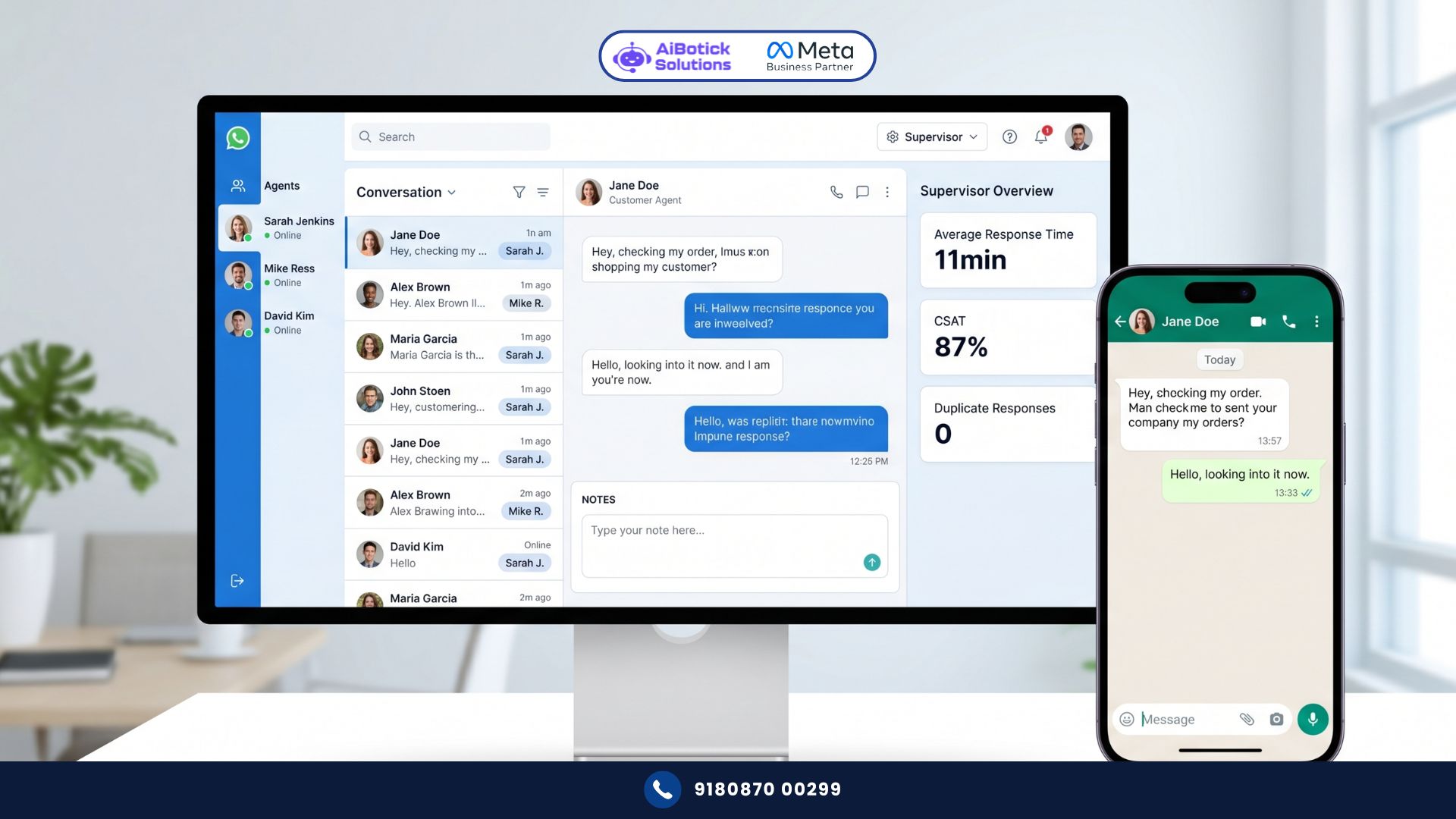
A real shared team inbox on WhatsApp looks like this:
- One official WhatsApp Business API number for your company
- Multiple agents log into a platform (like AiBotick) that connects to that number
- Every customer conversation appears in a shared dashboard — like a support ticketing system, but for WhatsApp
- Agents can be assigned specific conversations
- Every agent sees the complete history of every conversation
- No two agents accidentally respond to the same message
- Manager sees all conversations, all agents, all response times — from one view
That’s a shared team inbox. A system. Not a workaround.
Real Case Study: Gurugram D2C Brand — 500 Daily Queries, 4 Agents, Zero Chaos
The Situation:
- D2C personal care brand in Gurugram
- Monthly orders: 8,400
- Daily WhatsApp queries: 480-520 (order status, returns, complaints, product questions)
- Support team: 4 agents + 1 supervisor
- Current setup: 4 personal WhatsApp numbers, each agent handling their own conversations
- No visibility between agents
- No handover process when agent is off
The Problems They Were Experiencing:
- Duplicate responses: Two agents replying to the same customer from different numbers (customer had messaged both from their previous interactions)
- Zero handover: When Agent B took over Agent A’s shift, they had no context of ongoing conversations
- No accountability: Manager couldn’t see response times, quality, or volume per agent
- Customer frustration: Repeat customers getting different agents each time with no history
- Agent burnout: No workload balancing — some agents at 200 queries/day, others at 80
What They Implemented:
One WhatsApp Business API number connected to AiBotick’s shared team inbox. All 4 agents on the platform. Supervisor dashboard enabled. Conversation assignment rules configured.
Setup specifics:
- Conversations auto-assigned based on agent availability (round-robin for new conversations)
- Order status queries → routed to Agent 1 and 2 (trained on logistics)
- Returns/refunds → routed to Agent 3 (specialised)
- Product questions → routed to Agent 4 (product expert)
- All complaints → automatically flagged to supervisor
- Agent notes on every conversation (visible to all agents)
- Response time SLA: 15 minutes during business hours
The Results (90 days):
| Metric | Before | After | Change |
|---|---|---|---|
| Average first response time | 2.8 hours | 11 minutes | -93% |
| Duplicate response incidents/week | 12 | 0 | -100% |
| Customer satisfaction score | 58% | 87% | +50% |
| Agent workload variance | 150% gap | 18% gap | -88% |
| Supervisor visibility into team | 0% | 100% | — |
| Handover-related complaints/month | 34 | 2 | -94% |
| Returns rate (from better resolution) | 18% | 11% | -39% |
| Revenue impact of returns reduction | Rs.0 | Rs.1.8L/month | — |
That returns number. 18% to 11% returns rate. Rs.1.8L additional monthly revenue — not from new customers, but from better support resolution reducing avoidable returns. One shared team inbox implementation. 90 days.
The 6 Core Features Every Shared Team Inbox Must Have
Not all shared team inbox solutions are equal. Before choosing any platform, verify these 6 features exist:
Feature 1: Conversation Assignment
Every incoming conversation must be assignable to a specific agent. With two modes:
- Manual assignment: Supervisor assigns conversations to agents based on workload, expertise, or relationship
- Automatic assignment: Round-robin, load-balanced, or rule-based (e.g., all order queries go to Agent A)
Without assignment, all agents see all conversations and nobody takes ownership. Classic “everyone’s responsibility = nobody’s responsibility.”
Feature 2: Agent Notes and Internal Comments
Every conversation needs an internal notes field — visible to all agents, invisible to the customer.
Why this matters: Customer has a complex ongoing issue across 5 conversations over 3 days. Agent A handles Day 1. Agent B picks up Day 3. Without notes, Agent B has no context. With notes: Agent B reads “Customer unhappy about delayed refund for Order #48291. Escalated to supervisor on Day 2. Refund initiated but not reflecting yet. Handle with extra care.”
Agent B now handles it correctly without asking the customer to explain everything again.
Feature 3: Real-Time Availability Status
Agents should mark themselves Available, Away, or Offline. System routes new conversations only to available agents. Prevents conversations landing with an agent who won’t see them for 3 hours.
Feature 4: Response Time Tracking
Manager sees — for every agent, every day:
- Number of conversations handled
- Average first response time
- Average resolution time
- Conversations pending over SLA
This creates accountability without micromanagement. Data speaks. No need for supervisor to monitor every conversation manually.
Feature 5: Conversation History Across Sessions
When a customer who messaged 3 weeks ago messages again, the agent should see the entire previous conversation history — not just the current message.
No “can you tell us your order number again?” No “could you explain the issue you were having?” Full context. Every time.
Feature 6: Collision Detection
If Agent A is typing a response to a conversation, Agent B should see “Agent A is typing” and not start typing their own response simultaneously.
Without collision detection, you get the Hyderabad situation — two agents sending different answers to the same customer. With it, impossible.
How to Set Up a Shared Team Inbox on WhatsApp: Step-by-Step
Step 1: Get WhatsApp Business API
Personal WhatsApp and free WhatsApp Business app don’t support shared team inbox functionality. You need the API. This is the only technical prerequisite.
The API connects your business WhatsApp number to a platform (like AiBotick) that enables multi-agent access, conversation management, and all the features above.
Step 2: Define Your Conversation Categories
Before assigning agents, define your conversation types:
- Order/delivery queries
- Returns and refunds
- Product questions
- Complaints
- New sales inquiries
- General inquiries
These categories become your routing rules.
Step 3: Configure Routing Rules
Based on your categories, set up automatic routing:
- Customer mentions “order number” or “delivery” → assign to logistics team
- Customer mentions “refund” or “return” → assign to refunds team
- Customer mentions “price” or “buy” or “cost” → assign to sales team
- Any message containing “complaint” or negative sentiment keywords → flag to supervisor + assign to senior agent
Good routing means the right conversation reaches the right agent immediately — without supervisor manually sorting every incoming message.
Step 4: Set Up Agent Profiles and Permissions
For each agent, configure:
- Name and display (agents can sign conversations “— Priya, Customer Care” so customers know who they’re talking to)
- Access permissions (which conversation types can they see and respond to?)
- Working hours (conversations not auto-assigned to agents outside their working hours)
- Notification settings (how do they get alerted to new assigned conversations?)
Step 5: Create Response Templates for Common Queries
In a shared team inbox, response consistency is critical. Every agent saying different things to similar queries creates confusion.
Build a template library for the top 15-20 most common queries. Agents select from templates, personalise where needed, send.
Templates ensure:
- Brand tone is consistent across agents
- Key information (refund timelines, policies, procedures) is accurate every time
- Response speed improves (typing from scratch vs selecting and personalising)
- New agents onboard faster (templates are their training material)
Step 6: Set SLAs and Escalation Rules
Define:
- First response SLA: X minutes during business hours
- Resolution SLA: X hours for different query types
- Escalation trigger: If conversation unresolved for X hours → escalate to supervisor
- After-hours acknowledgement: Automated “we’ll respond by 9 AM tomorrow” message when a customer messages outside business hours
SLAs without enforcement are wishes. Configure automatic escalation so breached SLAs get immediate attention.
Step 7: Train Your Team
Platform training takes 60-90 minutes. But beyond platform mechanics, train on:
- How to use agent notes correctly (what information to record)
- When to escalate vs resolve
- How to use response templates (select + personalise, not just copy-paste robotically)
- How to mark conversations resolved and when to reopen
- Handover etiquette (what notes to leave before going offline)
One training session. Document it. New agents onboard from the document.
WhatsApp Shared Team Inbox vs Traditional Support Ticketing Systems
A question I get asked often: “We already use Freshdesk/Zendesk for support tickets. Why do we need a shared team inbox on WhatsApp separately?”
Valid question. Here’s the honest answer.
Traditional ticketing systems are built for email. They’re excellent at managing email queues, SLAs, and structured support workflows. They’re awkward for WhatsApp because:
- They break the WhatsApp conversation flow (customers don’t “open tickets,” they chat)
- Responses feel templated and formal (inappropriate for WhatsApp’s casual channel nature)
- Real-time conversation doesn’t fit “ticket” model well
- Mobile experience for agents is often poor
The best setups integrate both: WhatsApp shared team inbox for conversation management (where the customer interaction happens), connected to your CRM or ticketing system for record-keeping, escalation tracking, and reporting.
Customer chats on WhatsApp → Shared team inbox manages the conversation → complex issues create a ticket in Freshdesk → agent resolves → closes in both systems.
Both tools. Different jobs. One integrated workflow. And when you’re thinking about how the shared team inbox connects to your broader customer service strategy, our WhatsApp customer support guide shows how businesses are building complete support systems — including escalation flows, SLA management, and the metrics that matter most for support team performance.
Measuring Shared Team Inbox Performance
Once your shared team inbox is live, track these metrics weekly:
Speed metrics:
- Average first response time (target: under 15 minutes during business hours)
- Average resolution time (varies by query type — set type-specific targets)
- Percentage of conversations within SLA
Quality metrics:
- Customer satisfaction score (post-resolution survey via WhatsApp)
- First contact resolution rate (resolved in one conversation without escalation)
- Reopened conversation rate (customer messages again about the same issue)
Team metrics:
- Conversations handled per agent per day
- Response time variance between agents (should be low — indicates consistent performance)
- Escalation rate per agent (high rate indicates training gaps)
Business impact metrics:
- Returns/refunds rate (should decrease with better support)
- Repeat purchase rate from customers who received support (should increase)
- Support cost per conversation (should decrease as templates and routing improve)
These metrics tell you whether your shared team inbox is actually working — not just operational, but delivering business value.
Common Mistakes Businesses Make With Shared Team Inboxes
Mistake 1: No routing rules — free-for-all assignment
Every conversation visible to every agent with no assignment → everyone assumes someone else will handle it → conversations sit unanswered. Configure routing rules from Day 1.
Mistake 2: No response templates
Agents type every response from scratch → inconsistent information → some agents fast, some slow → customer experience varies dramatically. Build template library before going live.
Mistake 3: Ignoring agent notes
Agents don’t leave notes when closing conversations → next agent has no context → customer has to repeat themselves → satisfaction drops. Make notes mandatory for any conversation lasting more than 3 exchanges.
Mistake 4: No after-hours management
Customers message at 11 PM. No auto-acknowledgement. No morning follow-up system. Customer wakes up with no reply. Frustrated before the day begins. Set up after-hours auto-response and morning routing to handle overnight messages first.
Mistake 5: Only using inbox for support, ignoring sales
A shared team inbox is equally powerful for sales conversations. Leads that message after hours, inquiries that need multiple team member input, leads being handed from marketing to sales — all benefit from shared inbox visibility.
Mistake 6: No escalation to management
Difficult customers, complex complaints, repeat issues — these need manager visibility. Configure keyword-based flags that immediately alert supervisors. Don’t let a PR crisis start in an unmonitored agent conversation.
What a Shared Team Inbox Costs vs What It Saves
For a business with 5 agents handling 400 daily conversations:
Without shared team inbox costs:
- Duplicate response incidents: 10/week × Rs.500 recovery cost = Rs.20,000/month
- Handover failures causing churn: 2-3 customers/month × Rs.5,000 LTV = Rs.10,000-15,000/month
- Returns from poor support resolution: 18% vs 11% = 7% difference on Rs.50L revenue = Rs.3.5L/month
- Manager supervision time: 4 hours/day manually monitoring agents
Total monthly cost of no system: Rs.3.7L-4.2L
Platform cost for shared team inbox: Rs.15,000-40,000/month (depending on agents and volume).
ROI: 9-28x. Every month.
And that’s before counting the revenue impact of 50% higher customer satisfaction scores driving repeat purchases and referrals. If your business has more than 2 agents handling WhatsApp, the math overwhelmingly favours a shared team inbox. By such a margin that the question isn’t really “should we?” — it’s “why haven’t we yet?”
Honestly bhai, the Gurugram brand that stopped Rs.1.8L in monthly returns? They were most shocked that they’d been leaving that money on the table for 18 months while running on personal WhatsApp numbers. 18 months. Rs.32.4L in unnecessary returns. From a coordination problem they could have fixed for Rs.20,000/month. 😅
Ab toh samajh gaye — shared team inbox isn’t an upgrade. It’s the foundation. Everything else is built on it. 💯
Ready to set up a shared team inbox on WhatsApp for your support and sales teams?
— Mohit Shah | 15+ years in IT industry | 4+ years in WhatsApp automation | Worked with various MNC brands | Now helping businesses figure out what actually works
Q1: How many agents can use a shared team inbox on one WhatsApp number simultaneously?
A1: WhatsApp Business API supports unlimited agents on a single number simultaneously — there’s no technical cap. In practice, most SME businesses run 3-15 agents on one shared team inbox effectively. Larger operations (call centres, enterprise support teams) run 50-100+ agents on a single number with proper routing rules ensuring no agent is overwhelmed. The key to scaling agents isn’t the number limit — it’s the routing configuration. Well-configured routing means each agent sees only their assigned conversations, not the entire volume, regardless of total team size.
Q2: Can a shared team inbox on WhatsApp work for sales teams, or is it only for customer support?
A2: A shared team inbox works equally well for sales teams — often better, because the stakes per conversation are higher. For sales: leads are assigned to specific sales reps, conversation history is visible when a lead returns after weeks, manager can monitor pipeline conversations in real-time, handover between SDR and closing rep is seamless with full context. One B2B software company in Bengaluru used a shared team inbox for their 6-person sales team — lead response time dropped from 4 hours to 8 minutes, and their monthly deal closures from WhatsApp leads increased from 12 to 28 in 3 months.
Q3: What happens to existing WhatsApp conversations when a business switches from personal numbers to a shared team inbox?
A3: Existing conversations on personal numbers cannot be migrated to the new business number — WhatsApp doesn’t support conversation transfer between numbers. The practical approach: inform active customers of the new business number via a message from the old number (“We’ve moved to a new business number for better service. Please save [new number] for future conversations.”). For ongoing active issues, the agent handles them to completion on the old number before transitioning fully. New conversations route to the shared team inbox from Day 1. Full migration typically takes 2-4 weeks as active conversations naturally close and customers update their contacts.