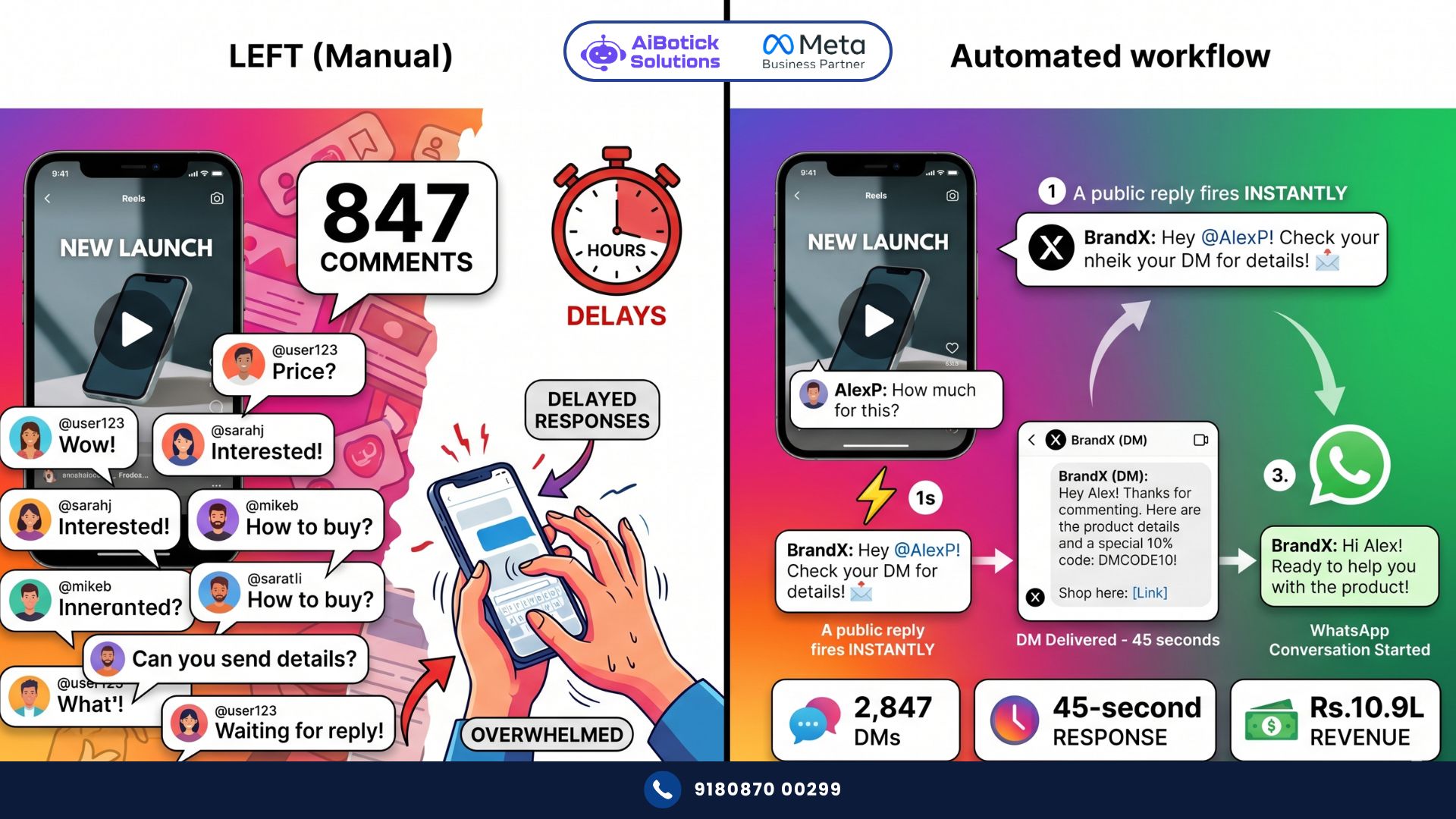
You posted a reel. It went semi-viral. 847 comments in 6 hours. Half of them are “price?” “how to order?” “DM me details” “where to buy?”
You replied to 40. Manually. Your social media manager replied to another 60. By the time you got to comment number 200, the other 587 people had moved on. Bought from someone else. Or just forgot.
Comment automation fixes this. Every single commenter gets a DM — instantly, automatically — the moment they comment. You reply to 847 people in 847 seconds without touching your phone once.
Here’s exactly how it works and how to set it up without getting your account flagged.
Why Comments Are Your Most Underutilised Lead Source on Social Media
Seedha bolta hoon — comments on Instagram and Facebook are the highest-intent signals your social media generates.
Think about it. Someone who just scrolls past your ad? Low intent. Someone who stops, reads your post, and types a comment asking about price or availability? That person is one step away from buying.
And yet — most businesses respond to maybe 20-30% of comments within a meaningful timeframe. The rest get a reply 12-48 hours later, if at all.
Here’s the brutal reality of social media timing: intent has a half-life of about 30 minutes. Person comments “how much?” at 8 PM. You reply at 10 PM. Their buying mood is gone. They’ve scrolled through 200 other posts since then. You’re a distant memory.
Comment automation responds in under 60 seconds. While they’re still on your post. Still warm. Still in the buying mindset.
I’ve tracked this across D2C brands, coaching institutes, real estate developers, and fashion labels. Consistently — businesses using comment automation convert 4-7x more comment-generated leads than businesses responding manually. Not because they’re better salespeople. Just because they respond while the lead is hot.
What Comment Automation Actually Does (Step by Step)
Here’s the full flow that comment automation creates:
Step 1: You create a post on Instagram or Facebook. In the caption or as a pinned comment: “Comment ‘PRICE’ to get instant details on WhatsApp” or just post normally and set automation to trigger on any comment.
Step 2: Someone comments. Could be “price?” Could be “interested” Could be “❤️” Could be “tell me more.” Whatever the trigger keyword or any comment you’ve defined.
Step 3 (happens in under 60 seconds): Two things simultaneously:
- They receive a public reply on the comment: “Thanks for your interest! Check your DMs 😄”
- They receive a private DM (Instagram Direct or Facebook Messenger): Your pre-crafted message with product details, pricing, or a WhatsApp link
Step 4: If your DM includes a WhatsApp link, they tap it → WhatsApp opens → your automated qualification flow starts → lead captured.
Or if you’re using Instagram/Facebook DM itself as the conversation channel, the DM conversation continues with your chatbot flow.
That’s comment automation. Comment → instant public reply → instant private DM → lead captured → conversation started.
All while you’re sleeping, in a meeting, or filming your next reel.
What People Get Wrong About Comment Automation
Most people who set up comment automation make one of these two mistakes. And both kill results.
Wrong approach 1: Trigger on every single comment, send a generic DM
Every commenter — including people saying “nice post” or dropping a single emoji — gets the same DM: “Hi! Thanks for your interest! Check out our products here: [link]”
This feels spammy. It IS spammy. People who left a casual emoji didn’t ask to be sold to. They report you. Instagram flags your account. Reach drops.
Wrong approach 2: Trigger only on specific keywords, miss 80% of intent
Only trigger on “price” and miss everyone who comments “how much?” “cost?” “rate?” “kitna?” “bata do” “interested” “want this” and 50 other variations.
You set up automation, get 10 triggered DMs from 200 comments, and conclude “comment automation doesn’t work.”
The right approach is a middle ground: trigger on a defined set of relevant keywords (broad enough to capture real intent, specific enough to exclude casual engagement), send a DM that feels personal and helpful — not a sales pitch.
Actually wait — better approach for many businesses: use a “comment to unlock” mechanic. Post says “Comment ‘GUIDE’ to get our free PDF.” Everyone who comments the specific word is clearly opting in for the DM. Zero spam complaints. High-quality leads. Fully intentional.
Both approaches work. Different contexts call for different triggers.
Real Case Study: Mumbai Fashion Brand — 2,847 Leads From One Viral Reel in 3 Days
The Situation:
- Women’s ethnic wear brand in Mumbai, Rs.18L monthly revenue
- Instagram following: 34,000
- Had never used comment automation
- Best-performing reel before this: 12,000 views, 180 comments, 8 sales from comments
The Post: They created a reel showcasing 5 new Diwali collection pieces. Caption: “Which one would you wear this Diwali? Drop the number in comments (1-5) and get exclusive pricing + early access on WhatsApp! 👇”
Comment Automation Setup:
- Trigger: Any comment containing 1, 2, 3, 4, or 5 (number drops)
- Public reply: “Love your pick! Sliding into your DMs with exclusive Diwali pricing 🎁”
- Private DM (Instagram): “Hi [Name]! You picked [number] — great choice! The [piece name] is Rs.[X], and we have early access slots available before the Diwali rush. Want to reserve yours? Tap here to connect on WhatsApp: [link]”
- WhatsApp link led to automated qualification flow: size preference, delivery location, and payment option
What Happened: Reel got 1.8L views in 72 hours (unusually high — algorithm loved the comment engagement spike from automation). 4,200 comments. Comment automation triggered on 3,100 of them (those containing numbers). 2,847 DMs delivered.
The Results (3 days):
| Metric | Before Automation | With Automation | Change |
|---|---|---|---|
| Comments on best reel | 180 | 4,200 | — |
| DMs sent to commenters | 0 (manual) | 2,847 | — |
| WhatsApp conversations started | 8 (manual replies) | 1,243 | +15,437% |
| Orders placed | 8 | 312 | +3,800% |
| Revenue from one reel | Rs.28,000 | Rs.10.9L | +3,793% |
| Response time to commenters | 2-8 hours | 45 seconds | -99% |
Rs.10.9L from one reel. In 3 days. Comment automation on the same post that would have generated Rs.28,000 without it.
Could be wrong about this multiplier being typical for every brand — going viral is a variable outside your control. But the conversion ratio improvement (8 orders from 180 comments vs 312 orders from 4,200 comments = 4.4% vs 7.4% conversion) is consistent with what comment automation delivers regardless of post performance.
Setting Up Comment Automation: Complete Step-by-Step
Step 1: Connect Instagram and Facebook to Your Automation Platform
Comment automation requires connecting your Instagram Business account (or Facebook Page) to a platform that has Meta’s official API access. AiBotick connects to Meta’s official Messenger API and Instagram Graph API for this.
Personal Instagram accounts can’t use comment automation. You need:
- Instagram Business or Creator account
- Facebook Business Page connected to it
- Automation platform with official Meta integration
Step 2: Choose Your Trigger Type
Option A — Keyword triggers Automation fires when comment contains specific words/phrases.
Build a keyword list covering all variations of intent:
- Price/cost: “price,” “cost,” “rate,” “kitna,” “how much,” “rates,” “pricing,” “kya price hai”
- Interest: “interested,” “want this,” “want,” “need,” “chahiye”
- Inquiry: “DM me,” “tell me,” “details,” “info,” “more info”
- Specific to your post: “DIWALI,” “GUIDE,” “OFFER,” (whatever you put in caption)
Option B — All comments trigger Every comment triggers a DM. Use only if your content specifically invites all commenters (giveaway posts, engagement posts, “comment to get” posts). Never for regular content.
Option C — Hybrid Post-specific keywords for some posts, all-comments for campaign posts. Configure per post.
Step 3: Write Your Public Reply
The comment reply the automation posts publicly. Keep it:
- Short (1-2 lines maximum)
- Acknowledging their comment
- Teasing the DM
- Personal-feeling (not robotic)
Examples: “Love that you asked! Check your DMs for full details 😄” “Great question! Sending you everything on WhatsApp in just a sec 👇” “Sliding into your DMs right now with pricing and availability!”
Avoid: “Thank you for your interest. Our representative will contact you shortly via direct message.” — robotic, cold, kills excitement.
Step 4: Write Your DM Message
This is where most people underthink. The DM is your first real sales touchpoint. It must:
- Reference their comment (personalisation) — use their name if available
- Give them what they asked for (price, details, or the promised freebie)
- Move them to the next step (WhatsApp, purchase link, or continue conversation)
Strong DM example (fashion brand): “Hi [Name]! You commented on our Diwali collection post — perfect timing! 🎁
The [piece name] you were looking at is Rs.2,400, and we have only 12 pieces left before Diwali. It comes in sizes S-XXL.
To reserve yours or see the full collection with prices, connect with us on WhatsApp right now — our team will help you pick and order within minutes: [WhatsApp link]
P.S. We ship across India in 3-5 days!”
Weak DM example: “Thanks for your interest! Please visit our website or WhatsApp us for more information.”
Specific. Helpful. Urgency (where genuine). Clear next step. That’s what converts.
Step 5: Set Up the WhatsApp Side
If your DM includes a WhatsApp link (recommended for higher conversion):
- WhatsApp link should go to your WhatsApp Business API number
- Configure an instant automated response when the lead arrives
- Run a brief qualification flow (name, requirement, budget if relevant)
- Route to sales team if qualified
The comment automation to WhatsApp handoff is the full funnel. Social media generates the lead. WhatsApp closes it. And if you want to understand how to structure the WhatsApp side of this funnel — from first message to converted customer — our WhatsApp chatbot builder guide walks through the exact conversation flows that work for social-media-generated leads who arrive warm but not yet sold.
Step 6: Configure Per-Post or Account-Level
Most comment automation platforms let you set automation:
- Account-level: Apply to all posts automatically (use for keyword-trigger approach)
- Post-level: Apply only to specific posts (use for campaign-specific triggers)
For regular content with keyword triggers: account-level automation. For specific campaigns (“Comment DIWALI for exclusive pricing”): post-level automation with that campaign’s keyword.
Step 7: Test Before Going Live
Test from a personal account:
- Comment the trigger keyword on your post
- Check that public reply appears (within 60 seconds)
- Check that DM arrives (within 60 seconds)
- Follow the DM flow to completion
- Check that WhatsApp link works and automation on WhatsApp side fires correctly
Fix anything that breaks. Then go live.
Comment Automation for Different Business Types
D2C and Fashion Brands Best trigger: “price?” variants + specific item comments + campaign keywords DM content: Specific product pricing, size availability, direct purchase or WhatsApp link Goal: Direct sale or WhatsApp handoff for personalised assistance
Real Estate Best trigger: “interested,” “details,” “price,” location-specific keywords DM content: Project name, configuration, price range, site visit offer + WhatsApp link Goal: Site visit booking via WhatsApp
Education and Coaching Best trigger: “interested,” “how to join,” “fees,” “batch” DM content: Course brief, batch dates, fees, free demo offer + WhatsApp link Goal: Demo class registration or counsellor call
Restaurants and Food Best trigger: “order,” “delivery,” “price,” “menu,” any food emoji 🍕🍔 DM content: Menu link or top 3 items with prices, WhatsApp ordering link Goal: Direct WhatsApp order
Services (salons, clinics, consultants) Best trigger: “book,” “appointment,” “available,” “slots” DM content: Services offered, pricing, availability, booking link Goal: Appointment booking
The Instagram Algorithm Bonus Nobody Talks About
Here’s something that’s not obvious but makes comment automation even more valuable: comment engagement signals to Instagram’s algorithm that your post is resonating.
When comment automation sends a public reply to every comment, your comment count effectively doubles (commenter + your auto-reply = 2 comments per interaction). More comments = higher engagement rate = Instagram pushes your post to more people = more organic reach = more comments = cycle continues.
The Mumbai fashion brand’s reel getting 1.8L views? Part of that was the algorithm seeing unusually high comment engagement in the first hour (automation was replying instantly to every comment, making the comment count spike rapidly) and boosting the post’s distribution.
This isn’t guaranteed. But it’s a genuine secondary benefit of comment automation beyond just capturing leads.
Meta’s Rules: What’s Allowed and What Gets You Banned
This is critical. Comment automation must use Meta’s official API, not third-party grey-market tools.
What Meta allows:
- Automated DMs triggered by comments (via official API)
- Automated public replies to comments (via official API)
- Keyword-triggered responses
- Welcome messages to new followers
What Meta bans:
- Bulk DMs to people who haven’t interacted (cold outreach at scale)
- Scraping follower lists and mass messaging
- Using unofficial “automation tools” that fake human activity
- Sending promotional DMs to people without prior engagement
As long as you’re using an official Meta API-connected platform (like AiBotick), comment automation is fully within Meta’s policies. You’re not spamming — you’re responding to people who actively commented on your content.
One thing I see businesses get wrong: they use comment automation via unofficial tools, account gets flagged, reach tanks. Then they blame automation. It wasn’t the automation — it was the tool. Official API only.
And to understand how this comment-to-WhatsApp lead flow connects with the broader lead nurturing strategy that keeps these social-media-generated leads warm and moving toward purchase, our WhatsApp lead nurturing guide shows the complete sequence — from first WhatsApp message to converted and repeat customer — that works specifically for warm social media leads.
What Comment Automation Costs vs What It Generates
Setup cost:
- Official Meta API access + automation platform: Rs.2,000-8,000/month (depending on volume and platform)
- No per-message cost for Instagram DMs or Facebook Messenger DMs
Revenue potential:
- If your post gets 500 comments and you were converting 2% manually → 10 sales
- With comment automation responding to 450 of those 500 in 60 seconds → 6-7% conversion → 30-35 sales
- Same post. 3x more revenue. Rs.2,000-8,000/month platform cost.
One mid-performing post per week × 3x conversion improvement × Rs.2,000 average order value:
- Before: 10 sales × Rs.2,000 = Rs.20,000/week
- After: 33 sales × Rs.2,000 = Rs.66,000/week
- Monthly difference: Rs.1.84L additional revenue
- Platform cost: Rs.5,000/month
ROI: 37x. Monthly. 😄
Common Mistakes With Comment Automation
Mistake 1: Generic, identical DMs for all comments “Hi! Thanks for your interest!” to everyone — including people who said “nice” — feels like spam. Segment by keyword and customise DM content accordingly.
Mistake 2: No WhatsApp handoff DM conversation ends in Instagram/Facebook Messenger only. For complex sales, WhatsApp is better. Route warm leads from Messenger to WhatsApp for proper qualification and closing.
Mistake 3: Automation on personal account Instagram personal accounts don’t support official API comment automation. You need a Business or Creator account. Non-negotiable.
Mistake 4: Setting up and forgetting Test your automation flow monthly. Instagram and Facebook API changes sometimes break automation rules. Check that public replies and DMs are still firing correctly.
Mistake 5: No follow-up for DMs that don’t convert Someone received your DM, didn’t respond. After 24 hours, send a gentle follow-up: “Hi [Name], just checking if you saw our message! Happy to answer any questions you have.” One follow-up. Not three.
Mistake 6: Using unofficial tools The temptation is real — unofficial tools are cheaper. The risk is real too — account restriction, reach reduction, permanent ban. Official API only. Costs more. Protects your account.
Why Comment Automation Is the Social Media ROI Fix Indian Brands Have Been Missing
Honestly? I think most Indian businesses have social media figured out from a content perspective. Decent reels, consistent posting, good visuals.
What they haven’t figured out is the conversion layer. Content generates attention. Comment automation converts that attention into leads and revenue before it evaporates.
The Mumbai fashion brand made Rs.10.9L from one reel. Without automation, same reel would have made Rs.28,000. That’s a Rs.10.87L difference from one automation setup that took an afternoon to configure.
That’s not marketing excellence. That’s plugging a revenue leak that was always there — just invisible because you couldn’t see what you were losing when comments went unanswered.
Real talk — every comment that doesn’t get a response within 30 minutes is a potential sale you didn’t close. Comment automation closes them all. Every one. 💯
Ab toh yeh clear hai — social media post karo, comment automation lagao, aur leads apne aap aa jaayenge. Baaki sab WhatsApp pe sort ho jaata hai.
Ready to set up comment automation and convert every commenter into a WhatsApp lead?
— Mohit Shah | 15+ years in IT industry | 4+ years in WhatsApp automation | Worked with various MNC brands | Now helping businesses figure out what actually works
Q1: Does comment automation work on Instagram Reels and Stories, or only on regular feed posts?
A1: Comment automation works on Instagram Feed posts and Reels — both support public comments and therefore comment-triggered DMs via the official Meta API. Stories don’t support public comments (only direct replies that go to DMs), so comment automation doesn’t apply to Stories. For Reels specifically, comment automation is especially valuable because Reels reach extends beyond your followers — comments from non-followers who discover your Reel organically can also trigger automation, expanding your lead capture beyond your existing audience. This is why comment automation on Reels consistently outperforms the same setup on feed posts for businesses in growth phase.
Q2: Will comment automation make my account look spammy or hurt my Instagram engagement rate?
A2: When done correctly using official Meta API — with relevant keyword triggers, personalised DM content, and contextually appropriate public replies — comment automation improves engagement metrics, not hurts them. The algorithm sees rapid, genuine engagement on your post (comments + replies) and rewards it with wider distribution. Where accounts get flagged is when they use unofficial tools, send identical DMs to everyone regardless of intent, or DM people who didn’t comment. Stick to official API, use keyword triggers that capture real intent, and write DMs that are genuinely helpful. Under these conditions, your reach improves rather than suffers.
Q3: Can comment automation handle multiple languages for Indian businesses serving diverse audiences?
A3: Yes. Build keyword trigger lists in multiple languages. A fashion brand serving pan-India can trigger on: “price,” “kitna,” “rate,” “விலை” (Tamil), “ಬೆಲೆ” (Kannada), “قیمت” (Urdu) — and route each to a language-appropriate DM response. The DM itself can be in the same language as the trigger keyword, or you can send a bilingual DM (Hindi + English) that covers most Indian audiences. For businesses with significant regional customer bases, language-specific triggers and responses consistently produce 20-30% higher DM response rates because people feel acknowledged in their preferred language — not just caught in a generic net.