Your customer asks “what products do you have?” You send them a PDF. Or a Google Drive link. Or 12 individual photos with prices typed in the caption. They scroll. Get confused. Ask more questions. Eventually give up.
Meanwhile your competitor’s customer asks the same question. Gets a beautiful, organised WhatsApp catalog — browse by category, see price, read description, add to cart — all without leaving WhatsApp. Orders placed. Revenue collected.
That’s the gap. Here’s how to close it.
Why Indian Businesses Are Losing Sales to Poor Product Presentation on WhatsApp
Dekho, WhatsApp is where Indian buying decisions happen. Not on websites. Not on apps. On WhatsApp. 87% of Indian consumers say they’ve made a purchase decision after a WhatsApp conversation with a business.
But here’s the problem: most businesses present their products on WhatsApp like it’s 2012. PDF catalogues. Screenshot collages. “Aur kuch chahiye toh batao” as a product browsing experience.
Customers don’t have patience for this. If they have to work hard to understand what you sell and what it costs, they leave. Silently. No complaint. Just gone.
A WhatsApp catalog gives them a proper shopping experience — inside the app they’re already using — without any of the friction of navigating to a website or downloading an app.
I’ve tracked this shift across 20+ Indian businesses. Average order value increases 23% when businesses move from image/PDF sharing to a proper WhatsApp catalog. Because customers can browse properly, see all options, and pick what they actually want — instead of buying whatever’s easiest to ask about.
What Is a WhatsApp Catalog (And What It Isn’t)
A WhatsApp catalog is a digital storefront that lives inside your WhatsApp Business profile.
When a customer views your WhatsApp Business profile, they see a “View Catalog” button. They tap it. A mobile-optimised store opens — with product images, names, descriptions, prices, and item codes. They can browse by collection, share specific products with others (“look at this!”), and send you a message directly about any item.
It’s not a full ecommerce checkout (you’re not collecting payment inside the catalog itself). It’s a product showcase + direct conversation trigger. Customer finds what they want → messages you → you close the sale and collect payment via UPI/WhatsApp Pay/payment link.
What it is:
- Mobile-optimised product showcase inside WhatsApp
- Up to 500 products across multiple collections
- Searchable by product name
- Shareable — customers can forward products to friends
- Direct “Message the business” button on every product
What it isn’t:
- A full ecommerce platform with cart and checkout
- A replacement for your website (complement, not replacement)
- Only for products — services can be listed too
What People Get Wrong About WhatsApp Catalogs
Most businesses set up a WhatsApp catalog and then do absolutely nothing to drive customers to it.
They add 40 products. Upload decent photos. Write okay descriptions. And wait for customers to magically discover and browse it.
Three months later: “WhatsApp catalog doesn’t really work.”
Nope, that’s not it. The catalog is a destination — you have to drive traffic to it.
Here’s what actually works:
1. Share catalog items proactively in conversations When a customer asks “what do you sell?” don’t reply with text. Open your catalog. Select the relevant product or collection. Share it directly in the chat. Instant, visual, professional.
2. Use catalog links in broadcasts “Check out our new Diwali collection in our WhatsApp Catalog: [catalog link]” in your monthly broadcast. 95% open rate. Every customer who reads it can tap directly into your store.
3. Put catalog link in your Instagram and Facebook bio Your social media audience can tap the link and browse your WhatsApp catalog directly — then message you to order.
4. Use catalog in chatbot flows Customer messages “I want to browse products” → chatbot shares your catalog link → customer browses → messages back with what they want → order placed.
5. Share during sales conversations Agent is chatting with a customer about one product. Customer seems interested in more. Agent shares the full catalog: “Here’s our complete collection — browse and let me know what catches your eye!”
The WhatsApp catalog is a tool. Like any tool, its value depends entirely on how actively you use it.
Real Case Study: Jaipur Handicrafts Brand — Rs.4.8L Monthly Direct WhatsApp Revenue in 4 Months
The Situation:
- Handmade jewellery and home décor brand in Jaipur
- Selling primarily through local shops and two Instagram pages
- WhatsApp orders: minimal — customers asked about products, conversations were messy, orders often didn’t close
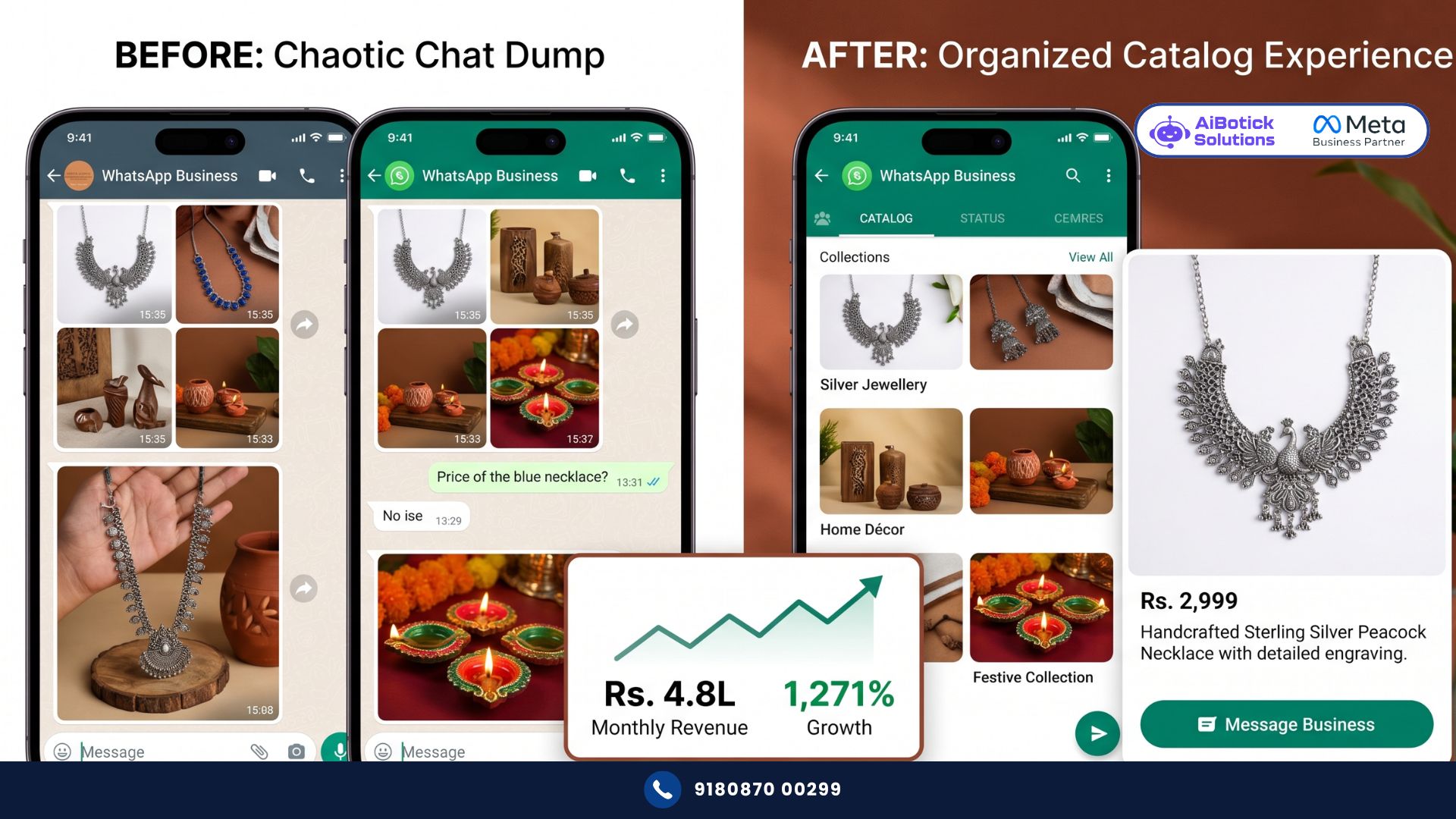
- No WhatsApp catalog — product sharing via 15-20 individual photos per conversation
- Monthly WhatsApp revenue: Rs.35,000
The Problem: Products were beautiful but presentation was chaotic. Customers asked for price. Agent sent individual photos. Customer got overwhelmed. Conversation died. Revenue stayed at Rs.35,000/month despite strong social media following (28,000 Instagram followers).
What They Did:
Set up a complete WhatsApp catalog with 180 products across 6 collections:
- Silver Jewellery
- Copper Jewellery
- Home Décor — Pottery
- Home Décor — Textiles
- Corporate Gifting
- Festive Collections (updated seasonally)
Each product: high-quality white background photo, specific product name, accurate price, material description, size/dimensions, product code.
Then — and this is the important part — they actively drove customers to it:
- Every incoming “what do you have?” reply → share catalog link
- Monthly broadcast to 3,400 WhatsApp contacts → highlight new arrivals with catalog links
- Instagram bio updated to WhatsApp catalog link
- Comment automation (from Instagram) → DM with WhatsApp catalog link
- Agent training: always share product from catalog during conversations, not individual photos
The Results (4 months):
| Metric | Before | After | Change |
|---|---|---|---|
| Monthly WhatsApp revenue | Rs.35,000 | Rs.4.8L | +1,271% |
| Average order value | Rs.820 | Rs.2,100 | +156% |
| Conversation-to-order rate | 8% | 31% | +288% |
| Products browsed per customer | 1.4 (sent individually) | 8.7 (catalog browse) | +521% |
| Time per sales conversation | 24 minutes | 8 minutes | -67% |
| Customer complaints about confusion | 12/month | 1/month | -92% |
That average order value jump from Rs.820 to Rs.2,100. When customers can browse properly, they buy more. They find things they didn’t know they wanted. They add to their order. The WhatsApp catalog isn’t just a convenience feature — it’s a revenue multiplier.
Step-by-Step: Setting Up Your WhatsApp Catalog
Step 1: Ensure You Have WhatsApp Business (App or API)
WhatsApp catalog is available on:
- WhatsApp Business App (free — for very small businesses, up to 500 products)
- WhatsApp Business API (for businesses with higher volume, team access, integration with other systems)
For businesses doing serious WhatsApp commerce with multiple agents and automation, API is the correct choice. For solo operators just starting, the free app works.
Step 2: Prepare Your Product Assets
Before opening the catalog builder, prepare:
Photos:
- Square format (1:1) recommended — 500×500 to 1024×1024 pixels
- Consistent background (white or light neutral — most professional)
- Good lighting — no shadows, no blurry product edges
- Multiple angles for key products
- Maximum 10 images per product
Don’t skip this step. A WhatsApp catalog with poor photos is worse than no catalog. Customers can’t touch and feel your product — the photo is the only sensory experience they get.
Product information per item:
- Product name (clear, searchable, specific — “Sterling Silver Lotus Earrings” not “Earrings 12”)
- Price (accurate — don’t put “contact for price” for everything, it kills conversions)
- Description (50-200 words: material, dimensions, use case, care instructions)
- Item code (for your reference and easy ordering)
- Website link (optional — links to product page if you have one)
Step 3: Create Collections First
Before adding products, create your collection structure. Think of collections as categories.
Good collection examples:
- By product type (Earrings, Necklaces, Rings, Bracelets)
- By price range (Under Rs.1,000, Rs.1,000-5,000, Rs.5,000+)
- By occasion (Wedding, Office, Casual, Gifts)
- By material (Silver, Gold-plated, Oxidised, Kundan)
- Seasonal (Diwali Collection, Summer Essentials)
Maximum 5-7 collections work best. More than that and customers feel overwhelmed navigating. And if you want to understand how WhatsApp catalog integrates with the broader product discovery experience — particularly how to showcase products during customer conversations in a way that drives repeat purchase behaviour — our WhatsApp product catalog guide covers the conversation strategy that works alongside catalog setup.
Step 4: Add Products
In WhatsApp Business App: Settings → Business Tools → Catalog → Add Product
In WhatsApp Business API platform (like AiBotick): Product Catalog section → Add Product → Upload photo, fill details, assign to collection
For each product:
- Upload 1-3 photos (more is better, up to 10)
- Product name
- Price (Rs. format — always include currency symbol)
- Description
- Item code
- Website link (optional)
- Assign to collection
For 100+ products, manual entry is painful. Most API platforms allow bulk CSV upload. Format your spreadsheet with all product data → upload → 100 products added in 10 minutes.
Step 5: Organise and Sequence Collections
The order your collections appear matters. Put your:
- Bestsellers first (or a “Featured” collection)
- Seasonal/promotional collection second (drives urgency)
- Regular collections after
Don’t lead with your most niche collection. Lead with what most customers want. First impression of your catalog determines whether they keep scrolling.
Step 6: Create Your Catalog Link
Your WhatsApp catalog has a shareable link. Find it in your catalog settings. This link opens your catalog directly — even for people who aren’t yet chatting with you.
Put this link:
- In Instagram bio (“Browse our collection 👇”)
- In Facebook Page’s “Shop” button
- In email signature
- On your website’s WhatsApp widget
- In every broadcast campaign
Step 7: Train Your Team on Catalog Sharing
If you have agents handling WhatsApp conversations, they need to know how to:
- Share individual products from catalog in chat (not screenshots)
- Share full collection links
- Share the complete catalog link
- Use product codes for smooth order processing
Sharing directly from catalog in the chat is important — it creates a clean, professional product card in the conversation (image + name + price + “Add to cart” button) rather than just a plain link.
What Makes a High-Converting WhatsApp Catalog (vs One That Sits Unused)
Photos that stop the scroll: Same rule as Instagram — first photo must grab attention. Product alone on white background. Clean. Sharp. Well-lit. If your product photo looks like it was taken in a dimly lit storeroom, no catalog will save your conversion rate.
Prices that are honest: Businesses that hide prices (“DM for price”) on their WhatsApp catalog are making a mistake. Customers who ask for price and get “contact for quote” on every item leave. Price is a filter — it helps customers self-qualify. Show it. Let serious buyers proceed and price-shoppers exit early (they were never going to buy anyway).
Descriptions that answer real questions: What’s it made of? What size is it? How do I care for it? Will it suit [occasion]? These are the questions customers ask in every conversation. Put the answers in your description. Reduce questions. Increase orders.
Product names that are searchable: Customers can search within your WhatsApp catalog. If your product is named “Item 47” — nobody finds it. Name it “Handmade Blue Pottery Chai Set — 6 cups” and customers searching “pottery” or “chai” or “blue” find it.
Regular updates: A WhatsApp catalog with products that sold out 3 months ago damages trust. Update it when stock changes. Remove sold-out items or mark them clearly. Add new arrivals immediately.
WhatsApp Catalog for Service Businesses (Not Just Products)
Most people assume WhatsApp catalog is only for product businesses. Wrong.
Service businesses can (and should) use it:
Salon/Spa catalog:
- Classic Haircut — Rs.350 — “60-minute service including wash, cut, and blow-dry”
- Premium Hair Color — Rs.1,200 — “Global color with Wella/L’Oreal professional products”
- Bridal Package — Rs.8,500 — “Full bridal preparation — makeup, hair, and pre-bridal treatment”
Customer browses services like a menu. Knows exactly what they’re getting and what it costs before asking. Conversation is much faster: “I want the Premium Hair Color” — not 10 minutes explaining what you offer.
Coaching institute catalog:
- CAT Preparation — 6 Months — Rs.18,000 — “Complete offline batch starting June 15”
- Online GMAT Module — Rs.6,500 — “Self-paced with 3 doubt-clearing sessions”
Digital agency service catalog:
- Social Media Management (3 platforms) — Rs.25,000/month
- WhatsApp Automation Setup — Rs.40,000 one-time
- Performance Marketing Management — Rs.30,000/month
Clients browse your services like a menu. They understand scope before calling. Meetings become shorter. Conversions improve.
Integration: WhatsApp Catalog + Automation = Powerful Combination
The WhatsApp catalog alone is good. Combined with automation, it becomes significantly more powerful.
Scenario 1: Catalog in chatbot flow Customer messages “I want to see products” → chatbot sends catalog link → customer browses → customer messages “I want Item #23” → chatbot captures order details → sends to team → payment link sent → order confirmed. Zero human involvement until payment confirmation.
Scenario 2: Abandoned catalog browse recovery Customer was sent catalog link. Browsed. Didn’t order. 24 hours later, automated message: “Hi [Name], noticed you were browsing our collection! Anything catch your eye? Happy to help you pick or answer questions. 😄” Win-back rate: 18-22%.
Scenario 3: Catalog in broadcast campaigns Monthly broadcast to 2,000 opted-in customers → “New arrivals added to our collection! See what’s new: [catalog link]” → 1,800 open it → 320 browse → 68 order → Rs.1.4L revenue from one broadcast. And if you want to understand how this broadcast + catalog combination works in detail — particularly how to structure the broadcast message for maximum catalog click-through — our WhatsApp broadcasting guide covers the exact message format, timing, and segmentation strategy that drives catalog traffic consistently.
Maintaining Your WhatsApp Catalog: What Most Businesses Neglect
Setting up the catalog is the easy part. Maintaining it is where most businesses fall short.
Monthly maintenance checklist:
- Remove sold-out products (or mark as unavailable)
- Add new products within 48 hours of stock arriving
- Update prices when they change (don’t let customers see old prices)
- Rotate featured collection based on season/promotion
- Review product descriptions for accuracy
- Check all photos are displaying correctly
- Update “Seasonal” or “Festive” collection for upcoming occasions
A stale WhatsApp catalog with wrong prices and sold-out items damages your brand more than no catalog. Commit to monthly maintenance before you launch.
What WhatsApp Catalog Setup Costs (Real Numbers for Indian Businesses)
WhatsApp Business App (free):
- Free to set up
- Up to 500 products
- Manual management only
- No team access
- No automation integration
- Suitable for: solopreneurs, very small businesses
WhatsApp Business API (Rs.1,500-8,000/month depending on platform and volume):
- Unlimited products
- Team access (multiple agents)
- Bulk product upload
- Automation integration
- Analytics on catalog views
- Shareable catalog links with tracking
- Suitable for: any business doing serious WhatsApp commerce
Revenue comparison from the Jaipur brand:
- Monthly platform cost at Rs.3,000/month
- Monthly WhatsApp catalog revenue: Rs.4.8L
- ROI: 160x on platform cost
Even for a smaller business doing Rs.80,000/month from WhatsApp: Rs.3,000 platform cost vs Rs.80,000 revenue = 27x ROI.
Common Mistakes Indian Businesses Make With WhatsApp Catalogs
Mistake 1: Poor quality photos A blurry, badly lit product photo makes customers trust your product less, not more. Invest in proper product photography. Even a decent phone with good natural light beats a low-effort photo.
Mistake 2: No prices (or “contact for price” on everything) Hiding prices reduces conversions dramatically. Show prices. Let customers self-qualify.
Mistake 3: Setting it up and not promoting it Catalog is invisible unless you drive people to it. Add the link everywhere. Share products proactively in conversations. Include in broadcasts.
Mistake 4: Ignoring the description field Most businesses leave descriptions blank or write one line. The description is your salesperson. Use it. Answer the questions customers always ask. Prevent questions. Enable decisions.
Mistake 5: Not updating regularly Sold-out items in catalog = frustrated customers = lost trust. Keep it current. Always.
Mistake 6: No collection structure All 200 products in one uncategorised list = shopping nightmare. Create logical collections. Guide customers to what they’re looking for.
Why 2026 Is the Year Your WhatsApp Catalog Becomes Your Best Salesperson
Honestly bhai, I see businesses spending Rs.50,000/month on ads to drive traffic to a website where conversion rate is 1-2%. Meanwhile their WhatsApp inbox — where they have 95% open rates and warm leads already in conversation — is being used to send photo collages that look like a 2015 forward.
A WhatsApp catalog done properly turns your WhatsApp inbox into a 24×7 showroom. Every customer who messages you can browse your complete inventory at any time — at 11 PM, on a Sunday, during a festival, from any city in India.
The Jaipur brand went from Rs.35,000 to Rs.4.8L monthly WhatsApp revenue. Not from ads. Not from new products. From presenting existing products properly on the channel customers were already using to talk to them.
Ab toh ek baar seriously socho — WhatsApp catalog lagao ya aise hi photo forward karte raho? The math is clear. 💯
Ready to set up your WhatsApp catalog and turn conversations into sales?
— Mohit Shah | 15+ years in IT industry | 4+ years in WhatsApp automation | Worked with various MNC brands | Now helping businesses figure out what actually works
Q1: How many products can I add to a WhatsApp catalog, and are there any restrictions on product types?
A1: WhatsApp catalog supports up to 500 products on the free WhatsApp Business app. Via WhatsApp Business API, the limit is higher (thousands of products with proper catalogue management). Product restrictions: WhatsApp doesn’t allow catalogs for alcohol, tobacco, gambling, adult content, weapons, or pharmaceutical drugs requiring prescriptions. All other physical products and most services are permitted. Service businesses (salons, coaching, consulting, agencies) can list their services as “products” with service name, price, and description — the catalog works identically for service businesses as for product businesses.
Q2: Can customers purchase directly from a WhatsApp catalog, or do they still need to message the business?
A2: Currently, WhatsApp catalog is a browse-and-enquire experience — not a full checkout. Customers can browse products, see prices, and tap “Add to Cart” (which creates a message draft to send to your business with the item details). Payment happens outside the catalog through UPI links, WhatsApp Pay, or payment gateway links sent in the conversation. In select markets, WhatsApp is testing integrated checkout — India is expected to see broader rollout of native payment within catalog experiences in 2026. For now, the catalog drives high-quality enquiries and the sale closes in the conversation.
Q3: How do I share my WhatsApp catalog with customers who haven’t messaged me yet?
A3: Your WhatsApp catalog has a shareable link that works even for people who haven’t contacted you before. Find it in WhatsApp Business settings under Catalog → Share Catalog. This link opens your full catalog in WhatsApp. Share it: in Instagram bio, Facebook Page shop button, email campaigns, SMS campaigns, your website’s WhatsApp widget, Google Business Profile, and in QR code format on packaging, invoices, and business cards. When someone taps the link, your catalog opens in their WhatsApp and a “Message the Business” button allows them to start a conversation — capturing them as a new lead with zero friction.