Most businesses in India pick a WhatsApp automation tool the same way they pick a restaurant on Zomato — they look at the rating, check the price, and order.
Three months later, they’re stuck with a platform that can’t do what they actually need, support that disappears after onboarding, and a year’s subscription they can’t get out of.
WhatsApp automation tools are not commodities. The wrong choice costs you more than the subscription fee — it costs you implementation time, team bandwidth, and the deals you lose while you’re busy switching platforms.
Here’s exactly what to check before you sign anything.
Why Choosing WhatsApp Automation Tools Is Harder Than It Looks
The market looks simple from the outside. A bunch of platforms, similar feature lists, different price points. Pick one, go live, done.
But I’ve watched this play out badly more times than I can count. At Interakt, at DoubleTick, working with client teams across industries — same story repeating itself. Business evaluates 2-3 platforms in a day, chooses the one with the best demo, signs up, and then discovers that the feature they actually need is behind a higher-tier plan. Or the integration they were counting on is “coming soon.” Or that “24/7 support” means a chatbot that sends them a documentation link.
No no, scratch that — the worst version I saw was a real estate company in Pune. They signed up for a popular WhatsApp automation tool based on a YouTube review. The reviewer had a referral link — big surprise. The platform looked great for ecommerce. For real estate? Site visit scheduling, drip campaigns across 90 days, CRM sync — all either missing or broken. They spent 6 weeks trying to make it work before switching. Those 6 weeks cost them more in lost leads than 2 years of any platform’s subscription.
So. Let’s do this properly.
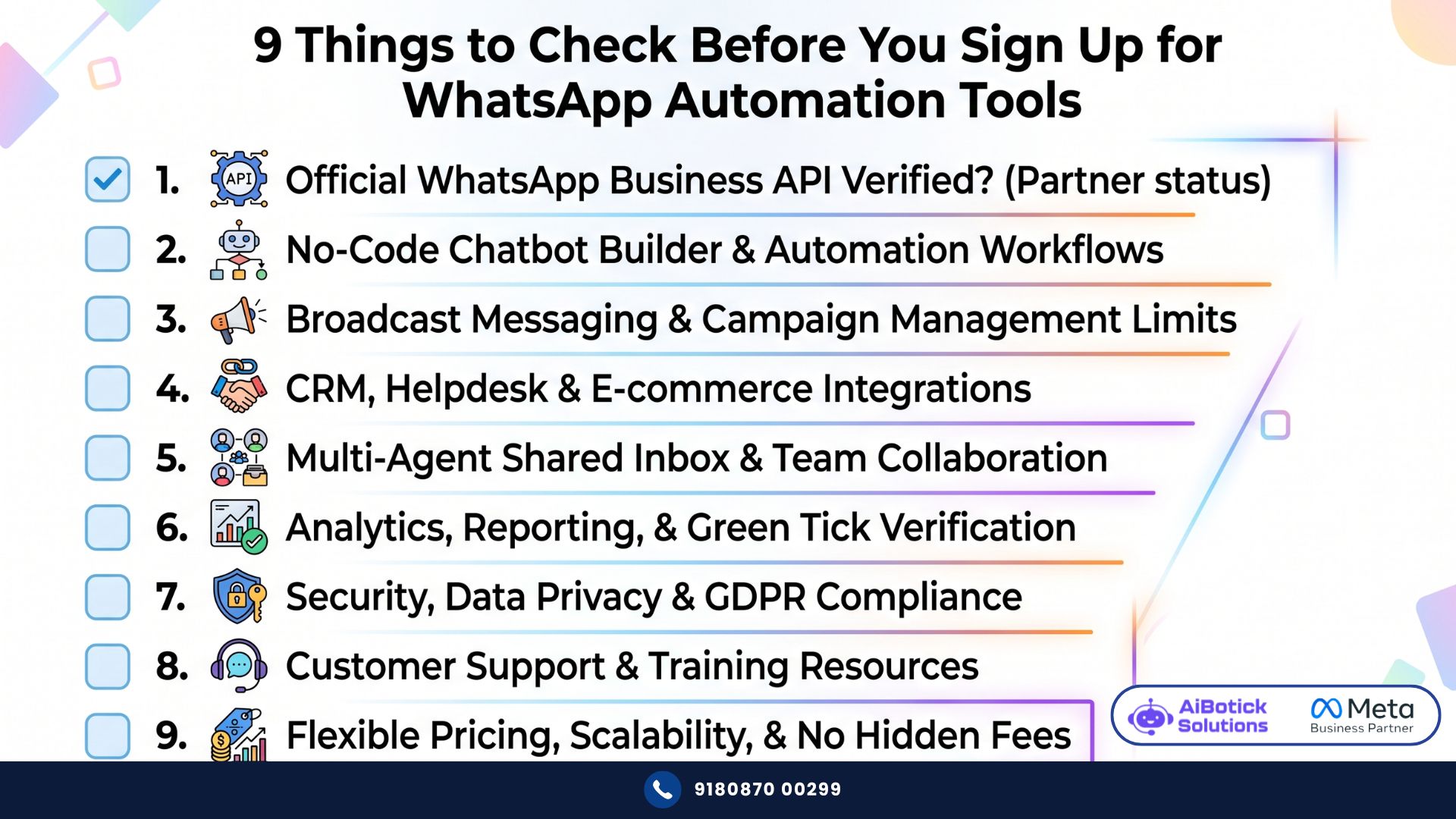
The 9-Point Checklist for WhatsApp Automation Tools in India
1. Is It an Official Meta-Verified Provider?
This is not optional. This is the foundation.
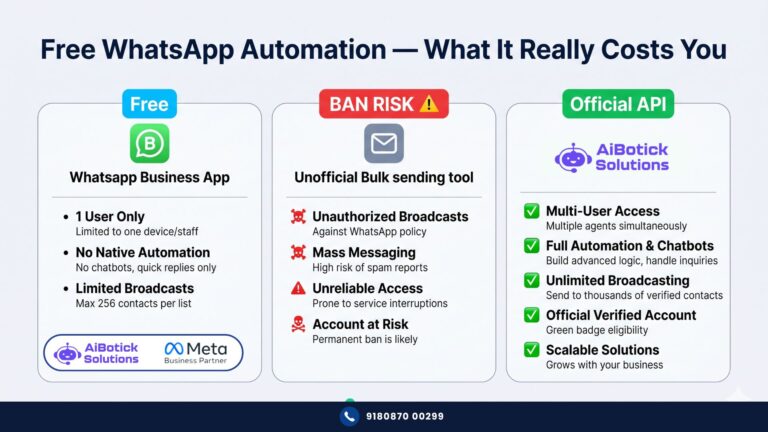
WhatsApp automation tools in India fall into two categories: official WhatsApp Business API providers (Meta-verified, officially licensed) and unofficial bulk senders (grey-market tools, often APK-based, not licensed by Meta).
The difference is not just compliance — it’s survival. Unofficial tools get banned. When Meta cracks down — and they do, regularly — businesses using unofficial tools wake up to a dead WhatsApp number and no recourse.
Every official WhatsApp automation tool should be able to show you their Meta Business Solution Provider status. If they can’t — or if they’re vague about it — walk away.
AiBotick is Meta-verified. So are Wati, Interakt, AiSensy. There are others. The point is: verify this first, before anything else. For a full breakdown of why this matters and how unofficial tools compare, read our article on why WhatsApp automation via bulk senders can get your number banned.
2. Does It Actually Support Your Specific Use Case?
This is where most evaluations fail. People check a feature list. They see “chatbot — ✅”. They move on.
But chatbot for what? A chatbot that handles FAQs with keyword triggers is not the same as a chatbot that qualifies real estate leads, checks budget and location preferences, and routes serious buyers to an agent automatically.
Before you evaluate any WhatsApp automation tool — write down your top 5 use cases. Specifically.
Not “chatbot.” But “chatbot that asks 4 qualifying questions and books a site visit automatically.”
Not “broadcasting.” But “broadcast to 8,000 contacts segmented by city and purchase history, with different messages per segment.”
Not “support.” But “shared inbox where 5 agents handle conversations from one number, with supervisor visibility on all chats.”
Then test each of those 5 use cases in the demo. Specifically. Not the demo they want to show you — the demo of your use cases.
3. What Are the Real Plan Limits?
WhatsApp automation tools love headline numbers. “Unlimited contacts!” “Unlimited broadcasts!” Then you read the fine print.
Key limits to check on every plan:
- Monthly broadcast cap — how many messages can you send per month before you’re blocked or charged extra?
- Active contacts limit — are you paying per contact? What happens when you exceed the limit?
- Number of users/agents — how many team members can access the platform? What does adding a user cost?
- Automation trigger limits — some platforms cap how many automation events fire per month. Hit the cap and automations stop.
- Chatbot step limits — maximum steps per chatbot flow. Complex flows need depth. Check this.
Seedha bolta hoon — take the plan you’re considering, map your actual monthly volumes against these limits, and calculate what it actually costs. Not the headline price. The real price at your scale.
4. What Integrations Do You Actually Need — and Are They Native?
WhatsApp automation tools vary wildly on integrations. And there’s a big difference between “we integrate with X” and “we have a native, reliable, tested integration with X.”
Common integrations Indian businesses need:
- E-commerce: Shopify, WooCommerce — for abandoned cart, COD verification, order tracking
- CRM: HubSpot, Zoho, Salesforce, Freshsales, Leadsquared
- Payment gateways: Razorpay, PayU, PhonePe, Stripe — for collecting payments inside WhatsApp
- Google Sheets — for trigger-based messaging from spreadsheets
- Zapier — for everything else
Ask specifically: is this a native integration or does it require Zapier? Native integrations are faster, more reliable, and don’t break when Zapier changes its API or you hit a Zap limit.
And if Shopify integration is important to you — check whether it’s included in the base plan or an add-on. Some platforms charge separately for this. Factor that into your cost calculation.
5. How Does the Onboarding Actually Work?
This is the question nobody asks in the sales call. And it’s one of the most important.
Most WhatsApp automation tools have a self-service onboarding model. You get access, a welcome email, a video library, and maybe a group webinar. Then you figure it out.
For a technically confident team — fine. For most mid-size Indian businesses with a marketing manager who’s also running 6 other things — this is where platforms go unused.
Ask directly:
- Do you provide live onboarding sessions?
- How many sessions? When?
- Is there a dedicated person I can contact when something isn’t working?
- What does support look like after the first 30 days?
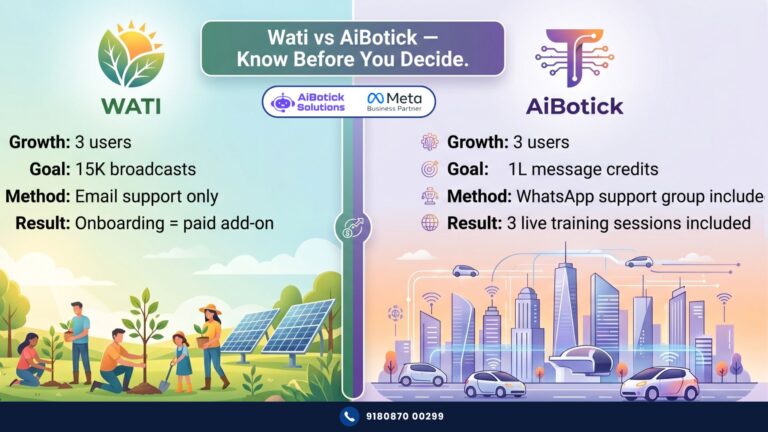
The answers reveal a lot. A platform that offers 3 live training sessions, a dedicated WhatsApp support group, and a 30-day check-in call is investing in your success. A platform that sends you a Loom video and a help center link — you’re on your own.
Could be wrong, but I’ve consistently seen that the businesses getting the most ROI from WhatsApp automation tools are the ones with proper implementation support — not the ones with the fanciest feature list.
6. What Is the Support Model — Really?
Closely related to onboarding, but different. Onboarding is what happens at the start. Support is what happens when something breaks at 9pm before your campaign goes live tomorrow morning.
Check specifically:
- Email support only — you wait. Could be hours. Could be a day.
- Chat support — faster, but still a queue.
- WhatsApp support group — your dedicated contact, real human, responds within hours.
- Priority support / Dedicated CSM — typically enterprise tier only, and priced accordingly.
And then ask: is this 24/7 or business hours? Is it 5 days or 7 days?
For campaigns that don’t follow business hours — a support model that does is a real problem.
Actually wait — test this before you sign up. Send a complex, specific support question to the platform’s sales or support team before you become a customer. See how fast they respond. See how specific and helpful the answer is. That response quality is exactly what you’ll get when you’re paying and something breaks.
7. Is the AI Actually Intelligent — or Just Keyword Triggers?
Honestly? I think “AI chatbot” is one of the most overhyped terms in WhatsApp automation tools right now. Every platform claims AI. Most of them mean “keyword-triggered responses with a fancy name.”
Real AI in a WhatsApp chatbot means:
- Natural language understanding — the bot understands “what’s the price?” and “kitna lagega?” as the same question
- Contextual memory — the bot remembers what was said earlier in the conversation
- Intent detection — the bot figures out what the user actually wants, not just what words they typed
- Fallback handling — when the bot doesn’t know something, it escalates gracefully instead of looping
Ask the platform to demo a conversation where the user asks something unexpected. See what the bot does. That tells you more than any feature list.
8. How Does Pricing Work — Total Cost, Not Just Subscription
WhatsApp automation tools have two layers of cost that many businesses don’t account for properly:
Layer 1 — Platform subscription: What you pay the provider. Monthly or annual. Per user or flat.
Layer 2 — Meta conversation charges: What Meta charges for each conversation. These are separate from the platform fee and are charged based on conversation type (marketing, utility, service, authentication) and volume.
Both layers are real costs. When you’re comparing platforms, get clarity on both.
Also check:
- Is there a setup fee?
- Is WhatsApp number registration included or charged separately?
- Are there per-message charges on top of the subscription?
- What’s the renewal pricing — does it go up in year 2?
A platform that looks cheap at Rs.999/month but charges per message, per user, and for every integration as an add-on — might end up costing more than a Rs.25,000/year flat plan with everything included.
Do the maths. Properly. For your actual volumes.
9. Can It Scale With You — or Will You Outgrow It in 12 Months?
This is the question most businesses don’t ask because they’re thinking about today, not 18 months from now.
The right WhatsApp automation tool for a business doing 500 conversations a month looks different from one doing 50,000. And the painful truth is that some platforms — particularly entry-level ones — hit a ceiling fast.
Signs a platform might not scale with you:
- Hard caps on contacts, broadcasts, or automations at every plan level
- No enterprise tier with dedicated infrastructure
- No API access for custom integrations
- Support model that doesn’t upgrade as you grow
- No multi-team or multi-number support for larger operations
If you’re a Rs.50L business today but targeting Rs.5Cr in 24 months — your WhatsApp automation tool needs to handle that trajectory. Switching platforms mid-growth is expensive, disruptive, and entirely avoidable if you ask the right questions upfront.
For context on what a full-stack automation setup looks like at scale — and the ROI you should expect as you grow — our article on calculating WhatsApp automation ROI for your business breaks this down with actual numbers.
What People Get Wrong When Evaluating WhatsApp Automation Tools
Wrong approach #1: Choosing based on which demo looks best
Sales demos are curated. They show you the platform at its best, with the use cases it handles well. Always request a demo of your specific use case — not their standard walkthrough.
Wrong approach #2: Treating all “WhatsApp API providers” as equivalent
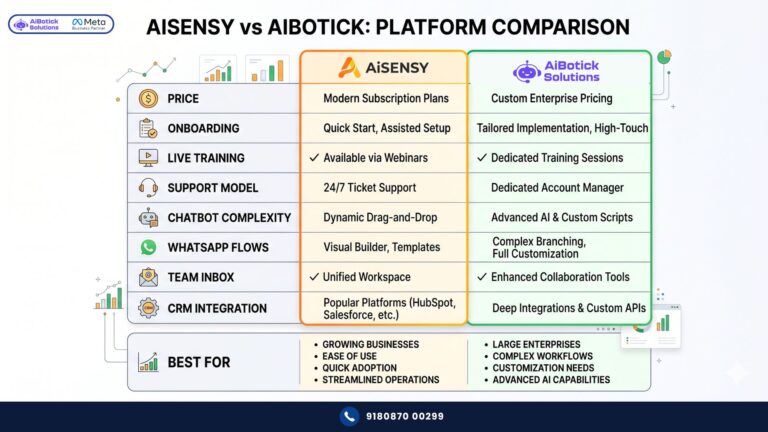
They’re not. Feature depth varies significantly. AI capability varies. Support models vary. Integration quality varies. Two platforms can both be “official Meta API providers” and have completely different real-world performance.
Wrong approach #3: Ignoring the onboarding and support question
The platform you implement well beats the platform you barely use. Support and onboarding are not nice-to-haves. They’re what determines whether your investment generates ROI or sits unused.
Wrong approach #4: Choosing the cheapest entry plan without checking limits
Entry plans are designed to get you in the door. Check the plan you’ll actually need at your current volume — with your actual use cases and team size. That’s the price you’re comparing.
Wrong approach #5: Not talking to existing customers
Ask every platform for a reference in your industry. A 20-minute call with an existing customer will tell you more than 3 hours of demos and sales calls. What broke? How did support handle it? Would they choose the same platform again?
A Real Example: How the Checklist Saved a Logistics Company 4 Months
A logistics company in Mumbai — 40 employees, Rs.3Cr turnover — was evaluating WhatsApp automation tools for customer communication: delivery updates, COD confirmations, exception alerts, and a shared inbox for their customer support team of 6.
They’d narrowed it down to two platforms. Both had similar pricing. Both had similar feature lists on paper.
Then they ran the 9-point checklist.
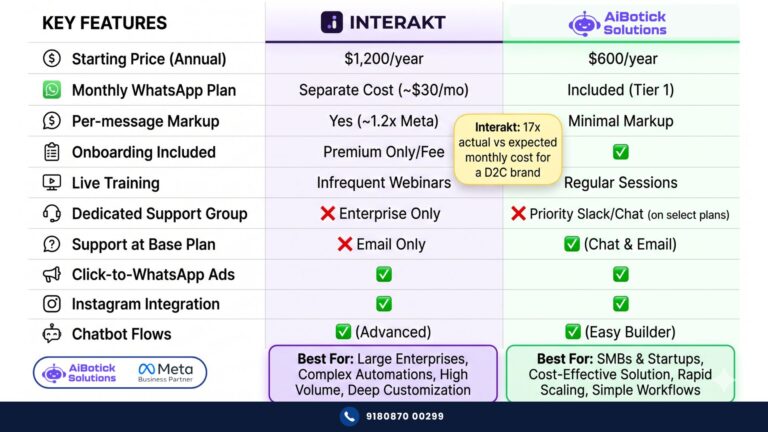
Platform A: Meta-verified ✅. Broadcast limit: 15,000/month — their volume was 22,000. Shopify: N/A for logistics. CRM integration: Zoho — native ✅. Onboarding: self-service, video library. Support: email, 24/5. No dedicated contact. Add-on for extra users.
Platform B (AiBotick): Meta-verified ✅. Broadcast limit: 1,00,000/month on Growth plan — well above their volume. CRM integration: Zoho — native ✅. Onboarding: 3 live sessions included. Support: dedicated WhatsApp group. 6 agents on shared inbox — included. Payment gateways: 20+ included.
They chose AiBotick. Went live in 11 days. Their support team of 6 was fully trained by Day 14. Delivery update automations running by Day 10. COD confirmation chatbot live by Day 12.
The 9-point checklist took them 2 hours. It saved them from a platform they’d have outgrown in 3 months. 💯
Your Action Plan — Do This Before Your Next Demo Call
👇 Before you book a demo with any WhatsApp automation tool, do these 5 things:
- Write down your top 5 use cases — specific, not generic. This becomes your demo script.
- Calculate your actual monthly volumes — contacts, broadcasts, conversations, agents needed.
- List your must-have integrations — CRM, ecommerce, payment gateways, Google Sheets.
- Prepare your support test question — something complex, specific to your business. Send it before the demo. See how they respond.
- Ask for a customer reference in your industry — before you sign. Every platform should have one.
Then run through the 9-point checklist with every platform you’re evaluating. The one that passes all 9 cleanly — that’s your platform. 😄
Choosing the right WhatsApp automation tool is a 30-minute decision that affects the next 2 years of your business communication. Take the time. Ask the hard questions.
If you want to run the checklist against AiBotick for your specific use case — Chat with us on WhatsApp and we’ll answer every question directly, with no sales spin.
— Mohit Shah | 15+ years in IT industry | 4+ years in WhatsApp automation | Worked with various MNC brands | Now helping businesses figure out what actually works
Q1: What should I look for in a WhatsApp automation tool in India?
A1: Check 9 things before signing up: Meta verification status, whether the platform supports your specific use cases, real plan limits (broadcasts, contacts, agents), native integrations with your CRM and ecommerce stack, onboarding model (live sessions vs self-service), support quality and response time, whether the AI is genuine or just keyword triggers, total cost including Meta conversation charges, and whether the platform can scale with your business in 12-18 months. Most businesses check 2-3 of these. The ones who check all 9 rarely switch platforms.
Q2: Is it important for WhatsApp automation tools to be Meta-verified?
A2: Yes — this is non-negotiable. Only official Meta Business Solution Providers can offer WhatsApp Business API access legally and compliantly. Unofficial bulk WhatsApp tools operate in a grey area and regularly get shut down or result in numbers being banned by Meta. Before signing up for any WhatsApp automation tool in India, verify that the provider is officially Meta-certified. All legitimate providers — AiBotick, Wati, Interakt, AiSensy — can confirm this status directly.
Q3: Why do WhatsApp automation tools cost more than the advertised subscription price?
A3: Because there are two layers of cost. The platform subscription is what you pay the software provider. But Meta also charges separately for each WhatsApp conversation — rates vary by conversation type (marketing, utility, service, authentication) and your message volume. On top of this, some platforms charge extra for integrations like Shopify, additional users beyond the plan limit, and onboarding support. Always calculate your total cost — subscription plus Meta charges plus add-ons — at your actual monthly volume before comparing platforms on price.