70% of online shoppers abandon their cart.
Seven. Zero. Percent.
That’s not a small number. That’s most of your potential customers — people who literally picked up your product, walked to the billing counter, and then quietly put it back and walked out.
And most Indian ecommerce businesses are trying to recover them via email. Which, as we’ve already established, gets a 20% open rate if you’re lucky.
Yaar, I’ve been in IT for 15 years. Last 3 years deep in WhatsApp automation. And abandoned cart recovery is hands down the single fastest ROI I’ve seen any ecommerce business generate from WhatsApp. Faster than broadcasts. Faster than chatbots. Faster than anything.
Because you’re not reaching cold leads. You’re reaching warm, almost-converted customers. People who wanted to buy. Something just stopped them at the last second.
WhatsApp gives you a second chance to close that sale. Done right — it works dramatically well.
Let me show you exactly how.
First — Why Do People Abandon Carts Anyway?
Before building your recovery flow — understand WHY they left. Because the recovery message needs to address the actual reason.
Research consistently shows the top reasons:
- Unexpected shipping cost — Saw the final price and flinched
- Just browsing — Not ready to buy yet, comparing options
- Distraction — Got a call, closed the tab, forgot
- Payment issue — Card declined, UPI failed, OTP expired
- Second thoughts — Price anxiety, “do I really need this?”
- Account creation friction — Didn’t want to register just to checkout
Different reasons need different recovery messages. A generic “You forgot something!” message works for distraction-based abandonment. It doesn’t work for price anxiety.
Good WhatsApp abandoned cart recovery — it addresses the actual objection. Not just reminds them the cart exists.
Why WhatsApp Abandoned Cart Recovery Outperforms Email
Actually wait — let me give you the numbers first, then explain why.
Email abandoned cart recovery: 3-5% recovery rate industry average WhatsApp abandoned cart recovery: 8-15% recovery rate
Nearly 3x better. Consistently. Across industries.
Why?
Speed. WhatsApp message delivered and read within 5 minutes. Email sits in inbox for hours — by which time the customer has moved on, bought elsewhere, or simply forgotten the impulse.
Visibility. WhatsApp notification is hard to ignore. Email promotional tab? Easy to ignore. They’ve been ignoring it for years.
Conversational feel. A WhatsApp message that says “Hey Priya, you left something in your cart — need help with anything?” feels personal. An email with the same text feels like a mass campaign.
Two-way. Customer can reply directly. “Actually the shipping cost was too high.” Now your team — or bot — can offer a solution. Free shipping threshold, a coupon, an alternative product. Email can’t do this in real time.
For a deep dive on why WhatsApp consistently outperforms email across all business communication — we broke it down completely in this article.
The 3-Message WhatsApp Abandoned Cart Sequence — Exactly What to Send
This is the sequence that works. Not theory. This is what I’ve seen perform consistently across ecommerce businesses in India.
Message 1 — 30 minutes after abandonment
Timing is everything here. 30 minutes is the sweet spot — they’re still thinking about the purchase. Still warm.
Keep it light. No pressure.
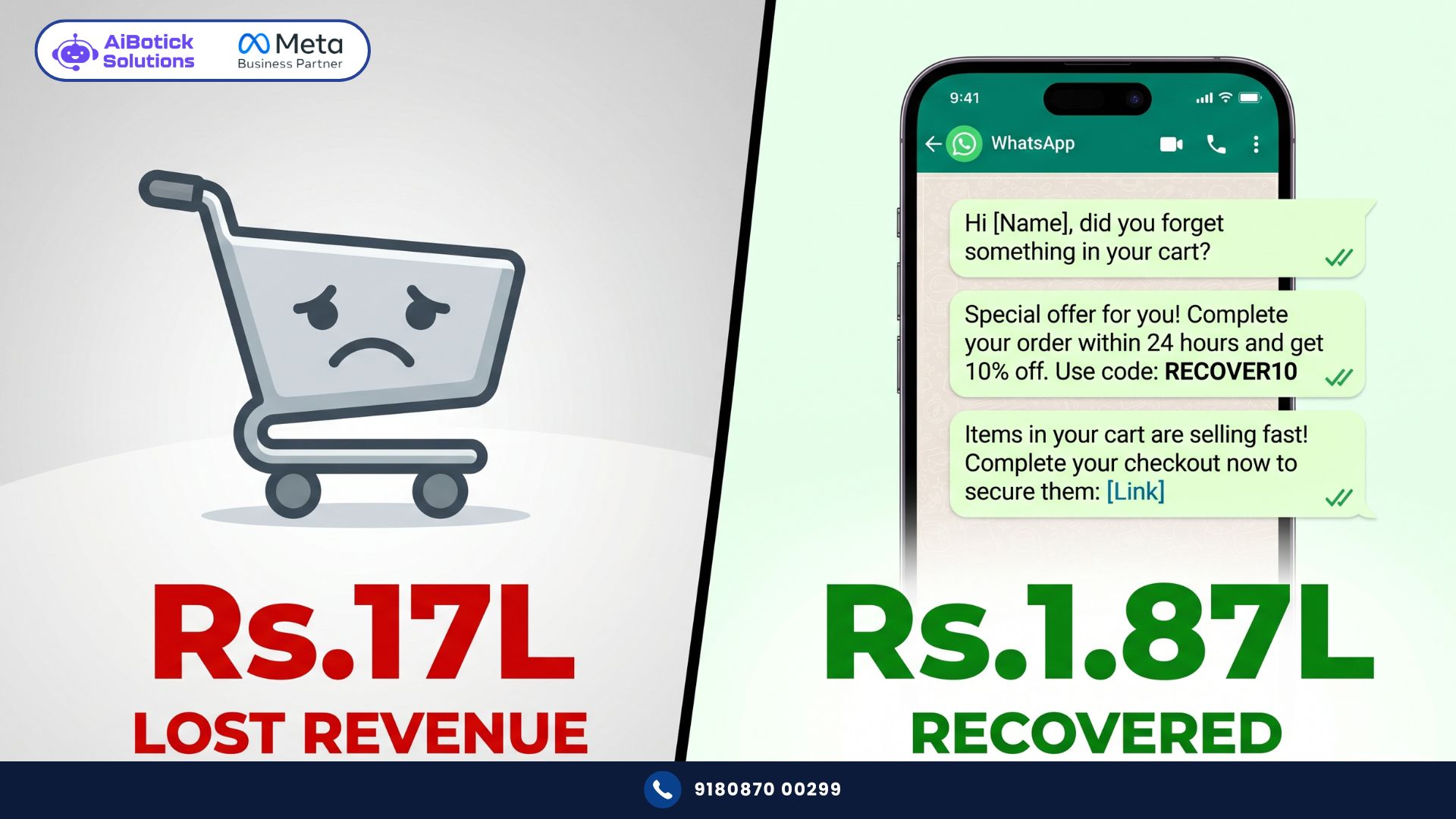
“Hey [Name]! 👋 Looks like you left something behind. Your [Product Name] is still waiting for you — shall I hold it? 😊 [Cart Link]”
That’s it. Short. Personal. No desperation. No “HURRY LIMITED STOCK” drama.
This message alone recovers 40-50% of your recoverable carts.
Message 2 — 24 hours later (if no purchase)
Now you address the possible objection. Still warm but slightly less urgent.
“Hey [Name], still thinking about your [Product Name]? Completely understand — big decisions deserve thought. Quick question — was there anything stopping you? Shipping cost? Size? Just let me know and I’ll help sort it out. [Cart Link]”
This message does two things — it opens a conversation AND signals that you’re helpful, not pushy. Responses to this message give you gold — actual objections you can address.
Message 3 — 48-72 hours later (final nudge)
Last attempt. Now you can add a small incentive if your margins allow.
“[Name], last nudge — promise! 😅 Your [Product Name] is still saved. Use code COMEBACK10 for 10% off — valid for the next 24 hours. [Cart Link] After that, we’ll let it go. Your call!”
The “we’ll let it go” line is important. It removes pressure while creating mild urgency. Doesn’t feel desperate.
How to Set This Up — Step by Step
No no, scratch that. Let me explain this more practically — because “set up a sequence” sounds vague.
Here’s exactly what needs to happen technically:
Step 1 — Connect your store to WhatsApp API
Your ecommerce platform (Shopify or WooCommerce) needs to be connected to your WhatsApp Business API platform. AiBotick has native integrations for both — takes 30-60 minutes to set up with proper guidance.
Step 2 — Define the abandonment trigger
When does a cart become “abandoned”? Standard is — customer added to cart, initiated checkout (meaning they gave you their phone number), but didn’t complete payment within X minutes.
The phone number collection at checkout — this is your opt-in. They gave you their number to complete the purchase. Using it for a helpful recovery message is completely within WhatsApp’s policies.
Step 3 — Build your 3-message flow
In AiBotick’s flow builder — drag, drop, done. Set timing for each message. Personalise with customer name and product name using dynamic variables. Add the cart link. Done.
Step 4 — Set stop conditions
Critical. If customer completes purchase — stop sequence immediately. Nothing worse than getting a “you forgot your cart!” message after you’ve already paid. I’ve seen this happen. Customer never forgets it. And not in a good way.
Step 5 — Add human handoff
If customer replies to Message 2 with an objection — route to your team immediately. This is where a human closes the sale. Bot starts the conversation. Human finishes it.
What People Get Wrong About WhatsApp Cart Recovery
Honestly? Most brands get this completely backwards.
Mistake 1 — Sending too many messages too fast
3 messages in 3 hours = spam. Customer blocks you. You lose them permanently. Worse than not sending at all.
Space them out. 30 minutes, 24 hours, 48-72 hours. Respect the customer’s decision-making timeline.
Mistake 2 — Generic messages with no personalisation
“You left items in your cart” — this is lazy and it shows. Use their name. Use the product name. Make it feel like a human noticed and reached out.
Dynamic variables in WhatsApp templates make this easy. No excuse for generic messages.
Mistake 3 — Offering discount in Message 1
Biggest mistake. If your first recovery message includes a discount — you’re training customers to abandon carts on purpose. They’ll learn that abandoning = discount code. And they’ll do it every single time.
Save the incentive for Message 3. Last resort. Not first move.
Mistake 4 — No stop condition
Already mentioned this but worth repeating. Customer buys — sequence must stop. Immediately. Automatically. This is not optional.
Mistake 5 — Ignoring replies
If your bot sends 3 messages but nobody is monitoring replies — you’re leaving the best leads unattended. The customers who reply are your most convertible. They’re engaged. They have a question. Answer it fast.
Real Numbers — What This Looks Like for an Indian Ecommerce Store
Let me make this concrete.
Mid-size D2C fashion brand. Mumbai. Doing Rs.25L GMV per month.
Cart abandonment rate — 68%. So roughly Rs.17L in potential revenue abandoning every month.
Before WhatsApp recovery — they had an email sequence. Recovering about 3.5% = Rs.59,500/month recovered.
After implementing the 3-message WhatsApp sequence — recovery rate went to 11%. Rs.1,87,000/month recovered.
Difference: Rs.1,27,500 additional revenue. Every month. From the same traffic. Same products. Same prices.
Annual impact: Rs.15,30,000 in additional revenue from one automation flow.
Platform cost for the year? Rs.45,000.
That’s a 34x return. From one flow. Set up once.
One More Thing — COD Orders Need Special Treatment
Quick note for Indian ecommerce specifically.
COD (Cash on Delivery) abandonment is a different beast. Customer placed the order — but COD orders have high return-to-origin rates when customers change their mind before delivery.
WhatsApp can help here too — but that’s a separate flow called COD confirmation. Send a WhatsApp immediately after COD order — “Hi [Name], confirm your order for [Product]? Reply YES to confirm or NO to cancel.” Reduces RTOs dramatically.
We’ll cover that in detail in a separate article. But wanted to flag it here because a lot of brands confuse cart abandonment recovery with COD confirmation — they’re different problems with different solutions.
Agar aapka ecommerce store COD heavy hai — yahan padho WhatsApp automation ROI ke baare mein — specifically the abandoned cart recovery section gives you the full financial picture.
Ab seedha baat — if you’re running an ecommerce store and you don’t have WhatsApp abandoned cart recovery running right now — you’re leaving a very calculable, very recoverable amount of money on the table. Every single day.
This isn’t complex to set up. It isn’t expensive. And the ROI is almost immediate.
Tap below. 👇 Show us your store setup and we’ll map out exactly what your recovery flow should look like — messages, timing, triggers, everything.
— Mohit Shah | 15+ years Learning & Growing | Now helping businesses figure out what actually works
Q1: How effective is WhatsApp abandoned cart recovery for Indian ecommerce stores?
A1: WhatsApp abandoned cart recovery achieves 8-15% recovery rates compared to email’s 3-5% — nearly 3x better. For a store doing Rs.25L GMV monthly with 68% abandonment, switching from email to WhatsApp recovery can mean Rs.1.27L+ in additional recovered revenue every month. The difference comes from WhatsApp’s 95% open rate, 5-minute read time, and conversational two-way nature.
Q2: What is the ideal timing for WhatsApp abandoned cart messages?
A2: Three messages work best — first at 30 minutes after abandonment (while customer is still warm), second at 24 hours (addressing possible objection), third at 48-72 hours (final nudge with optional incentive). Never send all three within a few hours — that’s spam. And always stop the sequence immediately when the customer completes their purchase.
Q3: Can I offer a discount in my first WhatsApp cart recovery message?
A3: No — and this is the most common mistake. Offering discount in Message 1 trains customers to abandon carts intentionally to get discount codes. Save any incentive for Message 3 only — the last resort. Your first message should be light, helpful, and personal. Your second should open a conversation about objections. Discounts come last, if at all.