Imagine your best salesperson.
Knows every product. Every price. Every variant. Every offer. Available 24×7. Never gets tired. Never says “let me check and get back to you.” Never loses a customer because they went offline.
That’s what WhatsApp product catalog does — when set up properly.
And yet — most Indian businesses using WhatsApp for sales are still doing it the old way. Customer asks “what products do you have?” — someone manually types out a list. Or worse, sends a PDF catalog that nobody scrolls through. Or shares a Google Drive link that half the people can’t open on mobile.
Yaar, I’ve spent 15 years in IT and 3 years specifically watching how businesses sell on WhatsApp. The WhatsApp product catalog feature is genuinely one of the most underused tools in this entire ecosystem. Underused because most people don’t understand what it can actually do.
Let me fix that today.
What Is WhatsApp Product Catalog — And What It’s Not
Basic WhatsApp Business App has a catalog feature. You’ve probably seen it — little shop icon on the business profile. Add products, photos, prices. Customer taps, browses, adds to cart.
That’s the basic version. Useful. But limited.
WhatsApp product catalog through the Business API — via platforms like AiBotick — is a completely different level.
Not just a static product list. A dynamic, interactive, shoppable experience — inside WhatsApp. Customer browses products, asks questions, gets answers from a bot, adds items to cart, gets a payment link, completes purchase. All. Without. Leaving. WhatsApp.
Actually wait — let me give you a concrete picture of what this feels like for the customer.
The Customer Experience — From Browse to Buy Inside WhatsApp
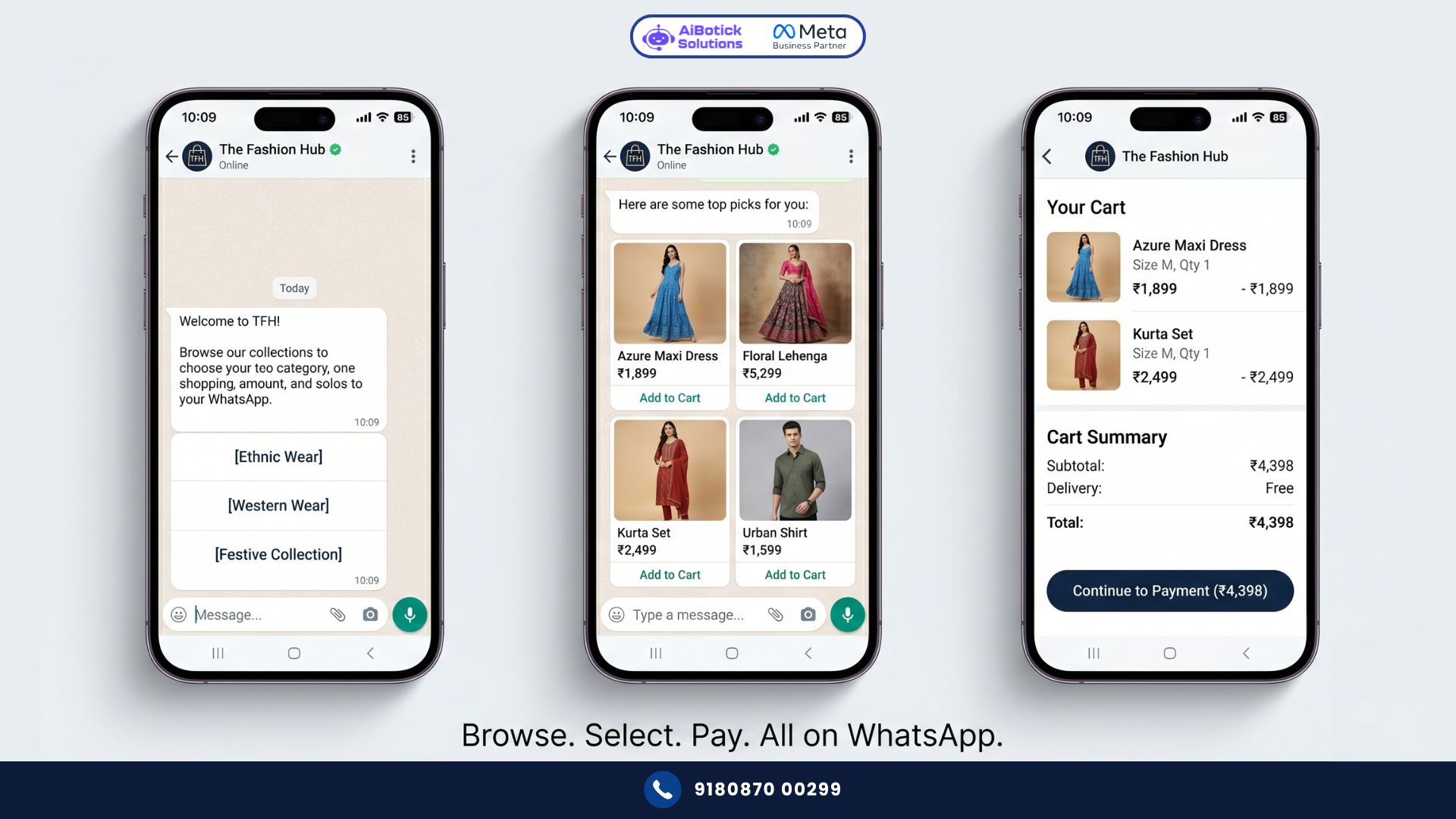
Customer messages your WhatsApp: “Hi, I want to buy some kurtas.”
Bot responds instantly: “Welcome! 😊 Here are our latest collections — tap any category to browse:”
[Ethnic Wear] [Western Wear] [Festive Collection] [Sale Items]
Customer taps “Festive Collection.”
Bot sends a carousel of products — beautiful images, product names, prices, “Add to Cart” buttons.
Customer taps a kurta. Gets detailed view — fabric, sizes available, care instructions, price.
Customer taps “Add to Cart.” Bot confirms. Asks if they want to continue shopping or checkout.
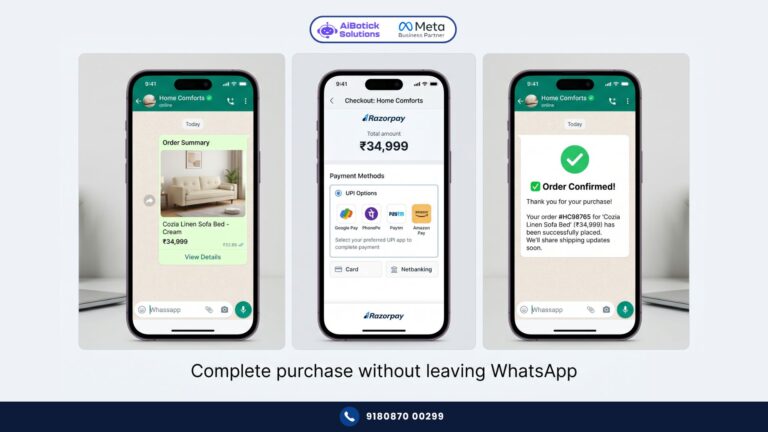
Customer says checkout. Bot sends payment link — Razorpay, PhonePe, UPI, whatever you’ve set up.
Customer pays. Bot sends order confirmation. Done.
Zero human involvement. Entire purchase journey — browse, select, pay — happened inside one WhatsApp chat.
That’s WhatsApp product catalog done right.
Why This Matters for Indian Businesses Specifically
India ka customer — dekho — he’s on WhatsApp all day. But asking him to visit your website, create an account, search for products, add to cart, fill shipping details, enter card information — every step is friction. Every step loses people.
Mobile internet speeds vary across India. Website loading time on a 3G connection in tier-2 cities? Painful. WhatsApp loads instantly everywhere.
And the trust factor. Website from an unknown brand — customer hesitates. Same product being sold over WhatsApp where they can ask questions, get instant answers, see real photos — trust builds faster.
This is why businesses selling through WhatsApp product catalog consistently see better conversion rates than the same products on their website. Not always. But often enough that it’s not a coincidence.
Could be wrong on the exact numbers — but I’ve seen this pattern consistently across fashion, FMCG, home decor, electronics accessories, jewellery. WhatsApp converts warm leads better than website for Indian audiences.
WhatsApp Product Catalog Features — Complete Breakdown
Let me go through every capability. Because the feature list is richer than most people realise.
Product Display:
- High-resolution product images (multiple per product)
- Product name, description, price (including sale price)
- Product variants — size, color, material — customer selects within chat
- Product categories for easy navigation
- Featured products and new arrivals sections
Cart and Checkout:
- In-chat cart — customer adds multiple items before checkout
- Cart review — customer sees full cart before paying
- Order summary sent to customer on WhatsApp before payment
- Payment link generation — Razorpay, PayPal, Stripe, PhonePe, Instamojo, 20+ gateways supported
Inventory Management:
- Mark products as in-stock or out-of-stock
- Back-in-stock notifications — customer requests alert, gets WhatsApp when available
- Hide/show products without deleting (for seasonal inventory)
Bot Integration:
- Customers can ask questions about any product — bot answers from knowledge base
- Size guide recommendations based on customer input
- “Customers also bought” suggestions
- Abandoned cart recovery if customer adds to cart but doesn’t checkout
Analytics:
- Which products are most viewed
- Add-to-cart rates by product
- Checkout conversion rates
- Revenue generated through WhatsApp catalog
Real Numbers — Jaipur Jewellery Brand
Concrete example. No guessing.
Handcrafted silver jewellery brand. Jaipur. Selling primarily through Instagram DMs and in-person exhibitions before WhatsApp.
Problem: Instagram DMs were chaotic. Customer asks “do you have something in budget of Rs.2,000?” — team manually going through 200 products, sending photos one by one. Slow. Inconsistent. Exhausting.
After setting up WhatsApp product catalog:
- Response time: went from 2-3 hours to instant (bot shows catalog immediately)
- Products browsed per conversation: average 11 (vs 3-4 when manually sharing)
- Conversion rate: 23% (vs 9% on Instagram DM)
- Average order value: Rs.2,800 (vs Rs.1,900 — because customers discover more products through catalog browsing)
- Monthly revenue from WhatsApp channel: Rs.3.4L within 90 days of launch
Same products. Same prices. Same team.
Just a better buying experience inside WhatsApp.
The jewellery owner told me something I won’t forget — “Pehle main sales karta tha. Ab WhatsApp sales karta hai mere liye.” 😄
Setting Up WhatsApp Product Catalog — Step by Step
Simple. No developer needed.
Step 1 — Organise your product data first
Before touching any platform — get your products organised. For each product you need:
- Product name (clear, searchable)
- Description (include key details — material, dimensions, use case)
- Price and sale price if applicable
- High-quality images (minimum 800×800px, white or neutral background works best)
- Categories/collections
Get this in a spreadsheet first. Uploading properly organised products takes 2 hours. Uploading messy data and fixing it later takes 2 days.
Step 2 — Upload catalog to AiBotick
AiBotick’s catalog manager lets you upload products individually or in bulk via CSV. Set categories, variants, availability. Preview how it looks on customer’s screen.
Step 3 — Build the catalog browsing flow
In AiBotick’s flow builder — create the browsing experience. Welcome message → category selection → product display → cart → checkout. This is the customer journey map. Each step is a visual block you connect in the builder. No coding.
Step 4 — Connect payment gateway
AiBotick supports 20+ payment gateways. Connect Razorpay or PhonePe for Indian customers — most common, highest conversion for Indian mobile users. International brands can add Stripe or PayPal.
Step 5 — Test the full journey
Message your own WhatsApp business number. Go through entire purchase journey as a customer. Buy something. Confirm payment works. Confirm order confirmation fires. Check every screen looks right on mobile.
Step 6 — Go live and promote
Add “Shop on WhatsApp” link to your Instagram bio, website, email signature, packaging. Drive traffic to your WhatsApp catalog from every channel.
For the broader picture of WhatsApp ecommerce automation beyond catalog — our WhatsApp for Shopify guide shows how catalog integrates with your full store setup.
What People Get Wrong About WhatsApp Product Catalog
Honestly? One mistake above all others.
“I’ll upload all 500 products and let customers browse.”
Nope. That’s not it.
500 products in a WhatsApp catalog = customer overwhelm = abandonment.
WhatsApp is not your website. It’s not designed for browsing through 500 SKUs. It’s designed for guided, conversational discovery.
Start with your top 30-50 bestsellers. Organised into 4-6 clear categories. Give customers a curated experience — not an inventory dump.
After customers engage with the catalog, use conversation data to understand what they’re looking for. Then add more products strategically based on actual demand signals.
Second mistake: poor product images.
I can’t stress this enough — WhatsApp product catalog lives or dies on image quality. Small, blurry, badly lit photos kill conversion instantly. Customer sees a Rs.3,000 product in a dim, unclear photo — they don’t trust it.
Invest one day in proper product photography before launching catalog. Plain background. Good lighting. Multiple angles. This single thing separates catalogs that convert from catalogs that disappoint.
WhatsApp Catalog + Broadcast = Powerful Combination
Quick note before we wrap — because this combination is where things get really interesting.
You have a WhatsApp product catalog live. You have an opted-in subscriber list.
New collection launch: broadcast to all subscribers → “Our Diwali collection is live! Browse and shop directly on WhatsApp” → direct link to catalog → customers browsing and buying within minutes of receiving the message.
No website required. No Instagram algorithm dependency. No email open rate problem.
Direct, instant, shoppable.
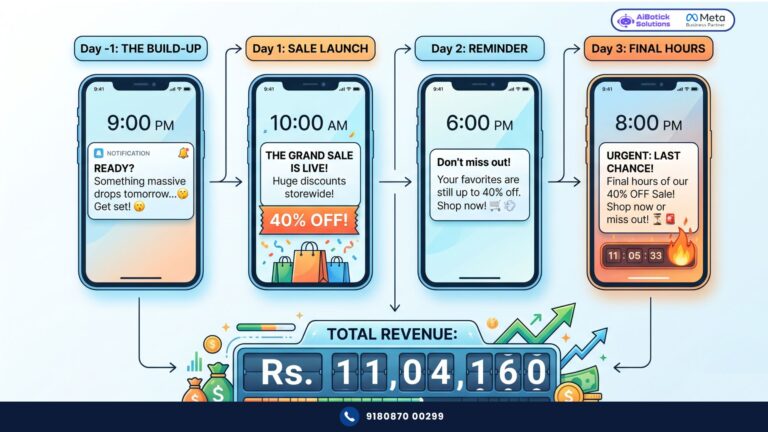
This is the combination that makes WhatsApp a genuine revenue channel — not just a support tool. And for the full ROI calculation on what this kind of automation delivers — our WhatsApp automation ROI guide breaks it down with actual numbers.
Ab seedha sawaal —
Aapke paas products hain. Aapke paas customers hain. Dono WhatsApp pe hain.
Toh beech mein kya problem hai? Usually — just the right setup connecting both.
WhatsApp product catalog is that connection. And it’s not complex to set up. It’s not expensive. And the results — as you’ve seen — are real.
Tap below. 👇 Tell us your product category and approximate catalog size — we’ll show you exactly how your catalog experience would look and what conversion rates to realistically expect.
— Mohit Shah | 15+ years in IT industry | 4+ years in WhatsApp automation | Worked with various MNC brands | Now helping businesses figure out what actually works
A3: Conversion rates vary by industry and catalog quality, but businesses moving from Instagram DM sales or manual WhatsApp selling to a properly set up WhatsApp product catalog typically see 2-3x improvement in conversion. A Jaipur jewellery brand went from 9% Instagram DM conversion to 23% on WhatsApp catalog, with average order value increasing from Rs.1,900 to Rs.2,800 — largely because customers discovered more products through catalog browsing.