Everyone’s celebrating 10,000 messages sent. Meanwhile, revenue is flat.
This is the most common measurement mistake I see in WhatsApp automation — businesses tracking vanity numbers while the metrics that actually predict growth sit in a dashboard nobody opens.
WhatsApp metrics are not all created equal. And if you’re measuring the wrong ones, you’re making the wrong decisions. Simple as that.
Why Most WhatsApp Reports Are Telling You Nothing Useful
Real talk — I’ve sat in more “WhatsApp performance review” meetings than I can count. At Interakt, at DoubleTick, with client teams across industries. And the pattern is almost always the same.
Someone pulls up a slide. “We sent 45,000 messages this month. Open rate 87%. Great month team!” Everyone nods. Meeting ends.
Then I ask — “How many of those messages generated a reply? How many replies converted to a sale? What was the revenue per message sent?”
Silence. 😅
Because nobody tracked that. And nobody tracked it because nobody asked for it. And nobody asked for it because everyone assumed “high open rate = success.”
Yaar, open rate is not success. Open rate is just evidence that your message delivered and someone tapped on it. What happened next — that’s the story.
The 3 Tiers of WhatsApp Metrics — Know Which Tier You’re In
Before getting into specific numbers, understand that WhatsApp metrics fall into 3 tiers. Most businesses only track Tier 1. The ones winning are tracking Tier 3.
Tier 1 — Vanity Metrics (Everyone Tracks These)
- Messages sent
- Delivery rate
- Open rate / Read rate
These are table stakes. They tell you your technical setup is working. Nothing more.
Tier 2 — Engagement Metrics (Some Businesses Track These)
- Reply rate
- Click-through rate on links
- Opt-out / block rate
- Response time
This is where things get interesting. Reply rate especially — because a message that gets read but not replied to is a message that didn’t land.
Tier 3 — Business Metrics (The Ones That Actually Matter)
- Cost per lead generated via WhatsApp
- Conversion rate from WhatsApp conversation to sale
- Revenue per broadcast campaign
- Customer acquisition cost via WhatsApp vs other channels
- Churn rate of customers contacted via WhatsApp vs not contacted
This is the tier that connects WhatsApp activity to business outcomes. And this is what your board, your investors, your management team actually care about — even if they don’t know to ask for it yet.
The WhatsApp Metrics Dashboard You Actually Need
Let me build this out metric by metric. Not theory — actual numbers, what they mean, and what to do when they’re off.
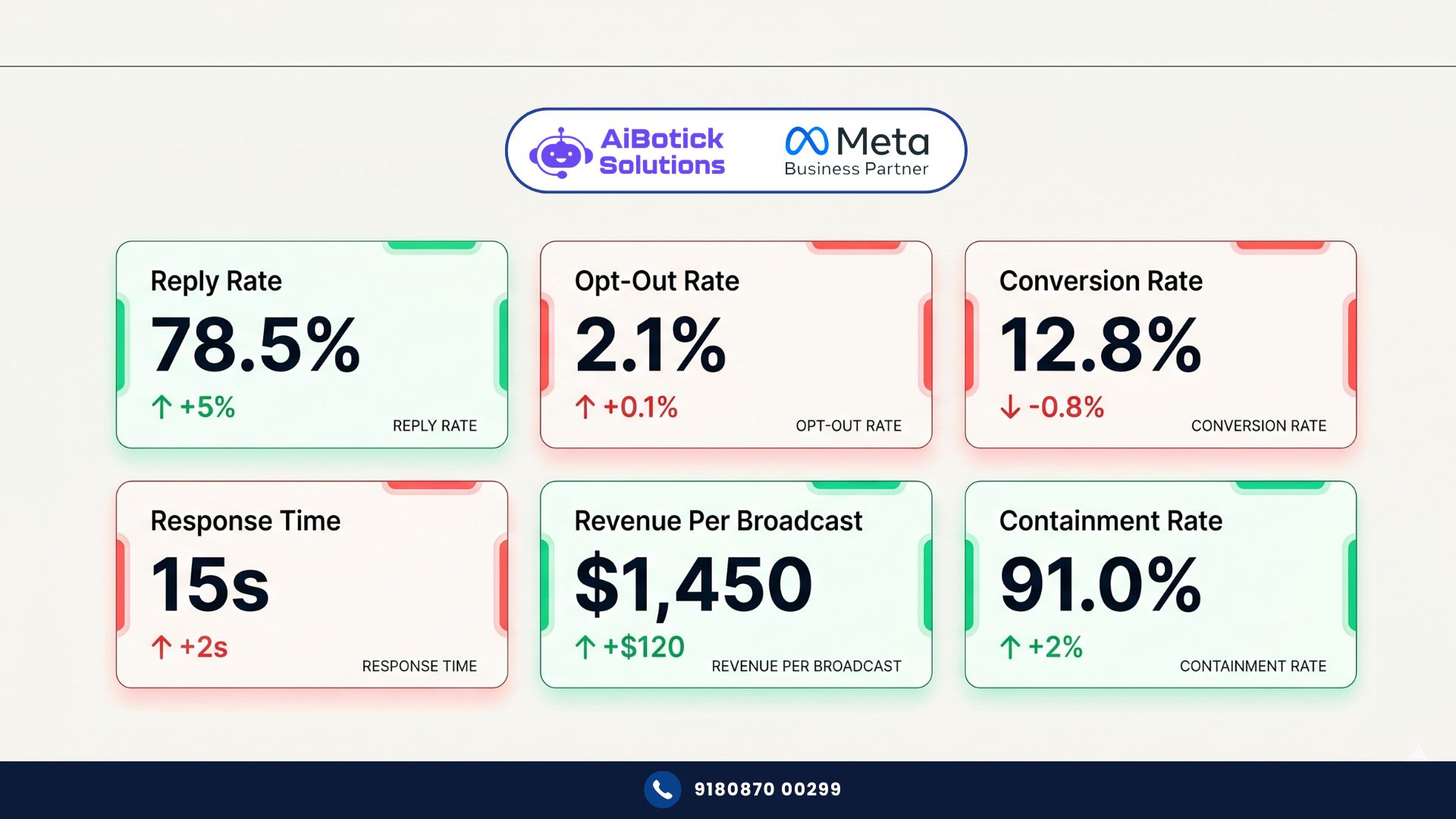
1. Reply Rate — Your Real Engagement Signal
What it is: Percentage of messages sent that received a reply from the recipient.
Good benchmark: 15-25% for broadcast campaigns. 40-60% for personalised follow-up sequences.
What low reply rate means: Your message didn’t create enough reason to respond. Either the content is off, the timing is wrong, or you’re messaging people who aren’t engaged enough to care.
What to do: Split test your message copy. Shorter messages typically get higher reply rates. Add a direct question at the end. “Does this apply to your situation?” gets more replies than “Feel free to reach out.”
Actually wait — the single biggest lever on reply rate that nobody talks about: personalisation in the first line. Not “Dear Customer.” Not even “Hi [Name].” But “Hi Priya — saw you were looking at our catalog last week” — that kind of first-line relevance. Reply rates jump 2-3x with this approach. I’ve seen this consistently across categories.
2. Opt-Out Rate — Your Early Warning System
What it is: Percentage of recipients who block your number or report spam after receiving a message.
Good benchmark: Under 0.5% per campaign. If you’re hitting 2%+, you have a serious problem.
What high opt-out rate means: You’re either messaging people who never opted in, sending too frequently, or sending content that feels irrelevant or intrusive.
What to do: Immediately review your list quality. Are these people who actually opted in to receive WhatsApp communication from you? Review frequency — more than 4 messages per month to the same person without engagement is usually too much.
And here’s the thing most people don’t realise — a high block rate doesn’t just hurt your feelings. It directly impacts your WhatsApp Business quality rating with Meta. Enough blocks and your number gets restricted. So this isn’t a vanity metric. It’s a compliance metric.
3. Conversion Rate Per Campaign — The Revenue Signal
What it is: Of the people who replied to your WhatsApp campaign, what percentage completed the desired action — made a purchase, booked a demo, paid an invoice, submitted a form.
Good benchmark: Varies hugely by industry and action type. For a purchase conversion on an ecommerce broadcast — 3-8% is solid. For a demo booking from a warm B2B lead — 15-25% is achievable.
What low conversion rate means: Either the wrong audience is receiving the message, the offer isn’t compelling enough, or there’s friction in the conversion step (the landing page is slow, the form is long, the payment process is broken).
What to do: Isolate the variable. If reply rate is high but conversion is low — the problem is after the reply, not in the message. If reply rate is also low — fix the message first.
No no, scratch that — even simpler test. Pick your last 5 campaigns. For each one: how many messages sent, how many replies, how many conversions, what revenue? If you can’t fill in that table right now, you don’t have a measurement system yet. That’s your starting point.
4. Response Time — The Speed Metric That Kills Deals Quietly
What it is: Average time between a customer message arriving and your team’s first reply.
Good benchmark: Under 5 minutes for sales conversations. Under 2 hours for support queries during business hours.
What slow response time means: Leads going cold. Support tickets escalating. Customers going to competitors who respond faster.
I’ve seen this kill sales that were already basically closed. Prospect asks a simple question — “What’s the onboarding process?” Team takes 6 hours to reply. By then the prospect has had a demo with a competitor and made a decision. Haath se nikal gaya.
What to do: Set up auto-responders for first response — even “Hey, got your message — our team will respond within the hour” buys you time and signals responsiveness. Then track actual agent response time per team member. Make it visible. Accountability follows visibility.
5. Revenue Per Broadcast — The Campaign ROI Number
What it is: Total revenue attributed to a specific WhatsApp broadcast campaign, divided by the cost of sending it.
Why it matters: This is the number that justifies the entire WhatsApp investment to your management or board. Not open rates. Revenue.
How to calculate it:
- Tag the broadcast campaign with a UTM or unique coupon code
- Track purchases that used that code in the 48-72 hours after send
- Divide revenue by cost (message sending cost + team time to build campaign)
For a well-segmented campaign to warm leads — revenue per broadcast should be anywhere from 15x to 50x the cost of sending. If it’s under 5x, something’s wrong with targeting or offer.
This connects directly to what we covered in our WhatsApp automation ROI breakdown — specifically how to build the business case using actual revenue attribution, not just cost savings.
6. Chatbot Containment Rate — The Efficiency Metric
What it is: Percentage of incoming conversations that were fully handled by the chatbot without requiring a human agent.
Good benchmark: 50-70% for a well-built bot in a defined use case. If it’s under 30%, your bot flows need work. If it’s over 85%, check whether customers are getting genuinely resolved or just getting stuck and giving up.
What it tells you: How much of your support volume is truly automated. And therefore, how many human hours your WhatsApp bot is actually saving.
What to do when it’s low: Review the top 20 queries your bot is failing on. These become your next bot training priorities. Ab toh most platforms show you exactly where conversations are falling to human — use that data.
What People Get Wrong About Measuring WhatsApp Performance
Wrong metric #1: Delivery rate
99% delivery rate means nothing if the messages aren’t relevant. Stop reporting this as a win.
Wrong metric #2: Total messages sent
Volume is a cost metric, not a performance metric. More messages sent to the wrong people = more money wasted + higher opt-out rate.
Wrong metric #3: “Engagement” without defining what engagement means
I’ve heard “great engagement” used to describe everything from high open rates to emoji reactions to someone asking to be removed from the list. Define what engagement means for your business — and make sure everyone on the team uses the same definition.
Wrong metric #4: Comparing WhatsApp metrics to email benchmarks
WhatsApp open rates are structurally higher than email. WhatsApp reply rates are structurally higher. Comparing them directly without context misleads you into thinking WhatsApp is always winning — even when it’s underperforming for your specific use case.
A Real Example: How a Financial Services Firm Fixed Their Measurement
They were a mutual fund distribution company in Mumbai. 3,000 clients. Monthly WhatsApp updates on portfolio performance, SIP reminders, market insights.
Their reporting: “85% open rate. Great.” That was the entire measurement system.
When we dug in — reply rate was 4%. Conversion on SIP renewal reminders was 1.8%. Response time when clients replied was averaging 9 hours.
No wonder client satisfaction was dropping despite “high engagement.”
We rebuilt their measurement around 6 metrics: reply rate, renewal conversion rate, response time, opt-out rate, revenue per campaign, and advisor-level response tracking.
Within 60 days of tracking and acting on the right metrics:
- Reply rate went from 4% to 19% (messaging became more conversational, less broadcast)
- SIP renewal conversion went from 1.8% to 6.3%
- Response time dropped from 9 hours to under 40 minutes
- Opt-out rate dropped from 1.8% to 0.3%
Same platform. Same client list. Same product. Different measurement → different decisions → different outcomes.
Building Your WhatsApp Metrics Dashboard — Do This Now
For context on how these WhatsApp metrics connect to your broader segmentation strategy, revisit how to segment your WhatsApp audience — because you can only measure performance by segment if you’ve built the segments properly.
Here’s the minimum viable dashboard every business should have: 👇
Weekly WhatsApp Metrics (review every Monday):
- Reply rate by campaign
- Opt-out rate
- Response time (avg and by team member)
- New conversations started
Monthly WhatsApp Metrics (review first week of month):
- Conversion rate per campaign type
- Revenue attributed to WhatsApp
- Chatbot containment rate
- Cost per lead via WhatsApp
- Churn comparison: WhatsApp-engaged vs not-engaged customers
Quarterly WhatsApp Metrics (review with leadership):
- Customer acquisition cost via WhatsApp vs other channels
- WhatsApp revenue contribution as % of total
- NPS score for WhatsApp-supported customers vs others
- ROI per rupee spent on WhatsApp infrastructure
This doesn’t need a fancy BI tool. A well-maintained Google Sheet works fine to start. What matters is that it exists, someone owns it, and decisions are made from it.
Honestly? My Opinion on WhatsApp Measurement in India
Most Indian businesses are 2-3 years behind on this. They’re treating WhatsApp like a broadcast channel and measuring it like a broadcast channel. Open rate. Delivery. Done.
The businesses that figure out Tier 3 metrics first — revenue attribution, conversion by segment, lifetime value of WhatsApp-engaged customers — are going to build an unfair advantage in their category.
Could be wrong. But I’ve seen this exact pattern play out in every digital channel that matured in India — email first, then SMS, now WhatsApp. The measurement sophistication always lags the adoption by a few years. The early movers who build the measurement muscle now will outcompete the rest when the channel fully matures. 💯
Your Action List — Start This Week
- Pull your last 3 WhatsApp campaigns. Calculate actual reply rate and conversion rate for each. Not open rate. Reply and convert.
- Check your opt-out rate per campaign. If you don’t know it, that’s your first problem to fix.
- Measure your team’s average response time. Be honest about what you find.
- Set up a simple Google Sheet with the 6 core metrics. Assign someone to own it.
- Run one A/B test on your next broadcast — two versions of the same message, different first lines. See which gets higher reply rate. That’s your measurement muscle starting to build.
If you want help setting up proper WhatsApp metrics tracking inside AiBotick — Chat with us on WhatsApp and we’ll show you exactly which numbers to pull and how to build the dashboard that actually drives decisions.
— Mohit Shah | 15+ years in IT industry | 4+ years in WhatsApp automation | Worked with various MNC brands | Now helping businesses figure out what actually works
Q1: What is a good WhatsApp open rate for business campaigns?
WhatsApp open rates typically range from 75-95% — structurally much higher than email because WhatsApp notifications are harder to ignore. But open rate alone is a weak metric. A good WhatsApp campaign should target a reply rate of 15-25% for broadcast campaigns and 40-60% for personalised follow-up sequences. Track reply rate alongside open rate for a meaningful picture.
Q2: How do I measure WhatsApp campaign revenue attribution?
Tag each broadcast campaign with a unique coupon code or UTM parameter. Track purchases or conversions using that code within 48-72 hours of the send. Divide total revenue by total campaign cost (message cost plus team time) to get revenue per broadcast. A well-segmented campaign to warm leads should deliver 15x-50x the cost of sending. Anything under 5x signals a targeting or offer problem.
Q3: What WhatsApp metrics should I review weekly vs monthly?
Weekly: reply rate per campaign, opt-out rate, average response time, new conversations started. Monthly: conversion rate per campaign type, WhatsApp revenue contribution, chatbot containment rate, cost per lead via WhatsApp. Quarterly: customer acquisition cost comparison across channels, NPS of WhatsApp-engaged customers vs others, total WhatsApp ROI. Start with a simple Google Sheet — sophistication can come later.